8W Game APK: Lobby, Login & Bonus Rules Explained
Description
8W Game APK: Lobby, Login & Bonus Rules Explained
Introduction
8W Game brings casino-style titles, sports options and account tools into one lobby. You can browse game tiles, open the promotion area and find deposit or withdrawal controls near the top. For a new visitor, the useful starting point is understanding these controls before choosing a game or responding to a bonus offer.
This guide explains the account forms, game menu, download route and payment options. It also separates advertised rewards from their conditions. Real-money play carries a risk of loss, and a reward banner does not promise a payout. The registration form requires users to confirm that they are over 18.
What Is 8W Game?
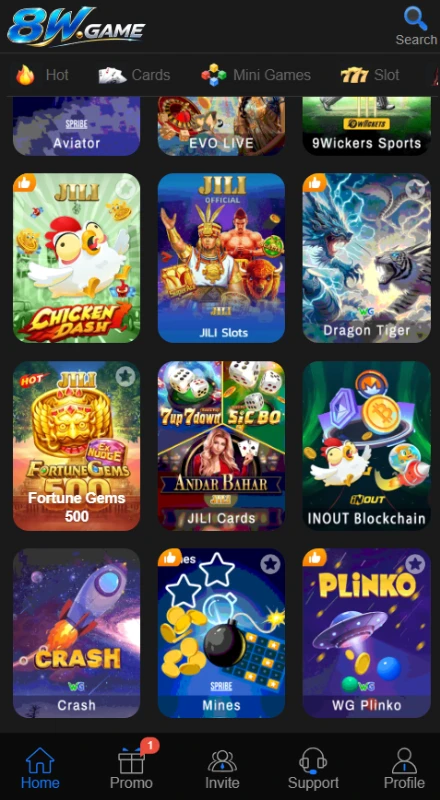
8W Game, also branded as 8wGame and 8w.game, groups several types of games under one account interface. Its lobby includes Aviator, Chicken Dash, Dragon Tiger, Fortune Gems 500, Mines, Crash and WG Plinko. Other tiles lead to collections such as JILI Slots and JILI Cards, so not every tile represents a single game.
Account tools sit alongside the game collection. The Promo area holds events, VIP information and rebates, while the wallet controls handle deposits and receiving-account setup. For readers researching the platform in Pakistan, the PKR currency selector and local payment labels are relevant details.
| Item | Verified information |
|---|---|
| Platform name | 8wGame / 8w.game |
| Categories | Hot, Cards, Mini Games, Slot, Live, Sports, Fishing and Lottery |
| Account access | Phone number/Profile field; password and code options |
| Currency | PKR appears in registration |
| Deposit options | JazzCash under Online deposit; separate Crypto tab |
| Receiving accounts | Easypaisa, JazzCash and Bank Transfer |
| Promotions | First-deposit tiers, referral offers, reward wheel, VIP and rebates |
| APK version and size | Latest-7MB |
| Minimum Android requirement | Android |
Key Features of 8W Game
8W Game Categories and Search
The category row separates cards, mini games and slots, while the search icon offers another starting point. These controls help you look for a title without treating the whole lobby as one long list.
8W Game Account and Wallet Shortcuts
Deposit, Withdraw, VIP and More sit together near the top. Their placement keeps account functions separate from individual game tiles, so you can return to wallet tools without searching through a game collection.
Password and Code Access
The account panel offers password and code routes for registration and login. A Forgot Password link also appears on the login form. Follow the selected route’s prompts; the presence of a code option does not mean every registration uses the same verification steps.
Message Center and Help Topics
The support area groups customer service, contact options and Help Center questions. One topic addresses a completed recharge that has not reached the balance. These tools provide a place to raise an account issue, although response times remain unverified.
How to Play 8W Game
- Open the lobby and browse a category that interests you.
- Select a named title or enter a collection such as JILI Cards.
- Read that game’s rules, controls and any stake information before starting. Aviator, Mines and card games use different mechanics.
- If the title offers a demo, check its rules separately from real-money play. A Demo link does not establish demo access for every title.
- Use the account and wallet controls when needed. Set a spending limit before any real-money session and stop when you reach it.
No single playing method applies to the whole collection. Choosing a title or completing a task does not guarantee a financial return.
Bringing the Virtual World to Life
The interface uses a dark background, blue buttons and colourful game artwork. Large banners occupy the upper lobby, with account shortcuts and category tabs below them. The game grid uses recognisable title cards rather than long text descriptions.
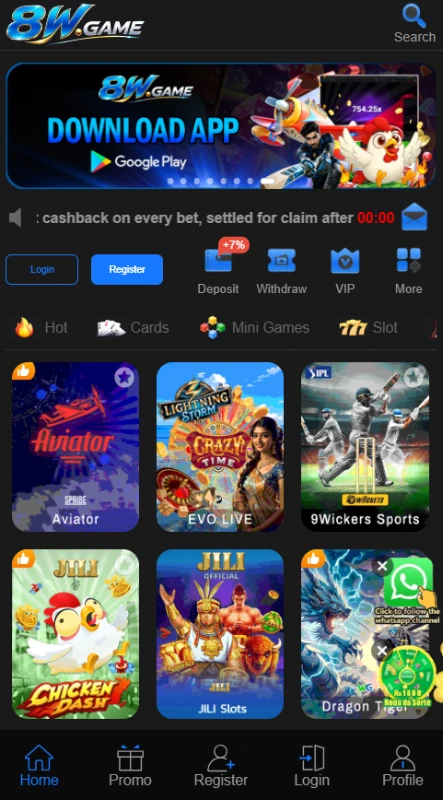
The bottom menu changes with account access. Before login, it includes Register and Login; the signed-in layout includes Invite and Support alongside Home, Promo and Profile. Inside Promo, tabs such as Event, VIP, Rebate and Interest separate different tools. This arrangement gives each area a place, although the number of banners and offers can take time to understand.
For another approach to organising game categories and account tools, see our 888GJ lobby and navigation guide.
8W Game Bonuses
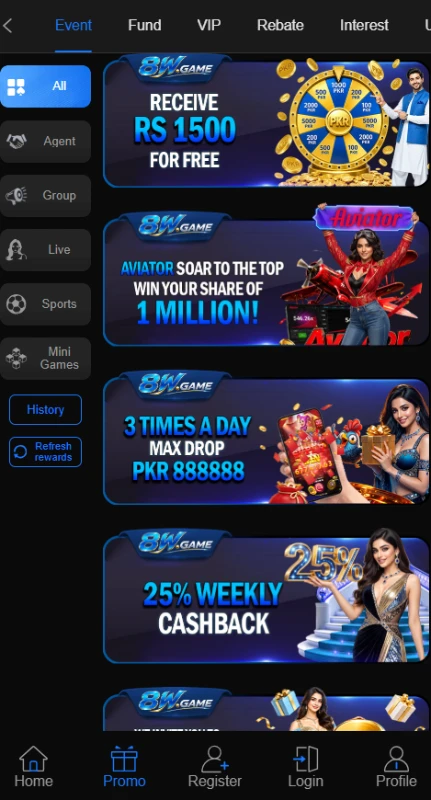
The promotion area contains several separate campaigns. Read each offer’s event rules before acting: a displayed reward is not necessarily withdrawable cash, and the available material does not establish that different offers combine.
8W Game First-Deposit Rewards
The First Deposit Extra Reward panel lists Rs 20 for a first deposit of at least Rs 100, Rs 60 at Rs 300 and Rs 100 at Rs 500. It also lists Rs 200 at Rs 1000, Rs 300 at Rs 3000 and Rs 500 at Rs 10000.
These tiers do not maintain a flat 20% rate at higher amounts. The deposit page also displays different reward figures beside some amount buttons. Treat those figures separately and open the event explanation to check eligibility, claim rules and any play requirements.
Referral and Invite Rewards
An invite campaign advertises Rs 588 for inviting a friend. The headline alone does not explain every eligibility requirement. Check what the referred account must complete before treating a registration as a qualifying referral.
Reward Wheel and Task-Based Draws
The wheel promotion advertises Rs 1500 and includes a task area for free draws. Its claim-progress message indicates that a displayed amount does not automatically mean an available withdrawal. Read the claim conditions before interpreting progress as money you can receive.
Deposit Offers and Cashback
A separate campaign advertises a 7% deposit bonus. Do not add that percentage to the first-deposit table without rules confirming the combination. Cashback wording also varies: one banner says weekly, while another notice says daily. The material does not resolve that difference, so confirm the schedule in the relevant event rules.
VIP Level Rewards
The VIP panel links benefits to level requirements. The entry-level view presents a next-level reward of Rs 2 and a deposit requirement of Rs 100 for VIP1. Higher levels include other requirements and reward categories. Check the selected level’s conditions rather than applying its headline benefits to every account.
Our PLAYER786 reward conditions guide offers another example of reviewing promotions separately. Each platform sets its own eligibility rules.
How to Download 8W Game APK on Android?
The site displays a Download App banner, but this review did not verify the download file or its destination. Use these checks when following the download route:
- Open the supplied source address, 8wgame.top, in your browser.
- Locate Download App and inspect the destination before proceeding.
- If it opens a store listing, check the app and developer details. A Google Play logo on a banner alone does not verify a listing.
- If it offers an APK, review the filename and any available publisher information before downloading.
- Wait for the download to finish, then locate the file in Downloads.
No verified version number supports a latest version claim here. Review the source and file details before deciding whether to proceed.
How to Install 8W Game App on Android?
These are general APK installation steps, not a tested installation of this app.
- Open the downloaded APK from your browser or file manager.
- If Android requests installation permission, review the source first. Where appropriate, allow installation only for the app opening the file.
- Read the installation prompt and requested permissions before tapping Install.
- Keep Play Protect enabled. If Android flags the file, stop and investigate the warning.
- After installation, remove the browser or file manager’s permission to install unknown apps.
After installation, review the app’s permissions in Android settings. Google’s guide to reviewing Android app permissions explains how to allow or deny access to phone features. These permissions are separate from permission to install an APK.
Menu names vary by phone. An installation error does not establish that your device needs a particular Android version; the app’s minimum requirement remains unverified.
Registration and Login Process
Register an Account
The 8W Game registration form offers Password registration and Code register. For the password route:
- Open Register and complete the Phone number/Profile field.
- Enter a password and repeat it in the confirmation field.
- Complete the separate phone field, which displays the +92 country code.
- Review the PKR currency selection. The form warns that currency affects games and payment methods and cannot be modified.
- Read the User Agreement. Confirm the over-18 checkbox only if you meet that requirement, then submit.
If you choose Code register, follow that route’s prompts. This review does not establish the complete code-delivery process.
8W Game Login and Password Recovery
Open Login, enter your Phone number/Profile details and select Password Login or Code login. The password route provides a password field and a remember-password checkbox. Avoid saving account access on a shared device.
Use Forgot Password if you cannot recall your password. A Google quick-login icon also appears, but this review did not test that connection.
Deposit and Withdrawal Methods
JazzCash Deposits
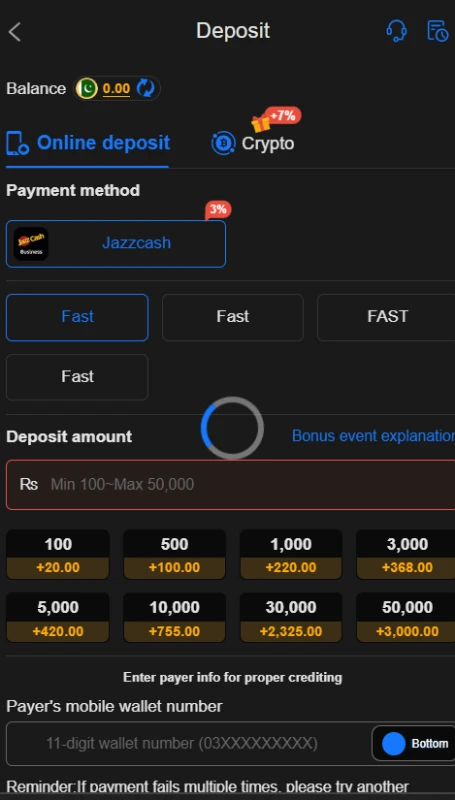
The 8W Game deposit page lists JazzCash under Online deposit. Its selected amount field displays Rs 100 to Rs 50000 and requests the payer’s mobile wallet number. This range applies to that displayed option; it does not establish a limit for every channel.
Select the relevant channel, review the amount and payer details, and read its instructions before confirming. Keep your transaction reference if you proceed. For a deposit not credited to your balance, use the Message Center rather than assuming that another payment will fix it.
Crypto Deposit Option
A separate Crypto tab appears beside Online deposit. The supplied material does not establish supported coins, networks, fees or minimum amounts. The tab’s presence alone is not enough to prepare a transfer.
Withdrawal Password and JazzCash Receiving Account
The 8W Game withdrawal setup asks you to create and confirm a separate withdrawal password. Keep it private. The Receiving account tab includes JazzCash with an Add control; follow the form and check the details before submitting a withdrawal request.
Easypaisa Receiving Account
Easypaisa also appears under Receiving account. This establishes an account-linking option, not a tested payout. It does not confirm Easypaisa deposits, since the reviewed deposit page lists JazzCash.
Bank Transfer Receiving Account
Bank Transfer has its own Add control. The available material does not establish supported banks, withdrawal limits, fees or processing times. Check those details in the withdrawal form or with support before proceeding.
FAQs-Frequently Asked Questions
What is 8W Game?
It is a gaming platform with casino-style titles, sports options, account tools and promotional offers.
How do I download the app?
Start with the source site’s Download App control and inspect its destination. This review has not verified the resulting APK file.
Is the APK version verified?
No. The version, file size and minimum Android requirement remain unverified.
Which payment methods appear?
JazzCash appears for online deposits, alongside a Crypto tab. Receiving-account options include Easypaisa, JazzCash and Bank Transfer.
Are bonuses guaranteed?
No. Offers have eligibility and claim conditions. A banner or progress balance does not establish a completed cash payout.
What is the visible deposit limit?
The selected JazzCash deposit screen displays Rs 100 to Rs 50000. Other channels may have different conditions.
Conclusion
8W Game places game categories, account access and wallet controls within one interface.
The registration form and receiving-account menu provide useful details for new users.
Bonus tiers need careful reading, especially where separate panels display different figures.
APK specifications and successful payout performance remain unverified.
Read the platform’s terms alongside ApnaAPK’s Terms and Conditions, Disclaimer and Privacy Policy before deciding how to proceed.
Download links
How to install 8W Game APK: Lobby, Login & Bonus Rules Explained APK?
1. Tap the downloaded 8W Game APK: Lobby, Login & Bonus Rules Explained APK file.
2. Touch install.
3. Follow the steps on the screen.