999Q Game APK: Read This Article Before You Download
Description
999Q Game APK: Read This Article Before You Download
Introduction
999Q Game gives you two account-access choices before you reach its busy lobby: password login and code login. Beyond the game tiles, the platform separates missions, VIP benefits and receiving accounts into their own menus. Understanding these different areas helps you find a title, check an offer or review an account setting without treating every green button as the next step.
The most useful detail for new readers concerns payments. The reviewed deposit page reported no available method, even though the receiving-account menu listed four options. This 999Q Game guide explains that distinction alongside the app-download entry, registration fields and reward conditions, so you know what needs checking before proceeding.
What Is 999Q Game?
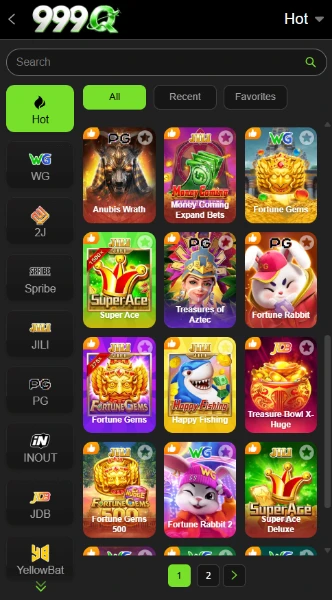
999Q is a gaming platform with Hot, Mini Games, Slot, Cards and Fishing categories. Its lobby lists titles such as Aviator, Chicken Road 2.0, Money Coming and Fortune Gems. Provider filters include WG, JILI, PG, Spribe, INOUT and JDB, which help organize the selection.
The platform also contains deposit controls, withdrawal settings, promotional missions and VIP levels. These money-related features make it different from a simple offline mobile game. Games involving wagers can lead to losses; a bonus banner does not establish a source of income.
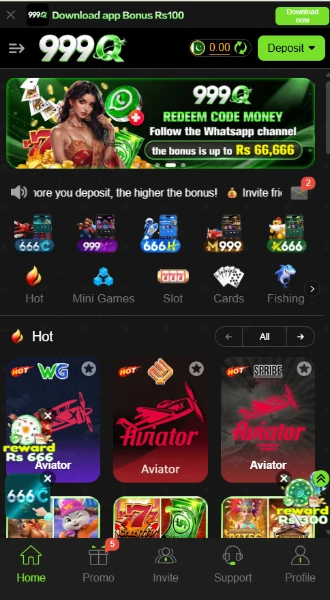
| Item | Verified detail |
|---|---|
| Platform name | 999Q |
| Categories | Hot, Mini Games, Slot, Cards and Fishing |
| Main navigation | Home, Promo, Invite, Support and Profile |
| Account access | Phone/email registration; password and code-login options |
| Languages | English and Urdu |
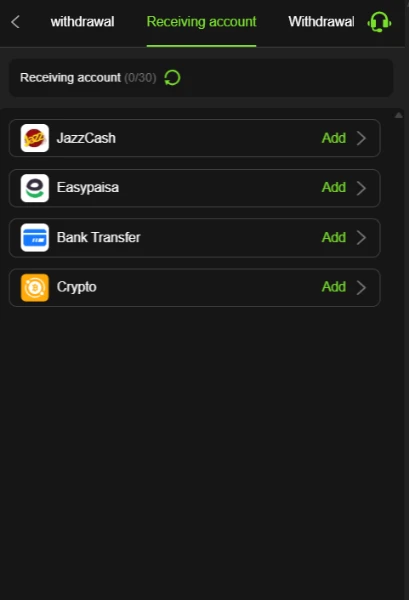
| Receiving-account options | JazzCash, Easypaisa, Bank Transfer and Crypto |
| Deposit availability | The reviewed deposit page reported no payment method available |
| App references | Mission terms mention Android_APP and iOS_APP; compatibility and distribution remain unverified |
| APK version | Latest |
Key Features of 999Q Game
999Q Game Lobby and Search
The lobby combines a search box with provider filters and All, Recent and Favorites tabs. These controls give you several ways to locate a title without scrolling through the entire catalogue.
Password and Code Access
999Q Game registration and login each offer password and code options. The login form also includes Remember account password and Forgot Password controls, so returning users have a separate recovery entry.
Separate Promotion Tabs
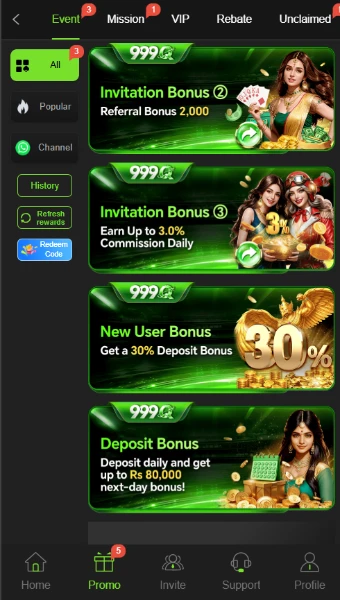
Promo divides offers into Event, Mission, VIP, Rebate and Unclaimed areas. This arrangement helps distinguish a task reward from a VIP benefit or an event advertisement.
Language, Display and Support Tools
English and Urdu appear in the language menu. Night-mode settings include fixed day, fixed night and automatic options. The Message Center separates support, notices, news and reward feedback.
How to Play 999Q Game
Start with the lobby and learn the selected title before using any money-related control:
- Open Home and browse a category, such as Mini Games or Cards.
- Use search or a provider filter to narrow the list.
- Select a title and read its own rules, controls and payment information.
- If the title requires a wager, understand the amount at risk before confirming anything.
- Return to the account tools when you need to review your balance or payment settings.
Aviator, slots and fishing titles do not share one set of rules. The lobby confirms their listings, but this review does not establish their individual mechanics or payout rates. A Demo entry appears on the account screens; its available content was not tested.
Bringing the Virtual World to Life
The 999Q Game interface uses a dark background with bright green buttons, selected tabs and outlines. Colourful game tiles fill the centre, while provider names run down the expanded lobby’s side. The All, Recent and Favorites controls sit above the games.
Home, Promo, Invite, Support and Profile remain easy to identify in the bottom navigation. The upper area carries the balance, deposit control and rotating promotional space. This separates game browsing from account access, although the number of banners can compete for attention.
For a comparison of menu layouts, see our 88EF lobby and account guide.
To change 999Q language to Urdu, open the language selector and choose Urdu. The presence of this option does not confirm that every game or help page has a complete Urdu translation.
999Q Game Bonuses
Read each campaign separately. An advertised maximum, percentage or claim button does not mean that every account qualifies or that the reward can immediately be withdrawn.
999Q Game Signup and App Missions
The new-player mission area lists Rs 70 for Sign up an account and Rs 100 for Login to the APP (First deposit). Its claim conditions include SMS verification, payment-method binding and a first recharge. It also requires manual claiming within the specified time.
These offers are conditional; signing up or downloading alone does not establish eligibility. Check the relevant task details before assuming that completing one action satisfies every requirement.
First Recharge Reward
A separate first-recharge panel pairs deposit thresholds with rewards. Examples include Rs 200 with Rs 20, Rs 1000 with Rs 50, and Rs 3000 with Rs 100. These are first-deposit offer thresholds, not verified platform-wide deposit limits.
New-Member and New-User Offers
One banner advertises a first-deposit reward of up to Rs 50000. Another advertises a 30% deposit bonus for new users. They are separate promotions; do not add them together or assume both apply to one deposit. Full eligibility and withdrawal conditions need confirmation.
Referral Rewards
The invitation area contains separate Rs 500 and Rs 2000 referral-bonus banners, an offer of up to Rs 10000, and a daily commission advertisement of up to 3%. Eligible referral activity matters, but the reviewed banners do not establish every qualifying condition. An invitation alone does not prove entitlement.
Daily Check-In and Login Rewards
Daily check-in and daily login rewards appear as distinct offers. Check each campaign’s requirements and claim period. The available material does not establish a fixed daily payment for every user.
999Q Game VIP Rewards
The VIP panel connects progression to deposits and betting activity. At the starting level, it lists a deposit of Rs 100 and betting activity of Rs 800 for progression toward VIP 1. Higher levels display different benefits. Read the level rules before treating any listed reward as available to your account.
Next-Day Deposit Bonus
A deposit banner advertises a next-day bonus of up to Rs 80000. This is a maximum, not a fixed reward. The banner does not establish the qualifying deposit amount or full claim rules.
Cashback
A separate cashback banner advertises 1.50%. Confirm which activity qualifies and how the platform calculates the reward; the headline does not establish the complete terms.
Betting Rebates
The betting-rebate campaign advertises rewards up to Rs 200000. Eligibility depends on the campaign rules, which the available banner does not fully explain.
Loss Relief
The loss-relief offer advertises cashback up to 8%. That maximum does not apply automatically to every loss, and the offer does not eliminate financial risk.
Daily, Weekly and Monthly Share Events
Separate share events advertise maximum rewards of Rs 300 daily, Rs 666 weekly and Rs 10000 monthly. Their different schedules and conditions matter; the amounts are not promised payments for sharing.
Redeem-Code Offers
The redeem-code promotion directs users toward a WhatsApp channel. No working 999Q redeem code has been verified for this guide. Check the offer terms and expiry before attempting a claim.
Lucky 9 Celebration
Lucky 9 names the 9th, 19th and 29th of the month for cash-reward events. Availability depends on the event schedule and eligibility rules; it is not an everyday reward.
How to Download 999Q Game APK on Android?
The interface contains a Download app entry. However, this review did not retrieve or inspect the APK, and the supplied source website did not load during research. Follow these steps only if you can verify the download source:
- Check the exact source address, 999q22.com, before entering account information.
- Locate the platform’s Download app control.
- Review the destination and any file details before accepting a download.
- If the address, file identity or download request looks unclear, stop and ask through the platform’s support entry.
Review the download destination carefully. The installation section below explains the relevant Android permission and app-checking precautions.
A 999Q latest version label alone does not establish a version number, compatibility or file safety.
How to Install 999Q Game App on Android?
These are general Android steps, not a tested installation of this APK:
- Open your Downloads folder and select the file only after checking its source.
- If Android requests installation permission, review which browser or file manager needs it.
- On supported devices, open Settings, then Apps, Special app access and Install unknown apps. Menu names can vary.
- Allow that specific source only if you choose to proceed, then return to the installer.
- Read the installation prompts. Keep Play Protect enabled and do not bypass a harmful-app warning.
- After installation, turn off the source’s installation permission again.
Read Google guide to Play Protect checks and warnings for an explanation of Android app checks. These checks do not amount to an endorsement of this APK.
Minimum Android requirements remain unverified. This guide therefore cannot promise that the 999Q app will install on your phone.
Registration and Login Process
999Q Game Registration
Open Register to find the phone number/email field and the +92 country-code area. Password registration includes a password field and a confirmation field. A Code register option provides another route, although this review did not test its delivery process.
The form also contains an over-18 statement and User Agreement checkbox. Read those terms before submitting. Google, Facebook and Telegram icons appear below the form, but their registration flows remain untested.
Login and Account Recovery
For 999Q Game login, use the account identifier requested by the form, which supports phone number, email or profile login. Choose Password Login or Code login as appropriate. For a forgotten password, use the Forgot Password entry.
The reviewed form does not establish a required referral-code field. Do not add an invented code or assume that registration requires one.
Deposit and Withdrawal Methods
For 999Q Game payments, distinguish deposit availability from receiving-account setup. A method listed for receiving funds does not automatically work for deposits.
Deposit Availability
The reviewed Deposit page reported that no payment method was currently available and displayed a Customer Service entry. Therefore, this guide cannot provide a verified deposit route. Ask support about the current availability; do not assume that a bonus threshold tells you the minimum deposit.
JazzCash
JazzCash appears under Receiving account with an Add control. This establishes a listed account option, not a completed withdrawal or a confirmed processing time.
Easypaisa
Easypaisa has its own receiving-account entry. Review any details requested after selecting Add; the supplied material does not establish the complete linking procedure.
Bank Transfer
Bank Transfer appears as another receiving option. Supported banks, fees and account-verification requirements remain unverified.
Crypto
The receiving-account menu also lists Crypto. It does not establish a supported currency, blockchain network or transfer fee. Do not assume that USDT or a particular network applies.
Withdrawal Password and Requests
The withdrawal setup asks you to create and confirm a six-digit password. Keep this separate from your understanding of the login process. The reviewed material does not establish the complete withdrawal submission flow, limits or payout speed.
For payment questions, the Support area includes online-service and social-channel entries. This review did not test response times or transaction resolution.
For another example of the distinction between payment menus, read our TD1947 deposit and receiving-account guide. Its listed methods do not establish availability on 999Q.
FAQs ” Frequently Asked Questions
What kind of platform is 999Q?
999Q Game is a casino-style platform with multiple game categories, account controls, promotions and payment-related menus.
How do I download the app?
The interface includes a Download app control. Verify its source and destination first; this review did not obtain or inspect the APK.
Is the latest APK version verified?
No. The version number, file size and minimum Android requirement remain unverified.
Which payment methods appear?
The receiving-account menu lists JazzCash, Easypaisa, Bank Transfer and Crypto. The reviewed deposit page reported no payment method available.
Are the bonuses guaranteed?
No. Campaigns have conditions, and displayed amounts do not prove eligibility or cash withdrawal rights.
What is the deposit limit?
No general deposit limit has been verified. First-recharge reward thresholds are not the same as minimum or maximum transaction limits.
Conclusion
999Q Game combines a searchable lobby with account tools and several promotion menus. Its language choices and separate reward tabs give readers useful points to explore. Payment availability, APK specifications and withdrawal performance still need confirmation. Read the platform’s Terms and Conditions before using its account or reward features. For this website scope and data practices, read ApnaAPK Terms and Conditions, Disclaimer and Privacy Policy.
Download links
How to install 999Q Game APK: Read This Article Before You Download APK?
1. Tap the downloaded 999Q Game APK: Read This Article Before You Download APK file.
2. Touch install.
3. Follow the steps on the screen.