
92Trade Game APK: Features, Login and Wallet Guide 2026
Description
92Trade Game APK: Features, Login and Wallet Guide 2026
92Trade Game brings several gaming categories, account controls and wallet options together in one mobile interface. Its home area includes game cards and shortcuts, while separate sections handle registration, VIP information, promotions, deposits and withdrawal-account details.
This guide explains the visible platform sections in plain language. It also explains the verified information from the available interface the details that you need, especially the APK file, developer, version and relationship between the supplied web address and the domain.
What Is 92Trade?
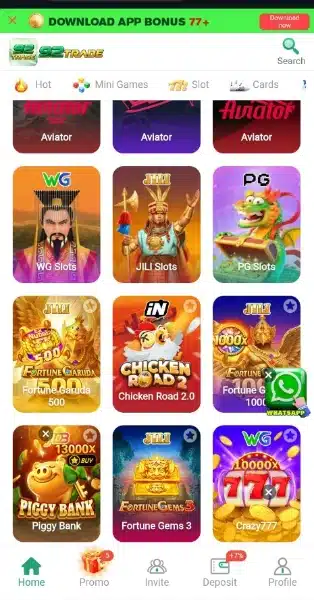
92Trade is presented through a mobile gaming interface with a lobby, account profile, promotional areas and payment controls. The home screen groups games into categories such as Mini Games, Slots, Cards, Fishing, Sports and Lottery. An Aviator tile is also visible in the game lobby.
The interface uses a bottom navigation bar to move between areas such as Home, Promo, Invite, Deposit and Profile. This layout makes the main account tools easy to locate, although the exact options available may depend on the page or account state.
| Platform detail | Available information |
|---|---|
| Displayed name | 92Trade |
| Platform format | Mobile-oriented gaming interface |
| Visible game categories | Mini Games, Slots, Cards, Fishing, Sports and Lottery |
| Featured game tile | Aviator |
| Registration fields | Mobile number, password, confirm password and optional invitation code |
| Payment options visible | JazzCash, Easypaisa and Crypto options appear in the deposit area |
| Withdrawal account options visible | JazzCash and Easypaisa |
| APK Version and size | Latest/7MB |
Finding Your Way Around the Game Lobby
The home screen is arranged for browsing rather than presenting every title as a long text list. Category shortcuts help separate different game formats, and the artwork on each tile gives users a quick visual clue about the title they are opening.
Mini Games and Aviator
The lobby includes a Mini Games category and a clearly labelled Aviator tile. Read the instructions shown inside an individual game before taking part.
Slots, Cards and Fishing
Slots, Cards and Fishing appear as separate browsing categories. They represent different styles of games, so users should not assume that the controls or rules are the same across all titles. Open a category, choose a game and review its own information before continuing.
Sports and Lottery
Sports and Lottery are also among the visible categories. Their presence identifies menu sections, not the availability of every event, market or draw at all times. Check the current in-platform details and applicable rules rather than relying on a category label alone.
VIP Levels, Missions and Promotional Areas
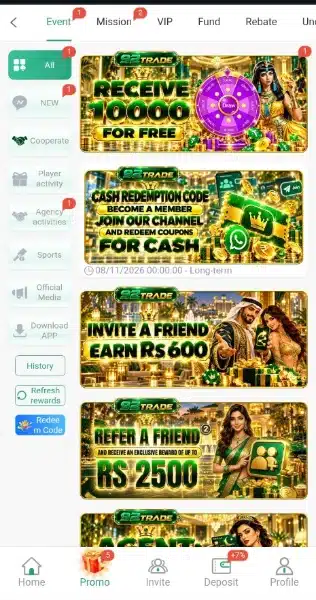
The Promo and VIP areas collect membership and reward-related information. The VIP page displays a level structure, progress information and reward labels that include daily, weekly and monthly entries.
How the VIP Page Is Organised
The VIP area presents a current level, progress toward another level and a list of reward categories.
Missions, Rebate and Invite
Separate menu items are provided for missions, rebate and invitations. These sections indicate that the platform groups promotional activity into different areas. Read the terms attached to each active offer before deciding whether to participate.
Registration, Login and Account Controls
The registration page contains a mobile-number field with the +92 country code, password and confirmation fields, and an invitation-code field. The invitation field is presented as optional. The form also includes an age confirmation for users aged 18 or over.
Creating an Account
- Open the registration page only after checking that you are on the domain you intended to visit.
- Review the age confirmation and platform terms before proceeding.
- Enter the mobile number requested by the form.
- Create a password and enter it again in the confirmation field.
- Add an invitation code only if you have one and want to use it.
- Check the details carefully before submitting the form.
Follow any verification instruction that appears during the actual registration process, and never share an OTP if received with another person.
Logging In
Returning users should use the login option and the credentials linked to their account. If access fails, check the mobile number and password carefully. Use only the account recovery or support route displayed by the platform; do not pay an outside person to recover an account.
Separate Withdrawal Password
A separate 6 digit Withdrawal Password page is available. This is different from the regular account password. Keep both private, avoid reusing an easy password and do not send either password to anyone claiming to be support staff.
Deposit and Withdrawal Options
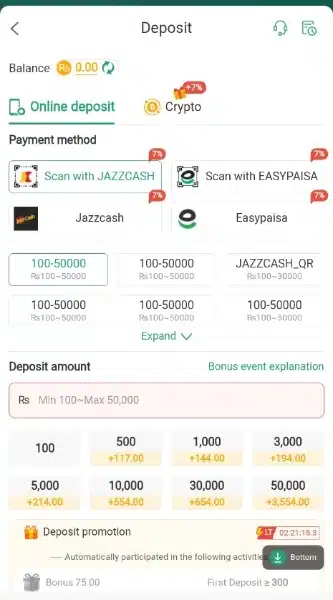
The wallet area separates adding funds from setting up a receiving account. The deposit screen displays Crypto, scan-based JazzCash and Easypaisa options, along with JazzCash and Easypaisa choices. The receiving-account screen lists JazzCash and Easypaisa.
Deposit Methods
- JazzCash: A JazzCash option is visible in the deposit area. Check the recipient information and instructions shown for the specific transaction before sending money.
- Easypaisa: Easypaisa also appears as a deposit choice. Confirm the receiving details and keep the transaction reference for your records.
- Crypto: A Crypto option appears separately. The available material does not confirm supported coins, networks, fees or transfer times. Never send cryptocurrency until you have checked the exact network and address.
Withdrawal Receiving Accounts
The receiving-account section provides JazzCash and Easypaisa account types. Users should enter details carefully and check that the account information matches the instructions on the platform. No fixed withdrawal limit, processing time or successful payout rate has been verified, so this guide does not promise a particular result.
APK Download and Installation:
A download-related banner is visible in the interface. The source address, 92trade.games domain visible in the browser screen. Before downloading anything, confirm the correct domain through a trusted platform channel and check the file identity and publisher information. Do not install a file simply because a page calls it the latest version.
Android Security Checks
Google explains that Play Protect checks apps for potentially harmful behaviour, including apps installed from sources outside Google Play. Keep Play Protect enabled and review any warning before proceeding. You can read Google’s guidance in Android Help: Use Google Play Protect. A scan or warning does not replace checking whether the source itself is trustworthy.
Important Checks Before Using the Platform
- Check the domain: Do not enter account or payment details until you have independently confirmed the correct destination.
- Review app details: Developer, version, file size and compatibility are verified here.
- Read promotion rules: A banner or VIP label does not mean that a reward is unconditional or immediately withdrawable.
- Confirm payment details: Check the recipient, amount and payment route before authorising a transaction.
- Protect account credentials: Keep login and withdrawal passwords, OTPs and wallet PINs private.
- Understand the risk: Games involving money can lead to financial loss. Do not treat rewards or game outcomes as guaranteed income.
- Check local law: Confirm whether this type of service is lawful where you live before creating an account or making a payment.
Related Guides on ApnaAPK
If you want to understand how similar mobile gaming interfaces organise their lobby and account tools, read our X 99 Game guide and S1 Game guide.
Frequently Asked Questions
What is 92Trade?
It is a mobile-oriented gaming interface with game categories, account controls, promotional areas and wallet options. The visible categories include Mini Games, Slots, Cards, Fishing, Sports and Lottery.
Which game categories are listed?
The lobby lists Mini Games, Slots, Cards, Fishing, Sports and Lottery. An Aviator tile is also visible. Individual game rules should be checked separately.
How do I register?
The registration form requests a mobile number, password and password confirmation. It also includes an optional invitation-code field and an age confirmation for users aged 18 or over.
Does the account use a separate withdrawal password?
Yes. A separate six digit withdrawal-password setup page is visible you need to remember this password for future withdrawals.
Which deposit options are displayed?
The deposit area displays Crypto, scan-based JazzCash and Easypaisa options, as well as JazzCash and Easypaisa choices.
Which withdrawal account types are visible?
The receiving-account page lists JazzCash and Easypaisa. Specific limits, fees and processing times have not been verified.
Does 92Trade have VIP rewards?
A VIP section displays membership levels, progress and daily, weekly and monthly reward labels.
Can game rewards or withdrawals be guaranteed?
No guarantee can be made. Promotional conditions, account eligibility and transaction processing depend on the platform’s current rules, and games involving money carry a risk of loss.
Editorial Assessment
92Trade Game has a broad category menu and separate areas for VIP information, missions, invitations, deposits and withdrawal-account setup. The separate withdrawal password is an important account-control detail that users should understand before using wallet functions.
The platform should therefore be approached with care. Confirm the website, read the applicable terms and local legal requirements, and never risk money you cannot afford to lose.
For information about how this website handles its own content, read the Disclaimer, Privacy Policy and Terms and Conditions.
What's new
Not verified
Download links
How to install 92Trade Game APK: Features, Login and Wallet Guide 2026 APK?
1. Tap the downloaded 92Trade Game APK: Features, Login and Wallet Guide 2026 APK file.
2. Touch install.
3. Follow the steps on the screen.