
TD999 Game APK: Lobby, Rewards and Account Guide
Description
TD999 Game APK: Lobby, Rewards and Account Guide
Introduction
TD999 Game brings its game lobby, promotional centre, registration page and payment controls into a mobile-focused interface. A new visitor may first notice the colourful game tiles, but the menus also lead to invitation activities, daily rewards, VIP offers and account settings. Knowing what each area does can make the platform easier to assess before deciding whether to create an account.
This guide explains the visible categories, promotional sections, registration choices and payment screens. It also separates what the interface displays from details that have not been independently confirmed, such as the APK version, file size, transaction processing times and reward eligibility.
What Is TD999 Game?
TD999 is presented on its website as an online slot-games platform. Its mobile interface combines several game categories with account registration, promotional activities and payment-related controls. The main screen uses a dark background, green highlights and large game cards.
| Detail | Information available |
|---|---|
| Platform name | TD999 |
| Source website | td999.games |
| Game categories visible | Hot, Mini Games, Slot and Cards |
| Examples visible in the lobby | Aviator, Chicken Road 2.0 and Fortune Gems titles |
| Registration choices | Password registration and code registration |
| Payment options displayed | Online deposit, Crypto, JazzCash and Easypaisa |
| Withdrawal account options displayed | JazzCash and Easypaisa receiving accounts |
| APK version and file size | Latest/7MB |
| Developer identity | TD999 |
The information above describes the interface and website identity. It does not confirm the platform’s licensing, the authenticity of any APK file, or whether a payment or promotional claim will be fulfilled.
Find Your Way Around the TD999 Game Lobby
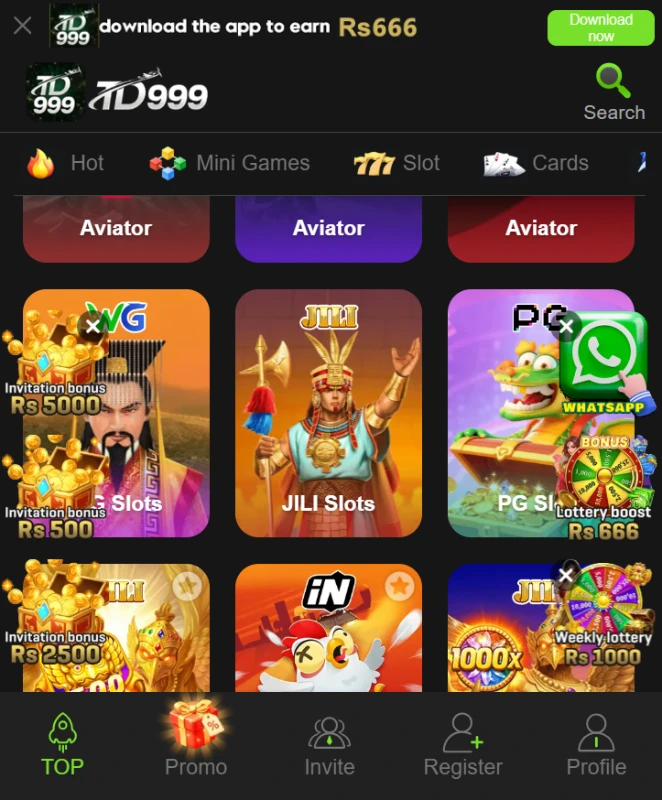
The home screen groups titles instead of placing every game in one long list. The category row includes Hot, Mini Games, Slot and Cards. These labels help visitors browse by game type, while the cards provide a quick visual indication of the available titles.
Aviator and Chicken Road 2.0 are among the titles visible in the lobby, alongside Fortune Gems games. Each title may have its own rules and controls. Read the instructions inside an individual game before taking part; a slot-style title and a game such as Aviator do not necessarily work in the same way.
The bottom navigation separates the main destinations into Home, Promo, Invite, Register and Profile. This layout is useful to understand because the promotional and account areas are not part of the game catalogue itself.
A simple way to browse
- Start on Home and choose one of the visible categories.
- Look through the game cards and open the title you want to understand.
- Read that game’s own instructions and rules before participating.
- Use the bottom navigation to return to Home or open Promo, Invite or Profile.
Different games can have different controls and outcomes. Do not assume that a result in one title predicts what will happen in another.
Explore the Promotional Centre in TD999 Game
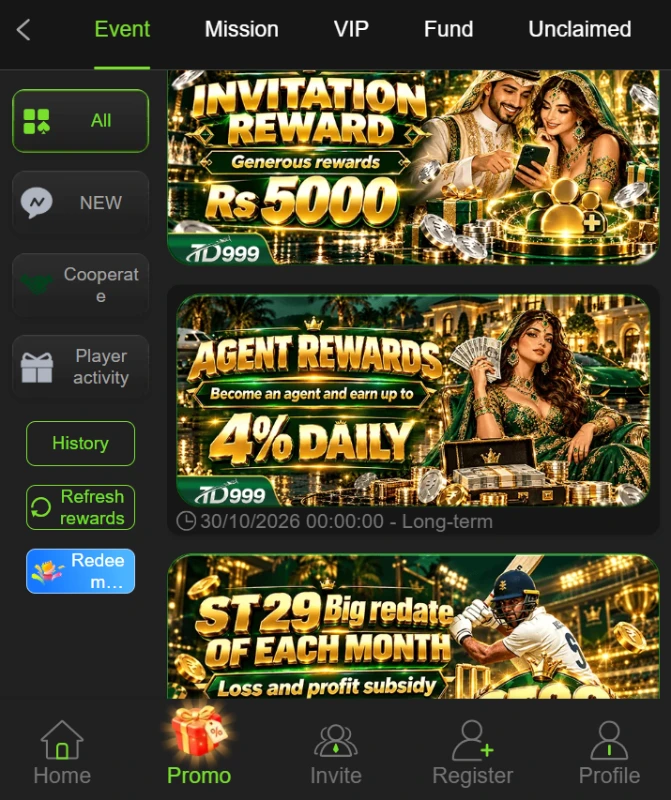
The Promo area is organized into separate sections, including Event, Mission, VIP, Fund and Unclaimed. Rather than treating every banner as the same kind of offer, open the relevant section and read its own rules. A promotion may depend on account status, a qualifying action, a time limit or another condition.
Events and invitation campaigns in TD999 Game
The Event area contains promotional cards for activities such as lucky draws, invitation campaigns, sharing rewards and agent-related offers. The Invite destination is a separate route for referral activity. Before sharing a referral link or expecting a reward, check what the campaign requires from both the inviter and the invited user.
Missions and daily activity
The Mission and daily-reward areas advertise tasks and recurring activities. A banner may show a reward figure, but that figure alone does not explain eligibility, completion requirements or claim steps. Check the task details and whether the offer is still active before spending money or sharing personal information.
VIP, Fund and Unclaimed sections in TD999 Game
VIP is presented as a separate promotional area with level-related rewards. Fund and Unclaimed also appear as distinct tabs. The available interface does not establish the full rules behind these sections, so users should open each one and read its current terms rather than assume that a displayed amount is available to every account.
TD999 Registration and Login
The registration page offers two routes: Password registration and Code register. It also includes a Pakistani phone-number field with the +92 country code, a password field for the password route, an optional referral-code field and an age-and-agreement confirmation.
Password registration
- Open the Register page from the main navigation.
- Check that the country code and phone-number field are correct.
- Select Password registration.
- Enter the requested account details and create a password.
- Read the age confirmation and User Agreement before accepting them.
- Enter a referral code only if you have one and understand how it is used.
- Review the details before submitting the form.
Code registration and login
The Code register option provides an alternative registration route. Follow the instructions displayed on that page and do not share a one-time code with another person. For an existing account, use the Login option and enter the credentials requested by the platform. If access fails, use a support route that you can independently verify; do not pay an unknown person who offers account recovery.
The registration screen includes an 18+ confirmation. Anyone under 18 should not create an account or use the platform.
TD999 APK Download and Android Installation Checks
The supplied source address is the TD999 website, but the publicly readable page does not provide enough information to verify a specific APK version, file size, package identity or developer. Do not treat a third-party page’s version number or download button as proof that a file is official.
If the website offers an Android download, first check that the download starts from the intended domain and that the page clearly identifies the file. Review the developer details, version information, permissions and privacy terms before installing. If these details are missing or inconsistent, pause rather than guessing.
- Use the source website and locate its current Android download option, if one is available.
- Check the file name, publisher information and any version details shown on the download page.
- After downloading, review the file source before opening it.
- Read Android’s installation prompt and the permissions requested by the app.
- Do not ignore a security warning that you do not understand.
Google explains that apps from outside Google Play can put a device and personal information at risk. Read Google’s Android guidance about downloading apps before installing an app from an unfamiliar source. APK version, file size and minimum Android version for TD999 remain unverified.
Understanding the Deposit and Receiving-Account Screens
The payment area separates deposit choices from the receiving-account page. This distinction matters: a payment method shown under Deposit is not automatically proof that the same method can be used for a successful withdrawal.
Online deposit and cryptocurrency option in TD999 Game
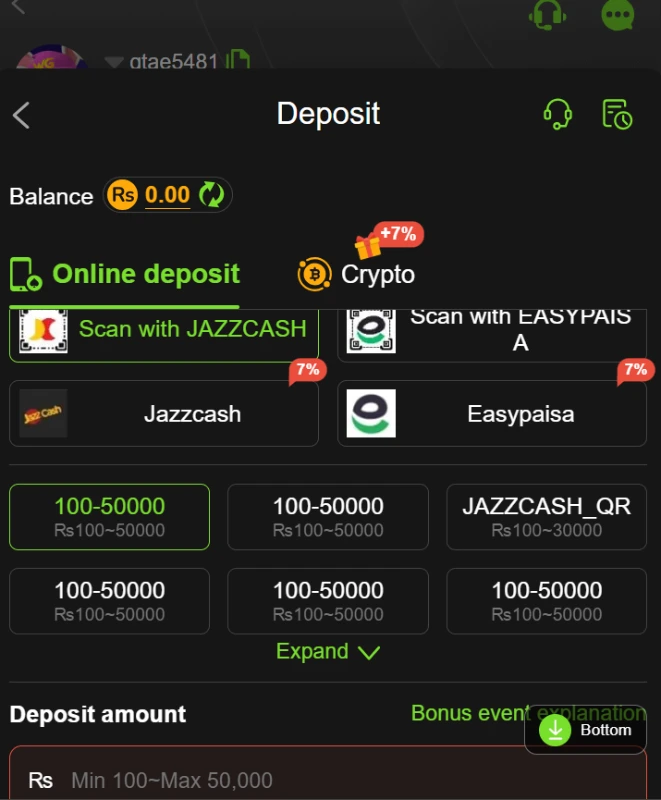
The Deposit screen displays Online deposit and Crypto tabs. Under the online option, JazzCash and Easypaisa are shown, including scan and wallet-style choices. The screen also contains preset amount buttons and a field for entering a deposit amount. No fixed minimum or maximum should be assumed from the presence of these controls; check the current amount field and the instructions presented at the time.
JazzCash and Easypaisa receiving accounts
The Receiving account page lists JazzCash and Easypaisa with an Add option. This indicates where account details can be entered for a receiving-account setup. It does not confirm that a withdrawal request will be approved, how long it may take, or whether a payment will arrive. Check the account holder details and current platform terms before entering financial information.
Do not send money to a personal account based only on a message or social-media contact. Confirm payment instructions inside the platform and with the relevant payment provider. Keep transaction references and never share your wallet PIN, password or verification code.
Account Safety and Responsible Use
The platform includes account registration and payment-related controls, so protect your personal and financial information. Use a unique password, keep verification codes private and avoid installing modified APK files. Read the privacy policy and terms before submitting personal details. The presence of a payment option or promotional banner is not a guarantee of service quality, a successful withdrawal or a financial return.
Online games that involve deposits or chance-based outcomes can result in financial loss. Do not treat advertised rewards or gameplay as a reliable way to earn income. Check the laws and restrictions that apply where you live before using any real-money gaming service. TD999’s licence and legal authorization have not been independently verified for this guide.
For Android installation risks, consult Google’s official Android Help page. You can also review ApnaAPK’s Disclaimer, Privacy Policy and Terms and Conditions.
Related Game Guides
If you are comparing how other mobile gaming platforms arrange their menus and account tools, read our XF777 game guide covering its game catalogue and wallet controls and the QZR888 Game guide. Their features belong to those platforms and should not be assumed to apply to TD999.
Frequently Asked Questions
What game categories are available on TD999?
The lobby displays Hot, Mini Games, Slot and Cards. The titles visible include Aviator, Chicken Road 2.0 and Fortune Gems games. The available categories may change.
Does TD999 provide more than one registration method?
Yes. The registration page displays Password registration and Code register. It also includes a phone-number field with the +92 country code and a referral-code field.
Can I use JazzCash or Easypaisa on TD999?
Both names appear on the online deposit screen, and both are listed as receiving-account options. This confirms what the interface displays, not that every transaction will be processed successfully.
Does TD999 have a cryptocurrency option?
A Crypto tab appears on the Deposit screen. The available information does not establish the supported cryptocurrency, network, fees or transaction limits. Check the live instructions carefully before considering a transfer.
Are TD999 bonuses guaranteed?
No guarantee can be established from promotional banners. Offers may have eligibility rules, activity requirements, time limits or other conditions. Read the terms for each campaign before relying on an advertised reward.
What is the latest TD999 APK version and file size?
The exact version and file size have not been independently verified. Check the current source page and do not rely on conflicting specifications published by unrelated download sites.
Is TD999 officially licensed in Pakistan?
Its licensing and legal authorization have not been independently verified for this article. Users should check applicable local laws and the platform’s own legal information before using any real-money features.
Conclusion
TD999 Game combines a category-based game lobby with a separate promotional centre, two registration routes and payment-related account screens. The visible options include JazzCash and Easypaisa for deposits, plus receiving-account entries for both services. However, the available information does not verify the APK specifications, transaction outcomes, promotional eligibility or licensing. Review the current terms, protect your account details and consider the financial risks before taking any action. Read ApnaAPK’s legal pages before relying on third-party app information.
Editorial Assessment
This TD999 Game guide focuses on how the platform is arranged: its game categories, the Event and Mission areas, the VIP and Fund tabs, and the difference between deposit methods and receiving accounts. Those interface details are useful for understanding the service, but they should not be mistaken for independent proof of its safety, legitimacy or payment performance. The most responsible next step is to verify the source, terms and legal status before downloading an app or sharing personal or financial information.
Download links
How to install TD999 Game APK: Lobby, Rewards and Account Guide APK?
1. Tap the downloaded TD999 Game APK: Lobby, Rewards and Account Guide APK file.
2. Touch install.
3. Follow the steps on the screen.