
Yoopkr Game: Categories, Providers and APK Guide
Description
Yoopkr Game: Categories, Providers and APK Guide
Introduction
Yoopkr Game is easier to understand when you look at its game collection as a set of separate categories rather than one large list. The official lobby places shortcuts such as Slots, Crash & Fly, Table, Instant, Lottery and Arcade near the top. It also groups titles under Hot and Popular, while provider labels help visitors browse a particular collection.
This guide follows that game-discovery route. It explains what the categories contain, how the provider and popularity sections are organised, and where account, promotion and payment controls appear. It also covers Android download precautions. The official site displays an APK download option, the current APK version, file size and minimum Android requirement have been independently verified.
A Quick Map of the Yoopkr Game Lobby
The lobby is the starting point for browsing. Its navigation includes Lobby, Hot, Popular, Favourites, Crash & Fly, Slots, Fortune, Table, Instant, Lottery and Arcade. The exact list of games can change, so treat the names below as examples of titles currently displayed rather than a permanent catalogue.
| Lobby area | What it helps visitors find | Examples currently displayed |
|---|---|---|
| Hot | Titles highlighted in the hot list | Aviator, Speed Winner, FlyX, Fortune Gems 2, Car Roulette |
| Popular | A separate selection of popular titles | Fortune Gems 3, Mines, Mahjong Ways 2, Super Ace |
| Slots | Slot-style game collection | Fortune Gems, Fortune Gems 2, Fortune Gems 3 |
| Crash & Fly | Crash-style and related titles | Aviator, Chicken Road 2, FlyX |
| Table | Table and card-style options | Car Roulette, Baccarat, Dragon Tiger, Toss a Coin |
| Quick Wins / Instant | Short-format titles shown in the quick selection | Lucky Wheel, Mines, Plinko, Scratch |
| Arcade | Arcade-style title selection | Royal Goal |
These labels describe how the website sorts its catalogue. They do not mean every game follows the same rules, uses the same controls or offers the same play experience. Open a title’s own information before starting.
Explore the Main Yoopkr Game Categories
Slots: browse titles by theme
The Slots area brings together titles such as Fortune Gems, Fortune Gems 2 and Fortune Gems 3. Other visible examples include Fortune Tiger, Fortune Rabbit, Royal Fruits and Mahjong Ways 2. The artwork and names can help visitors recognise a title, but they do not explain its rules or odds. Check the individual game’s information and understand any stake or balance controls before playing.
Crash & Fly: a different style of game
The Crash & Fly section includes Aviator, Chicken Road 2 and FlyX. These are separate titles, so do not assume that one game’s controls or round structure apply to another. Read the instructions shown when opening each title. If a game involves a stake, decide on a limit before beginning and do not chase a previous result.
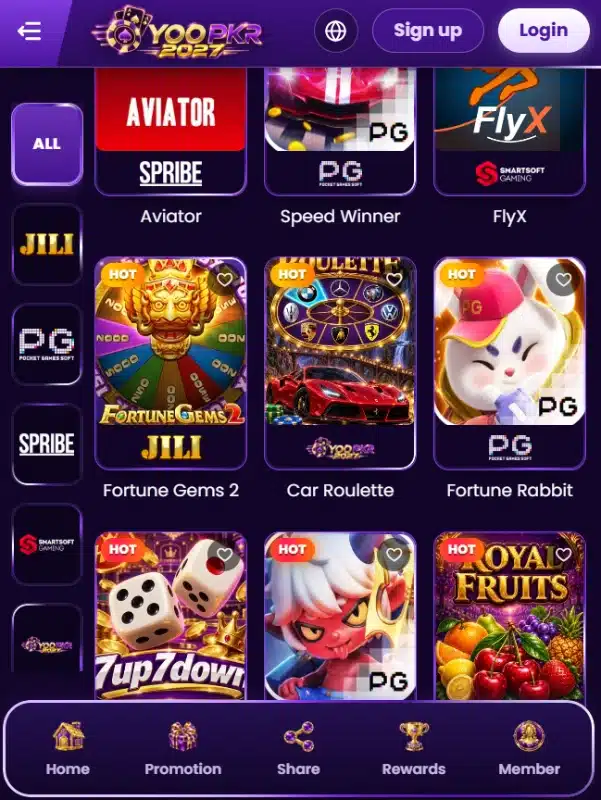
Table games: familiar names, individual rules
The Table section currently lists Car Roulette, Baccarat, Dragon Tiger, Toss a Coin, 7 Up 7 Down and Lucky Dice. Familiar names can make a category easier to recognise, but rules and settlement details can vary between digital versions. Review the rules inside the selected game rather than relying on the category label alone.
Instant, Quick Wins and Arcade
The quick selection includes Lucky Wheel, Mines, Plinko, Scratch and Royal Blocks. The Arcade area also lists Royal Goal. These shorter-title collections offer another way to browse without scrolling through the full catalogue. The presence of a title in a category does not confirm its availability in every account or region.
How Provider Browsing Works
The website displays provider labels including JILI, PG Soft, SPRIBE, SmartSoft and Yoopkr. Visitors can use these labels to narrow the visible collection. For example, the official lobby associates titles such as Fortune Gems with JILI, while Aviator appears in the Crash & Fly area alongside the SPRIBE label.
A provider label is a navigation aid. It should not be treated as proof of a business partnership, licensing status or independent certification. If a provider name matters to your decision, check the provider’s own official information separately.
To browse efficiently, start with the type of game you want, then use the provider filter if it is available for that category. This is usually more direct than opening random tiles from the home screen.
Hot, Popular and Favourites Are Not the Same
Hot and Popular appear as separate sections on the site. Hot contains highlighted titles such as Aviator, Speed Winner and Fortune Gems 2. Popular includes a different group, with examples such as Fortune Gems 3, Safari Wilds, Mines and Super Ace. The site does not provide a public ranking method in the information reviewed here, so these labels should be understood as the platform’s own groupings, not an independently measured ranking.
Favourites works differently: the site instructs visitors to sign in and tap the heart icon on a game to save it there. This makes Favourites a personal shortlist rather than another platform-wide popularity list.
Registration and Account Access in Yoopkr Game
The official registration page displays fields for a username, password and password confirmation. It also provides an optional referral-code field. The password prompt specifies a minimum of eight characters. A Login option is available for returning users.
- Open the official website by entering its address yourself: yoopkr.com.
- Choose Register and read the form and any linked terms before continuing.
- Enter the requested details only if you are comfortable sharing them with the operator.
- Create a strong, unique password. Do not reuse your email or banking password.
- Keep your login details and any verification codes private.
The available public page does not establish every account-verification step, password-recovery route or eligibility condition. Follow the instructions displayed by the service and do not send credentials to people claiming to offer account support through unofficial channels.
Promotions, Rewards and Referral Area
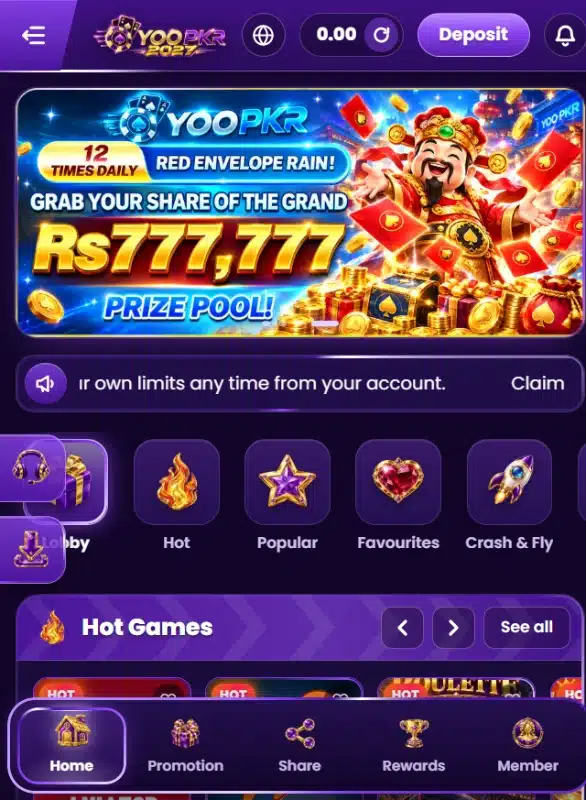
The official site directs visitors to a Rewards centre for a daily bonus and includes an Invite friends message about referral income. Promotion, Share & Earn and VIP Club also appear in the site’s help and navigation areas. Your selected interface image also contains a promotional banner advertising a red-envelope event and a prize-pool figure.
Promotional banners are not a guarantee that a particular visitor will receive a reward. The complete eligibility rules, dates, claim limits, turnover conditions and withdrawal restrictions were not all available for independent verification. Open the offer details and read the full conditions before taking any action. Do not deposit money only because a banner displays a large prize figure.
Deposit and Withdrawal: Check Each Process Separately
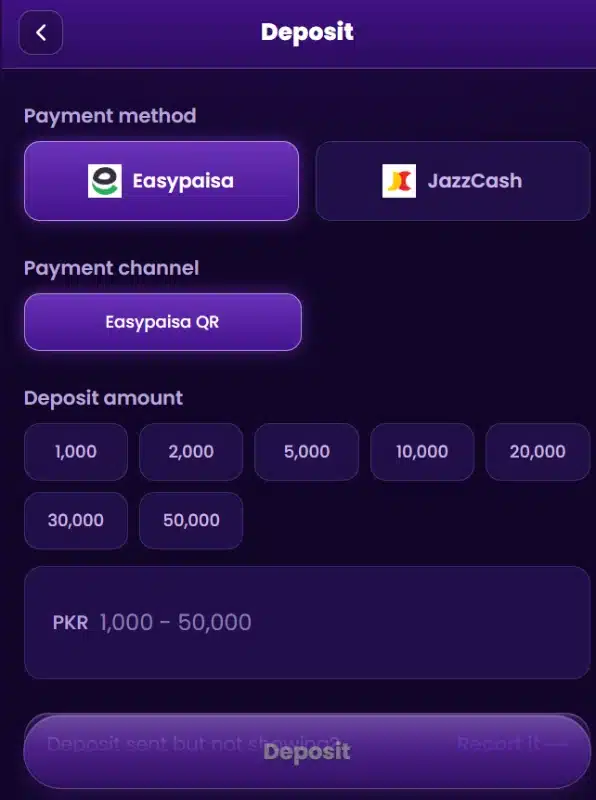
The deposit interface displays Easypaisa and JazzCash as payment methods and shows an Easypaisa QR channel. It also presents preset amount buttons. These are details visible on the deposit screen; they should not be treated as a guarantee that every method or amount is available to every account at all times.
The withdrawal process is a separate matter. The material reviewed for this guide confirm current withdrawal methods like jazzcash, easypaisa and bank account.
- Check the payment channel and recipient details on the live page before sending funds.
- Confirm the amount and keep the transaction reference.
- Read the current withdrawal conditions before making a deposit.
- Do not send money to a personal account supplied in an unrelated message.
- Never borrow money or chase losses from gaming activity.
Downloading the Android App: What to Verify
The official website displays a Download APK option. However, the current file’s version number, size, developer identity and minimum Android requirement have not been verified for this article. Do not rely on a third-party page that lists technical details without evidence from the actual file or publisher.
If you choose to download an APK, confirm that the link remains on the genuine official domain and inspect the file details before opening it. Android warns that apps from unknown sources can put your device and personal information at risk. Keep Google Play Protect enabled and take its warnings seriously. Read Google’s guidance on downloading apps from other sources before installing an APK.
If the file asks for permissions that do not make sense for its purpose, the publisher cannot be verified, or Play Protect raises a warning, stop rather than bypassing the warning. A website download button alone is not proof that a file is safe.
Responsible Use and Practical Checks
The official website states that players must be 18 or older and encourages users to set limits and take breaks. Real-money gaming can lead to financial loss. A previous result, promotional message or displayed prize pool cannot predict a future outcome.
- Check the laws and age requirements that apply where you live.
- Set a spending limit before using any paid feature.
- Do not treat gaming as a source of guaranteed income.
- Take a break if play affects your mood, work, studies or finances.
- Review the platform’s terms and privacy information before registering.
Frequently Asked Questions
What is Yoopkr Game?
Yoopkr is an online gaming website with a lobby that groups titles into areas such as Slots, Crash & Fly, Table, Instant, Lottery and Arcade. It also provides account, promotion and rewards navigation.
Which game categories are available?
The visible navigation includes Slots, Crash & Fly, Table, Instant, Lottery and Arcade, along with Hot, Popular and Favourites sections.
Which providers appear on the website?
The lobby displays JILI, PG Soft, SPRIBE, SmartSoft and Yoopkr provider labels. These labels help organise browsing and do not by themselves verify a commercial partnership.
How do I save a game to Favourites?
The website says visitors should sign in and tap the heart icon on a game to save it to Favourites.
What details are required to register?
The registration page displays username, password and confirm-password fields. A referral code field is optional, and the password prompt specifies at least eight characters.
Does the website offer an Android APK?
Yes, the official website displays a Download APK option. The current APK version, size and minimum Android requirement have not been verified here.
Can I deposit through Easypaisa or JazzCash?
Both options appear on the deposit screen, and an Easypaisa QR channel is also displayed. Check the current instructions and recipient details before making any payment.
Are withdrawal methods and processing times confirmed?
No. The available information does not establish current withdrawal methods, limits, fees or processing times. Review the live withdrawal page and terms separately.
Final Thoughts
Yoopkr Game organises its catalogue around game types, provider labels and separate Hot, Popular and Favourites lists. This structure can help visitors narrow their browsing before opening an individual title. The site also provides registration, rewards, referral and payment areas, but promotional and payment conditions need to be checked directly.
The most important unknowns remain the current APK specifications and the full withdrawal conditions. Verify the source and file before installing anything, read the rules for each game, and do not treat promotional claims as guaranteed returns. For information about this website’s publishing policies, read ApnaAPK’s Disclaimer, Privacy Policy and Terms and Conditions.
Editorial Assessment
This Yoopkr Game guide focuses on how the catalogue is organised: category selection, provider browsing and the difference between Hot, Popular and personal Favourites. It also records the limits of what could be confirmed about the APK and payment process. It does not claim that the app was installed, that a game was played or that a deposit or withdrawal was tested.
For comparison, you can also read ApnaAPK’s guides to 999YO game account and payment options and 555VU game search and provider navigation. They cover different platforms, so their features and conditions should not be assumed to apply to Yoopkr.
What's new
Category-focused guide based on the currently visible official website features. APK release details are not verified.
Download links
How to install Yoopkr Game: Categories, Providers and APK Guide APK?
1. Tap the downloaded Yoopkr Game: Categories, Providers and APK Guide APK file.
2. Touch install.
3. Follow the steps on the screen.