
555vu game APK: Coupons, Game Search and Payment Checks
Description
555vu game APK: Coupons, Game Search and Payment Checks
Introduction
555vu game brings a searchable game lobby, account controls, promotions and payment tools into one platform. Its navigation separates Home, Promo, Invite, Deposit and Profile, so you can understand where each task belongs before using an account.
This 555vu game guide explains the visible features, registration forms, reward categories and wallet setup. It also identifies important unknowns, including the current APK version, file size and payment processing times. Real-money play involves possible losses; a displayed bonus or payment option does not prove a successful payout.
What Is 555vu Game?
The 555vu game platform presents a collection of individual games rather than one game with a single set of rules. Its lobby includes titles such as Chicken Road 2.0, Aviator, Super Ace, Fortune Gems 2 and Wild Bounty Showdown. Each title needs its own explanation of controls and rules.
The 555vu app interface also includes daily missions, referral tools, VIP levels and receiving-account settings. These account features sit outside the individual games. Understanding that separation helps you distinguish a game result, a promotional reward and money available for withdrawal.
| Information | Verified detail or review status |
|---|---|
| Platform name | 555vu; branding displays 555VU.COM |
| Lobby organization | Hot, provider navigation, All, Recent and Favorites |
| Game examples | Aviator, Chicken Road 2.0, Super Ace and Fortune Gems titles |
| Account access | Phone number/email/profile field and password; Google option also appears |
| Payment options displayed | JazzCash, Easypaisa, NO wallet, Crypto and Bank Transfer; options differ by screen |
| Promotions | First-deposit offers, missions, referrals, VIP rewards, check-in and coupons |
| Language choices | English and Urdu |
| Minimum Android requirement | 5 and above |
| Current APK version | Latest |
| APK file size | 6MB |
Key Features of 555vu Game
Search and Favorites in 555vu Game
The lobby provides a search field alongside All, Recent and Favorites filters. These controls give you ways to locate a title without repeatedly browsing the whole collection.
Provider Navigation and Game Choices
The side menu includes labels such as Spribe, INOUT, 2J, JILI, PG, WG, JDB and MG. These labels organize the collection; they do not independently establish partnerships or confirm that every listed title currently works.

Account Recovery and Separate Withdrawal Controls
The login form includes Forgot Password. Withdrawal setup uses a separate password screen, allowing you to distinguish account access from the controls used when requesting funds.
Missions, VIP Levels and Language Options
Promo separates Event, Mission, VIP, Unclaimed and SVIP areas. English and Urdu choices also appear, although the review does not establish whether every page has a complete translation.
How to Play 555vu Game
To explore 555vu game, start with the lobby and the rules of your chosen title. Different games can use different controls, stakes and settlement rules.
- Open the lobby and browse All or use the search field.
- Choose a provider label or a named game.
- Read that title’s instructions before starting a round.
- Check the stake, available balance and confirmation controls if the title involves money.
- Keep game activity separate from promotional tasks and withdrawal setup.
- Use account or customer-service controls if you need clarification.
A Demo link appears on the account forms. Its presence does not confirm a playable demo for every title. Previous results also do not establish what a later round will produce.
Bringing the Virtual World to Life
The 555vu game lobby uses a dark background with bright, illustrated game tiles. A vertical provider menu runs beside the collection, while the search bar and filters sit above it.
The lower navigation keeps account-related destinations together. Home covers browsing, Promo contains offers, Invite groups referral activity, and Deposit opens payment controls. Profile gives the account area its own destination.
Promotional panels in 555vu game use a different layout, with banners, timers, progress bars and claim buttons. Several offers can appear close together, so read each event separately. A bright headline attracts attention, but the details determine whether an offer applies to your account.
For another example of how browsing and account tools are organized, read our S1 Game lobby and account navigation guide. Each platform has its own controls.
555vu Game Bonuses
The 555vu game reward areas contain several separate campaigns. A headline amount does not tell you whether a bonus can be claimed, used or withdrawn. Check each offer’s eligibility, deadline and any activity requirements.
Registration Tasks and Task Roulette
A registration banner advertises Rs 365 in connection with completing tasks after registration. A separate Task Roulette promotion also uses Rs 365. Do not combine these into two guaranteed payments or describe registration alone as sufficient.
First-Deposit Promotions
One campaign advertises a 100% first-deposit offer with a maximum bonus of Rs 88888, subject to eligibility. A separate First Deposit Extra Reward panel lists deposit tiers and corresponding bonuses.
Treat these as different campaigns unless their rules explicitly allow them together. The first-deposit requirement matters, and the material does not establish complete wagering or withdrawal conditions.
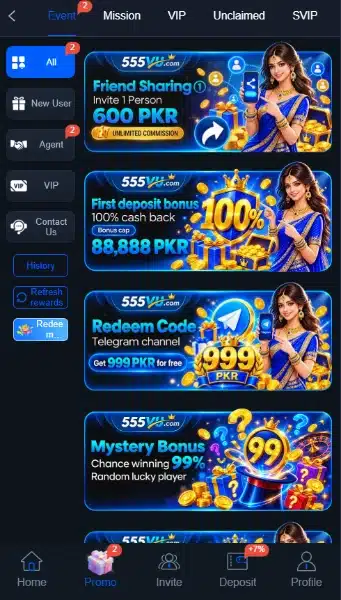
Daily Missions and Referral Rewards
Daily Mission lists invitation tasks tied to referred users completing a first deposit. Progress indicators distinguish tasks involving one, two, three or ten qualifying users.
Sending an invitation alone does not satisfy that condition. Review the task’s Details link before assuming that a referral qualifies or earns a particular amount.
Check-In and VIP Rewards
A Cash sign-in campaign advertises a seven-day reward of Rs 399. VIP pages separately show level-based daily, monthly and next-level benefits.
The VIP interface connects access to deposit or activity requirements. A higher tier’s displayed amount is not an entitlement for a new account.
Deposit Coupons and Redeem Codes
My discount coupons separates Not used, Used and Expired entries. Individual coupons include deposit thresholds, expiry timers and payment-method restrictions.
Redeem-code banners direct attention to a Telegram channel, but no currently valid code has been verified. Do not treat a banner as a working code or an unconditional reward.
How to Download 555vu Game APK on Android?
A download-style page includes a Quick Installation button. The review did not retrieve or inspect its APK, verify a Google Play listing or confirm a current release.
- Check the supplied source address and resolve any branding or domain uncertainty first.
- Locate the current app-download information if the page opens.
- Check the publisher identity, file destination and any stated device requirements.
- Use a download control only after establishing where the file comes from.
- Locate the downloaded APK in your device’s Downloads folder.
A search for “555vu APK download†does not authenticate the files it returns. Likewise, “latest version†in a page title does not establish the build number. Do not replace missing specifications with numbers from another download site.
For general guidance on checking downloaded apps, read Google’s Play Protect guidance.
How to Install 555vu App on Android?
These are general APK installation steps, not a tested installation report for this application.
- Open the APK only after checking its source.
- If Android requests permission, review which browser or file manager is asking.
- If you choose to proceed, enable Allow from this source for that specific app.
- Follow the installation prompts and review any warnings.
- Turn that source permission off again afterward.
- Review the application’s requested permissions before entering account details.
Menu names can differ by device. Keep Play Protect enabled, and stop if Android flags the file as harmful. Permission to install an APK does not establish that its contents are safe.
Registration and Login Process
Registering a 555vu Game Account
The registration form contains a phone number/email/profile field and a password field. It also includes an acknowledgement that the user is over 18 and agrees to the User Agreement.
Enter an accepted account identifier, choose a private password and read the agreement before selecting Register. A Google registration option also appears. No separate OTP, country-code or referral-code field has been verified in the reviewed form.
555vu Game Login and Password Recovery
For 555vu login, open Login and enter the identifier and password associated with your account. The form provides a Remember account password checkbox, a Google option and Forgot Password.
Avoid remembering credentials on a shared device. If you cannot access the account, use the recovery control rather than creating repeated accounts. A Customer Service link appears, with quick response times.
Deposit and Withdrawal Methods
The 555vu game payment screens separate deposits from receiving accounts and withdrawal requests. A listed method establishes a visible option, not successful transaction processing.
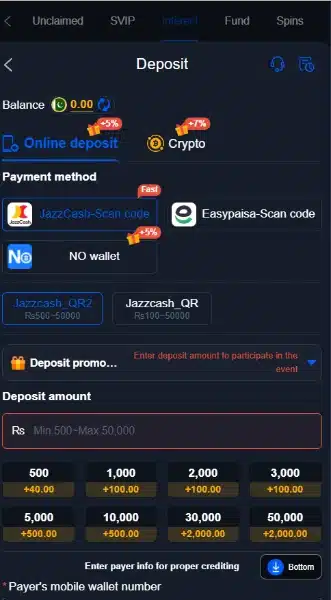
JazzCash Deposit and Receiving Account
The deposit area labels its JazzCash route as a scan-code option and provides different channels. The receiving-account page also includes JazzCash with an Add control.
For a deposit, inspect the selected channel’s instructions and payer-information fields. For withdrawal setup, follow the separate receiving-account form.
Easypaisa Deposit and Receiving Account
Easypaisa appears as a scan-code deposit option and as a receiving-account choice. Check the information requested in the active form rather than assuming that its procedure matches JazzCash.
NO Wallet
The deposit area includes NO wallet. A separate wallet-linking control also appears among receiving-account options. Check the current linking form before assuming which details it requires.
Crypto
A separate Crypto deposit tab and a Crypto receiving-account option appear.
A promotion mentions USDT on TRC20, but that banner does not confirm every supported asset or network. Check the actual transaction instructions before using a crypto address.
Bank Transfer Receiving Account
Bank Transfer appears under receiving accounts. This supports describing it as a displayed withdrawal-account option; it does not establish that bank deposits are universally available.
Channel-Specific Deposit Amounts
The selected JazzCash channel displays Rs 500 to Rs 50000. Another listed channel displays Rs 100 to Rs 50000.
These ranges belong to the displayed channels at the time of review. They are not a universal minimum deposit, a withdrawal limit or a promise that the same ranges remain available.
Our 1ee guide to QR payments and bonus conditions explains another platform’s payment menus. Always check the instructions and limits for the service you are using.
Withdrawal Password and Request Setup
Withdrawal setup asks the user to create and confirm a separate withdrawal password. The request page also provides Add withdrawal account and a withdrawal-amount field.
Set up the required account details, then inspect the current request conditions before submitting anything. Fees, processing times and completed payouts remain unverified. Never share either password with someone offering payment assistance.
FAQs: Frequently Asked Questions
What is this platform?
It is a gaming platform with a multi-title lobby, account forms, promotional areas and payment controls. Different titles have their own rules.
Is a current APK version verified?
No. The current build number, file size, minimum Android version and Google Play availability have not been independently verified.
Which payment methods appear?
Deposit screens include JazzCash scan code, Easypaisa scan code, NO wallet and Crypto. Receiving-account choices also include Bank Transfer.
Are bonuses guaranteed after registration?
No. The displayed campaigns involve conditions such as tasks, qualifying referrals, first deposits, VIP levels or expiry dates.
What is the visible deposit limit?
One selected JazzCash channel displays Rs 500 to Rs 50000; another displays Rs 100 to Rs 50000. Check the active channel for current limits.
Does the platform offer Urdu?
The language selector includes English and Urdu. Complete translation coverage has not been tested.
Conclusion
555vu game combines a searchable lobby with account tools, promotions and payment setup. Its Recent and Favorites filters help organize browsing, while separate tabs group missions and VIP benefits. Current APK specifications and payment performance remain unverified. Read the platform’s own terms before using its financial features. For ApnaAPK’s publishing and information practices, review our Terms and Conditions, Disclaimer and Privacy Policy. Review each offer’s conditions separately and remember that real-money play can result in losses.
Download links
How to install 555vu game APK: Coupons, Game Search and Payment Checks APK?
1. Tap the downloaded 555vu game APK: Coupons, Game Search and Payment Checks APK file.
2. Touch install.
3. Follow the steps on the screen.