
M 19 game APK Guide: Check These Details First
Description
M 19 game APK Guide: Check These Details First
Introduction
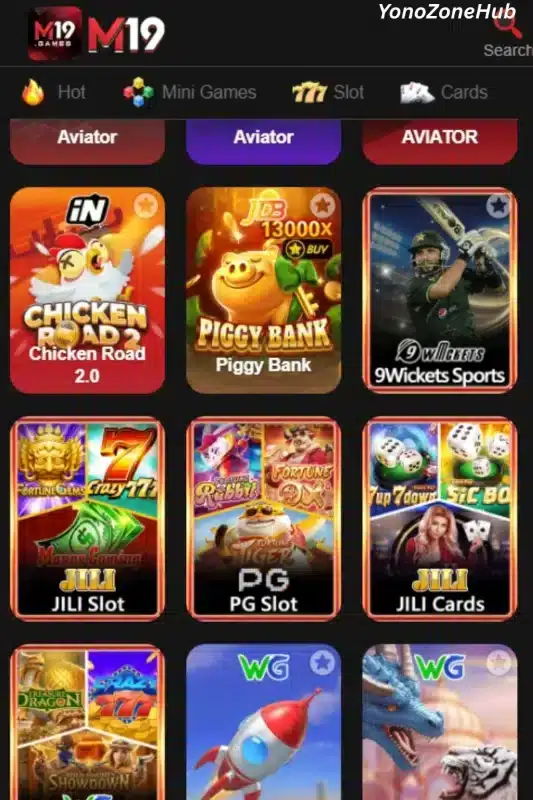
M 19 game brings a collection of mobile games together with account access, wallet controls and promotional areas. Its lobby groups titles into sections such as Hot, Mini Games, Slot and Cards. The platform also provides phone-based login options, Android app access, JazzCash and Easypaisa payment choices, VIP information and separate pages for missions and events.
This guide follows the way a user moves through the platform, from opening the lobby to reviewing account and payment controls. It separates features that are visible in the supplied material from details that remain unconfirmed. That distinction matters: an advertised reward is not a guaranteed payment, and an APK label does not confirm its version, file size or safety.
What Is M 19 game?
M 19 game is a mobile-oriented gaming service with several types of titles available from one lobby. The category tabs help divide the collection, while individual tiles identify games such as Aviator, Chicken Road 2.0, Piggy Bank, 9Wickets Sports, PG Slot, JILI Cards and WG Crash. A search control is also available for users who prefer to look for a title by name.
The platform combines game browsing with account and promotional tools. Its main navigation includes Home, Promo, Invite, Deposit and Profile. Other areas provide access to VIP levels, missions, daily sharing activities, event offers, receiving accounts and withdrawal settings. These are separate functions, so a user should check the correct section before taking an account action.
The available material confirms some interface details but does not establish every technical or operational specification. The table below keeps those distinctions clear.
| Item | Available information |
|---|---|
| Platform name | M19 |
| Game categories | Hot, Mini Games, Slot and Cards |
| Examples of listed titles | Aviator, Chicken Road 2.0, Piggy Bank, 9Wickets Sports, PG Slot, JILI Cards and WG Crash |
| Account access | Phone number, password login, code login and Google quick login are visible |
| Country code shown | +92 |
| Deposit options | JazzCash and Easypaisa |
| Withdrawal receiving accounts | JazzCash and Easypaisa |
| Displayed deposit range | Rs 300 to Rs 100000 |
| Promotion areas | First recharge, invitation, missions, VIP, daily share, events and lucky draw |
| Operating system | Android app access is provided |
| APK version and file size | Latest |
Key Features of M 19 game
M 19 game categories and game types
The lobby uses category tabs rather than placing every title in a single feed. Hot, Mini Games, Slot and Cards give users a starting point based on the kind of game they want to browse. This layout is useful when someone wants to explore one category without scrolling through unrelated titles.
M 19 game search and title tiles
A search control appears near the top of the interface. Users who know a game’s name can use it instead of opening each category. The individual tiles also display game names and artwork, helping users distinguish one title from another before selecting it.
M 19 game account access choices
The login page accepts a phone number with the +92 country code shown for Pakistan. It offers Password Login and Code Login, along with Forgot Password and a Customer Service route. A Google quick-login option is also visible, although availability may depend on the current account and service flow.
M 19 game wallet and receiving-account controls
The deposit area and withdrawal-account area serve different purposes. Deposit options include JazzCash and Easypaisa, while the receiving-account section lets a user add details for one of those services. Keeping these tasks separate can help prevent confusion when reviewing a transaction.
M 19 game promotions in separate sections
The platform places offers under areas such as Promo, Mission, VIP, Event, Unclaimed and History. This makes it possible to distinguish a current campaign from a reward that still needs to be claimed or an item already listed in account history.
M 19 game VIP levels and account activity
The VIP section contains multiple levels, a reward list and rules. A separate Super VIP promotion also refers to deposit activity. Users should read the relevant level and campaign conditions rather than assuming that every displayed VIP benefit applies to every account.
How to Play M 19 game
Begin at the lobby and choose a category that matches the type of title you want to explore. For example, the Slot and Cards sections group different kinds of games, while Mini Games provides another route through the collection. If you already know a title, use the search control to find it more directly.
Open a game tile and read the instructions provided within that game before making a selection. Controls and rules can differ between titles. A crash-style game, a card game and a slot-style title should not be treated as if they all work in the same way.
Check the displayed balance and any bet or play settings before taking an action that involves money. The wallet and promotion areas are not gameplay instructions; they are account tools. Keep those functions separate and do not assume that a bonus banner predicts a game’s outcome.
For anyone learning the M 19 game interface, it is sensible to browse the available menus first and understand what each control does before using payment features.
Interface, Layout and Navigation
The interface uses a dark background with red accents and prominent promotional artwork. The lobby places category tabs and game tiles in the main viewing area. This visual arrangement gives game titles more space than account details, while the bottom navigation keeps common destinations within reach.
Home returns users to the game area. Promo opens campaign information, Invite relates to referral activity, Deposit leads to payment options and Profile contains account-related tools. VIP, missions and event pages provide more detailed information than the main lobby banners.
The menu is compact, but the number of banners and reward panels can make the first screen feel busy. Users can reduce unnecessary browsing by choosing a category or using search. They should also open the campaign rules rather than relying on a short banner headline.
In practical terms, M 19 game puts browsing, promotions and wallet management into one mobile layout. That can make the main functions easy to locate, but it also means users need to pay attention to which section they have opened before confirming an account action.
M 19 game Bonuses and Promotional Areas
The supplied platform material contains several separate offers. The amounts below describe what the campaigns advertise; they are not promises that every account will receive the full amount. Eligibility, timing and claim rules can affect each offer.
First recharge offer
The first-recharge area says that the offer applies to the first deposit after sign-up. The promotion uses different deposit levels and corresponding reward ranges. A separate new-member banner advertises a first-deposit reward of up to Rs 6666. Up to means this is the advertised maximum, not a fixed reward for every new account. Check the current tier and conditions before relying on the offer.
Mission reward
A Mission Bonus campaign advertises Rs 666 and connects the reward with app download and deposit activity. The mission requirements determine whether the reward can be claimed. Installing the app by itself should not be treated as proof that the mission is complete.
Invitation campaign
The invitation area advertises an Invitation Reward Super Prize of Rs 10000. This is a referral promotion, so users need to review the eligibility rules for invited accounts and any required activity. Sharing an invitation link does not automatically establish that a referral qualifies.
Daily sharing task
A Daily Share campaign displays Rs 300. The amount belongs to the promotion shown in the supplied material. Users should open the active task to check what sharing action is required and whether there are limits on claiming it.
Monthly sharing mission
The promotional area also lists a monthly sharing random mission with a displayed amount of Rs 10000. The word random matters: users should not assume that every account receives this amount each month. The active mission and its conditions determine eligibility.
Deposit-related promotion
A separate banner advertises a Deposit Bonus of Rs 66666. This figure is a promotional amount, not a statement that an ordinary deposit automatically receives that value. Deposit size, campaign status and other rules may apply.
Loss subsidy
The platform also advertises a game loss subsidy of up to 8%. This is a maximum percentage shown for that campaign. The actual amount, eligibility and calculation depend on the offer’s rules.
VIP and Super VIP offers
The VIP area displays different reward totals across multiple levels. A separate Super VIP 4 promotion advertises up to 25% of the deposit. This percentage is tied to the promotion’s VIP and deposit conditions; it should not be read as a standard reward for every deposit.
Lucky draw
The lucky-draw campaign describes roulette-style draw chances and shows a maximum bonus of Rs 1310. Its rules include claim conditions and validity requirements. A maximum prize does not mean every draw awards that amount.
How to Download M 19 game APK on Android
- Open the M19 source website on the Android device you intend to use.
- Locate the app download control provided by the platform.
- Tap the download option and wait for the file to finish saving.
- Open the Downloads folder or the browser’s download list.
- Check the file name and source before opening the APK.
- Do not assume that a third-party page’s version number or file-size claim is correct.
- Continue only if you understand that the file comes from outside Google Play and you want to proceed.
For a comparison with another Android app guide on this site, read our 9Win Game APK guide. It covers a separate platform and should not be used as a source for M19 specifications.
How to Install M 19 game on Android
- Find the downloaded APK in your phone’s Downloads folder or file manager.
- Tap the file to start the installation process.
- If Android asks for permission to install apps from that source, review the prompt carefully.
- If you decide to continue, allow the specific browser or file manager to install the file. Avoid changing unrelated security settings.
- Return to the APK and select Install.
- Wait for Android to finish, then open the app if you still want to use it.
Before installing the M 19 game APK, check the file source and review any Android warning. Android may display warnings for apps installed outside Google Play. Read those prompts instead of dismissing them automatically. Google’s Android app installation guidance explains how app downloads and installation sources work.
Registration and Login
Creating an account
The interface provides a Register option and a new-member screen after registration. However, the complete registration form is not sufficiently documented in the supplied material to confirm every field. Do not assume that a referral code, age checkbox or particular verification method is compulsory unless the live form asks for it.
Enter only the information requested by the registration page. Review any user agreement or terms presented before submitting details, and avoid sharing account credentials with another person.
Signing in to an existing account
- Open the login page and select Login.
- Check the country code. The supplied interface displays +92.
- Enter the phone number linked to the account.
- Choose Password Login or Code Login.
- Enter the requested password or code.
- Select Login to continue.
The page also provides Forgot Password, Customer Service and a remember-password option. Google quick login is displayed as another access route. Use account recovery controls if you cannot access the account rather than repeatedly guessing passwords.
M 19 game Deposit and Withdrawal Options
The M 19 game payment screens list JazzCash and Easypaisa. The displayed deposit range is Rs 300 to Rs 100000. This is the range shown in the deposit area; it does not confirm a withdrawal minimum or maximum. The platform material does not verify transaction fees or processing times, so this guide does not assign any.
[[IMAGE3]]
Adding funds through JazzCash
Select JazzCash from the deposit options and follow the instructions shown for the transaction. Check the amount and payment details before completing a transfer. Keep any transaction reference provided by the payment service for your own records.
Adding funds through Easypaisa
Select Easypaisa in the deposit area and follow the current on-screen payment instructions. Confirm the displayed amount and destination details before sending money. Do not use payment information copied from an old message or an unrelated website.
Setting a JazzCash receiving account
The withdrawal section allows users to add JazzCash receiving details. Enter the information requested by the platform and check the number carefully before saving it. The supplied material does not establish a withdrawal processing time or fee.
Setting an Easypaisa receiving account
Easypaisa is also listed as a receiving-account option. Add it through the withdrawal or receiving-account area, not the deposit menu. Confirm the account details before submitting a withdrawal request.
Withdrawal password and account checks
The withdrawal flow includes a separate withdrawal-password step. Keep that password private and do not share it with anyone claiming to provide support. If you forget it, use the account’s available recovery or customer-service route.
Withdraw to Deposit
A separate Withdraw to Deposit control converts a withdrawal amount into a deposit within the platform. Its description connects the feature with eligibility for applicable deposit promotions. It is not the same as sending money to a JazzCash or Easypaisa receiving account, so read the selection carefully before confirming.
Our MF777 Game bonus and payment guide covers another platform’s account and promotion features. Its limits or rules should not be assumed to apply to M19.
FAQs About M 19 game
What is M 19 game?
The M 19 game platform has Hot, Mini Games, Slot and Cards categories, along with account, payment and promotional sections.
Can I download the APK on Android?
The platform provides an app download option for Android users. Check the download source and Android warnings before installing an APK from outside Google Play.
Is the current APK version confirmed?
No. The exact version number and file size are not verified in the supplied material, so they should not be guessed.
Which payment options are listed?
JazzCash and Easypaisa appear in the deposit options and in the withdrawal receiving-account area.
What deposit range is displayed?
The deposit screen displays Rs 300 as the minimum and Rs 100000 as the maximum. These figures do not establish withdrawal limits.
Are the displayed bonuses fixed payments?
No. Promotional amounts depend on campaign rules, eligibility and claim conditions. Up to amounts describe a maximum, not a guaranteed reward.
Conclusion
M 19 game brings game categories, account access, promotional campaigns and wallet controls into one mobile interface. The supplied material verifies JazzCash and Easypaisa options, a displayed deposit range of Rs 300 to Rs 100000, several login routes and multiple conditional promotions. It does not verify the APK version, file size, transaction speed or withdrawal limits. Before using the platform, read its current rules and our Terms and Conditions, Privacy Policy and Disclaimer.
Download links
How to install M 19 game APK Guide: Check These Details First APK?
1. Tap the downloaded M 19 game APK Guide: Check These Details First APK file.
2. Touch install.
3. Follow the steps on the screen.