M19 Game APK Version: What to Know First
Description
M19 Game APK Latest Version: What to Know First
Introduction
M19 Game is a mobile gaming platform built around slots, crash-style titles, card games, mini games and sports-related options, with account, promotion and wallet tools placed in the same interface. The platform also provides APK download access for Android users and includes separate areas for registration, login, deposits, withdrawals, VIP rewards and promotional events.
Instead of treating the platform as only an APK download, it helps to understand how its different sections connect. A user can browse the lobby, choose a game category, manage an account, view promotional tasks, add payment details and access wallet functions from the main navigation. Several promotions display specific reward amounts, but those offers have conditions and should not be treated as guaranteed earnings.
What Is M19 Game?
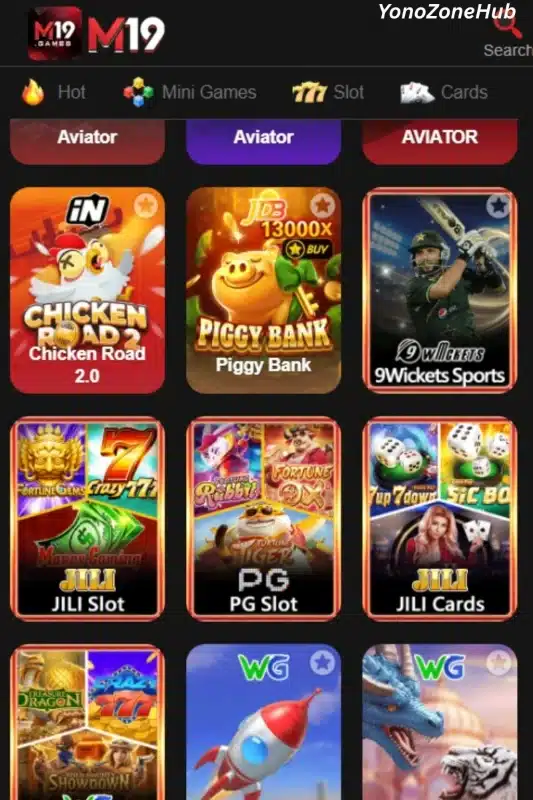
M19 Game is an online gaming platform with a mobile-focused interface. Its lobby organizes games into categories such as Hot, Mini Games, Slot and Cards. Individual titles visible in the game area include Aviator, Chicken Road 2.0, Piggy Bank, 9Wickets Sports, PG Slot, JILI Cards and WG Crash.
The platform also includes more than the game lobby. Users can access promotions, invitations, deposits, profile controls, VIP rewards, missions and event-related offers from different sections. A search option appears near the top of the interface, which can help when the game collection becomes difficult to browse manually.
M19 also connects gaming and account management closely. Deposit options, receiving accounts, withdrawal controls and promotional tasks sit inside the same mobile interface rather than sending users through completely separate systems.
| Information | Verified Detail |
|---|---|
| Platform name | M19 |
| Main categories | Hot, Mini Games, Slot, Cards |
| Example games | Aviator, Chicken Road 2.0, Piggy Bank, 9Wickets Sports, PG Slot, JILI Cards, WG Crash |
| Account access | Registration, phone-number login, password login, code login and Google quick login are visible |
| Deposit methods | JazzCash and Easypaisa |
| Withdrawal receiving accounts | JazzCash and Easypaisa |
| Promotions | First recharge, invitation rewards, missions, VIP rewards, daily sharing, events and lucky draw |
| Visible deposit range | Rs 300 to Rs 100000 |
| Operating system | Android app access is provided |
| APK version | Latest |
| APK size | 7MB |
Key Features of M19 Game
M19 Game Lobby and Category Navigation
The M19 Game lobby separates titles into simple categories instead of placing every game in one long list. The Hot, Mini Games, Slot and Cards tabs let users move between different types of games quickly.
The lobby also uses individual game tiles with recognizable names and artwork. This gives users a clearer idea of what they are opening before selecting a title.
M19 Game APK Access
The platform provides a visible option to download its mobile app. This makes the Android app an important part of the M19 experience rather than an unrelated download page.
The exact APK version number and file size could not be verified from the supplied source material, so users should check the current download information before installing it.
M19 Account Login Options
The login area supports a Pakistan country code of +92 and asks for a phone number. Users can choose between Password Login and Code Login.
The same area also includes Forgot Password, Customer Service, a remember-password option and Google quick login. These controls give users several ways to access or recover an account.
M19 Game Search and Quick Navigation
A search icon appears at the top of the main interface. This can be useful when a user already knows which title they want instead of browsing the full collection.
Important platform areas such as registration, promotions, VIP rewards, invitations and other tools also remain close to the main lobby.
M19 Game Deposit Controls
The deposit section shows JazzCash and Easypaisa as payment choices. Users can select a predefined deposit amount or work within the range displayed by the platform.
The deposit screen shows a minimum of Rs 300 and a maximum of Rs 100000. These figures relate to the visible deposit interface and should not be confused with withdrawal limits.
M19 Withdrawal Receiving Accounts
M19 lets users add receiving-account details for JazzCash and Easypaisa. This separates the destination account from the normal game lobby.
The withdrawal area also contains a dedicated withdrawal-password step. This is an account-control feature that users should set and remember carefully.
M19 Withdraw-to-Deposit Option
The platform includes a separate Withdraw to Deposit function. Its description explains that the feature converts a withdrawal directly into a deposit and can make the account eligible for applicable deposit bonus rewards.
This is different from sending funds to a JazzCash or Easypaisa receiving account, so users should check which withdrawal option they have selected before confirming anything.
M19 Game VIP System
M19 includes multiple VIP levels with different displayed reward totals. The VIP area contains a reward list and rules section so users can check the conditions linked to each level.
A separate Super VIP promotion also advertises benefits linked to deposit activity. These rewards depend on the relevant VIP and promotional requirements rather than being available automatically to every account.
Missions, Events and Reward Areas
The platform divides promotions into areas such as Event, Mission, VIP, Unclaimed and History. This organization helps users see whether a reward is still active, available to claim or already part of their account history.
Users should read the rules for each promotion because different missions can require deposits, app downloads, invitations or other qualifying actions.
How to Play M19 Game
Start from the main lobby after opening the M19 platform or Android app. The lobby provides categories including Hot, Mini Games, Slot and Cards.
Choose the category that matches the type of game you want to explore. You can also use the search option when you already know the title.
Tap the required game tile to open it. Before using money in any title, check its rules, controls, bet settings and available balance information. Games such as Aviator or slot-style titles do not all use the same mechanics.
Use the account and wallet areas separately from gameplay. Deposit, withdrawal, VIP and promotional controls belong to account management, so there is no need to treat every bonus or wallet option as part of the game itself.
Avoid assuming that a displayed reward means a guaranteed return. Game outcomes and promotional eligibility are separate matters.
Bringing the Virtual World to Life
M19 Game uses a dark mobile interface with red accents across most menus. The branding stays visible near the top while navigation controls, promotional banners and game categories occupy the sections below it.
The lobby is image-heavy because each game receives its own tile. Titles such as Aviator, Piggy Bank, Chicken Road 2.0 and 9Wickets Sports can be recognized without opening them individually.
The platform divides major account functions into clear sections. Home, Promo, Invite, Deposit and Profile form the main lower navigation, while areas such as Daily Share, VIP and additional options appear closer to the lobby controls.
Promotional content uses larger banners than normal game tiles, so it is easy to distinguish campaigns from games. The mission and event interface also separates current promotions from unclaimed rewards and history.
Overall, M19 keeps its game lobby, promotions and financial controls inside one mobile layout. The number of banners and reward icons can make the screen feel busy, but category tabs and dedicated menu areas reduce the need to search through every item manually.
M19 Game Bonuses
M19 has several separate promotional campaigns. They should be treated individually because each has its own requirement.

M19 Game First Recharge Rewards
The first-recharge area states that only the first deposit after sign-up is eligible for the listed reward.
Different deposit levels have different reward ranges. This means the reward depends on the qualifying first-deposit amount and the stated promotion rules. It is not an automatic payment for simply opening an account.
A separate new-member promotion advertises a first-deposit reward of up to Rs 6666. The words mean Rs 6666 is a maximum promotional figure, not a guaranteed amount for every user.
M19 Mission Bonus
A promotion titled Mission Bonus advertises Rs 666 and connects the offer with depositing and downloading the app.
A user must satisfy the mission requirements before treating the displayed amount as claimable. Downloading the app alone should not be assumed to guarantee the reward.
M19 Invitation Rewards
The invitation area advertises an Invitation Reward Super Prize of Rs 10000.
This is a referral-based promotion. Users need to follow the invitation rules and meet the qualifying referral conditions. The Rs 10000 figure should therefore be understood as a promotional prize amount rather than a payment automatically received for sharing a link.
M19 Daily Share Reward
A Daily Share campaign displays a reward of Rs 300.
Because it appears as a promotional task, eligibility depends on completing the required sharing activity and satisfying the campaign rules.
M19 Monthly Sharing Mission
The promotions area also lists a monthly sharing random mission with a displayed reward of Rs 10000.
The term random mission is important. Users should check the active mission requirements rather than assuming that every account receives Rs 10000 each month.
M19 Deposit Bonus Promotion
One promotional banner advertises a Deposit Bonus of Rs 66666.
This should not be interpreted as a guaranteed bonus attached to any normal deposit. Deposit campaigns can depend on deposit size, qualification rules, account status and the active promotional period.
M19 Loss Subsidy
The platform advertises a game loss subsidy up to 8%.
Up to 8% describes the maximum promotional percentage shown. The actual eligibility and amount depend on the conditions of that campaign.
M19 VIP Rewards
M19 has a multi-level VIP reward system. The visible reward list shows different total bonus values as users move through the VIP levels.
Another promotion for Super VIP 4 advertises a reward of up to 25% of the deposit. This offer is tied to VIP and deposit conditions, so it should not be treated as a standard 25% payment for every deposit.
M19 Lucky Draw
The lucky-draw rules describe roulette-draw chances and a maximum bonus of Rs 1310 for the displayed campaign.
The rules also state that rewards have claim conditions and validity requirements. A maximum amount does not mean every spin gives Rs 1310.
How to Download M19 Game APK on Android?
Follow these steps when downloading the M19 Game APK:
- Open the official M19 source on your Android phone.
- Find the Download App or APK download option.
- Tap the download button.
- Wait for the APK file to finish downloading.
- Check the downloaded filename before opening it.
- Do not rely on an unverified version number or file size from third-party websites.
- Continue to installation only if you intentionally downloaded the file from the source you selected.
Readers comparing similar Android gaming platforms can also review our 9Win Game APK guide for another example of APK, login and payment features.
How to Install M19 Game App on Android?
After downloading the APK:
- Open your phone’s Downloads or file manager.
- Tap the downloaded M19 APK file.
- Android may stop the installation if the browser or file manager does not have permission to install apps from that source.
- If you choose to continue, open the relevant Android setting and allow installation for the specific app that downloaded the APK.
- Return to the APK file.
- Tap Install.
- Wait for Android to complete the installation.
- Open the app after installation.
Do not disable Android protection settings more broadly than necessary. For general guidance, read Google Android Help for installing apps.
Registration and Login Process
M19 Registration
The M19 interface provides a Register option for new users, and the supplied material confirms that successful account registration leads to a new-member screen.
However, the complete registration form is not sufficiently visible in the source material to verify every required field. For that reason, details such as a compulsory referral code, age checkbox or specific verification field should not be assumed.
Users should enter only the information requested by the current registration form and read any agreement presented before creating the account.

M19 Game Login
- Open the M19 login page.
- Keep Login selected.
- Confirm the +92 country code when using a Pakistani phone number.
- Enter the registered phone number.
- Select Password Login or Code Login.
- Enter the password or requested login code.
- Tap Login.
The page also provides a Forgot Password option and access to Customer Service. A Google button appears under Quick login, giving users another visible login route where supported.
Deposit and Withdrawal Methods
M19 Game separates deposits from withdrawal receiving accounts, which makes it important to understand each process independently.
JazzCash Deposit
JazzCash appears as one of the available deposit methods.
The deposit page provides predefined amounts and displays a supported range of Rs 300 to Rs 100000. Users should select JazzCash and then follow the current payment instructions shown in their account.
No deposit-processing time or fee should be assumed unless the platform displays it during the transaction.
Easypaisa Deposit
Easypaisa is also available from the deposit section.
The process begins by selecting Easypaisa, choosing or entering the deposit amount and following the payment instructions generated for that transaction.
Again, the visible deposit range is Rs 300 to Rs 100000. This range relates to the displayed deposit interface.
JazzCash Withdrawal Receiving Account
The withdrawal section lets users add JazzCash as a receiving account.
Before requesting a withdrawal, users should make sure that their receiving-account details are correct. A wrong number or mismatched information can create problems that cannot be solved by guessing or changing unrelated wallet settings.
Easypaisa Withdrawal Receiving Account
Easypaisa can also be added as a withdrawal receiving account.
The account should be added through the dedicated receiving-account section rather than through the normal deposit screen.
Withdrawal Password
The platform asks users to verify a withdrawal password during the withdrawal process.
This password is separate from simply choosing a JazzCash or Easypaisa account. Users should keep it private and use the password-recovery or customer-service options if they cannot remember it.
Withdraw to Deposit
M19 also provides a separate option to convert a withdrawal amount directly into a deposit.
The interface explains that this function can qualify the converted amount for applicable deposit bonus rewards. Users should not choose it when their intention is to receive the withdrawal in JazzCash or Easypaisa.
For another comparison of bonus and payment features, see our MF777 Game bonus and payment guide.
FAQs: Frequently Asked Questions
What is M19 Game?
M19 Game is a mobile gaming platform with categories such as Hot, Mini Games, Slot and Cards. It also includes account, promotion, deposit, withdrawal, VIP and referral tools.
How do I download M19 Game APK?
Use the download option provided through the M19 source, download the APK on Android and then follow your device’s installation prompts. Check Android security warnings before allowing a third-party APK installation.
What is the latest M19 APK version?
The exact APK version could not be verified from the supplied source material. It is better to state Not verified than use conflicting version numbers published by third-party sites.
Which payment methods does M19 support?
The supplied platform material verifies JazzCash and Easypaisa for deposits. Both also appear as options for adding withdrawal receiving accounts.
What is the visible M19 deposit limit?
The deposit interface displays a minimum deposit of Rs 300 and a maximum of Rs 100000.
Are M19 Game bonuses guaranteed?
No. The displayed rewards belong to individual promotions and have qualifying conditions. Offers such as first recharge rewards, referral prizes, VIP benefits and mission bonuses require the relevant conditions to be completed.
Conclusion
M19 Game combines a large game lobby with Android app access, account controls, promotions and wallet functions in one interface. Its verified categories include Hot, Mini Games, Slot and Cards, while JazzCash and Easypaisa appear in its payment areas. The platform also runs several missions, referral rewards, VIP campaigns and deposit-related promotions, but their displayed amounts depend on qualifying conditions. Readers should review our Terms and Conditions, Privacy Policy and Disclaimer before relying on payment or promotional information. The APK version and file size remain unverified and should not be invented simply to complete an app table.
Personal Experience and Final Thoughts
My assessment of M19 Game is based on a careful review of the supplied material, the visible platform interface and the source website rather than personal deposits, withdrawals or gameplay tests.
The strongest practical point is the amount of detail available directly inside the interface. Game categories, search, promotions, VIP rewards, JazzCash, Easypaisa, receiving accounts and withdrawal controls are organized into identifiable sections. The platform also explains many promotions through separate mission and event pages instead of relying on one general bonus banner.
Download links
How to install M19 Game APK Latest Version: What to Know First APK?
1. Tap the downloaded M19 Game APK Latest Version: What to Know First APK file.
2. Touch install.
3. Follow the steps on the screen.