
S1 Game APK Guide: From Lobby Search to Wallet Setup
Description
S1 Game APK Guide: From Lobby Search to Wallet Setup
Introduction
S1 Game brings a game lobby, account controls, promotions and payment settings into one mobile-focused platform. Its menus cover slots and other gaming categories, while separate areas handle registration, login, rewards and receiving accounts. The useful starting point is understanding those controls before downloading anything or adding money.
This guide explains the available interface and the conditions attached to its advertised offers. It also separates confirmed menu options from details that remain unverified, including the latest APK version and successful withdrawals. The registration form requires users to confirm that they are over 18. Games involving wagers can result in financial loss; promotional rewards do not establish a dependable income.
What Is S1 Game?
S1Game, also branded S1.GAME, is an online gaming platform aimed at Pakistani users. Its interface uses rupee amounts, offers English and Urdu, and lists local payment services. The supplied website describes mobile-browser access, so an APK is not the only access route it advertises.
S1 Game separates game browsing from account activity. Home leads into the lobby, Casino opens game listings, and Promo groups events, missions, VIP rewards and rebates. Login and registration use a phone number/profile field rather than a confirmed email-only process.
The following information covers the reviewed platform material. A listed payment method confirms a menu option, not a completed payment.
| Item | Verified information |
|---|---|
| Platform name | S1 Game / S1.GAME |
| Source website | www.s1game.win |
| Game categories listed | Slots, mini games, cards, live, fishing, sports, lottery and e-sports |
| Languages | English and Urdu |
| Account access | Phone number/profile; password and code options |
| Deposit controls | Easypaisa, JazzCash, QR-code payment and a separate Crypto tab |
| Receiving-account options | Easypaisa, JazzCash and bank transfer |
| Promotions listed | Check-in, first-deposit, referral, missions, VIP and rebates |
| Android requirement | 5+ |
| APK version | Latest |
| APK file size | 6MB |
Key Features of S1 Game
S1 Game Lobby and Title Search
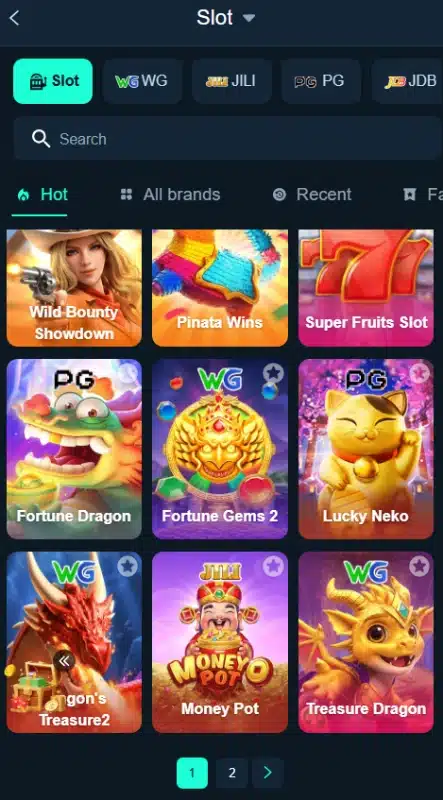
The S1 Game slot lobby combines a search field with provider tabs and browsing filters. Labels include WG, JILI, PG and JDB, while Hot, All brands and Recent help organize browsing. This layout gives users a route to a particular title without scrolling through every card.
English and Urdu Options
The S1 Game language menu offers English and Urdu. Users can choose their preferred option, although the available material does not establish whether every game and help page translates fully.
Account Access and Recovery Controls
The login page separates password login from code login and includes Forgot Password. Customer Service and Demo links also appear beside account tools. Their presence establishes access points, but not response times or the scope of demo access.
Separate Promotion and Wallet Areas
Promo groups reward activity under several tabs instead of mixing every offer into the game list. The deposit page contains payment controls, while the receiving-account page handles payout destinations. These areas serve different purposes, so readers should check each before submitting financial details.
How to Play S1 Game
Start by learning the lobby rather than assuming that every title follows the same rules.
- Open the platform: Use the supplied source address and enter the lobby. A Demo link appears near account access, but its available functions remain untested.
- Choose a category: Open Casino or select an available gaming section. Category labels identify different formats, not one shared set of rules.
- Find a title: Browse provider tabs or use search. The listings include Fortune Gems 500, Fortune Garuda 500, Money Coming, Crazy777 and Lucky Neko.
- Read the individual rules: Check the title’s help, controls, stake settings and payout explanation before participating. The lobby alone does not establish these details.
- Review account requirements: Sign in where required. If a game involves a wager, understand the amount at risk before confirming it.
- Use wallet controls separately: Review deposits, receiving accounts and promotional conditions outside the game controls.
No game selection, betting pattern or promotional offer guarantees a return. Stop if you cannot understand the rules or the amount you could lose.
Bringing the Virtual World to Life
S1 Game uses a dark navy background with turquoise highlights for selected tabs and major buttons. Game artwork fills a three-column grid, while provider labels help distinguish titles. Search sits above the grid, keeping title discovery close to the listings.
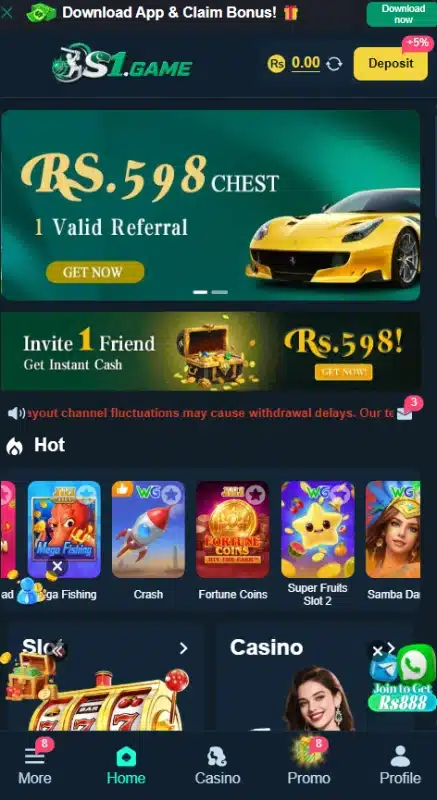
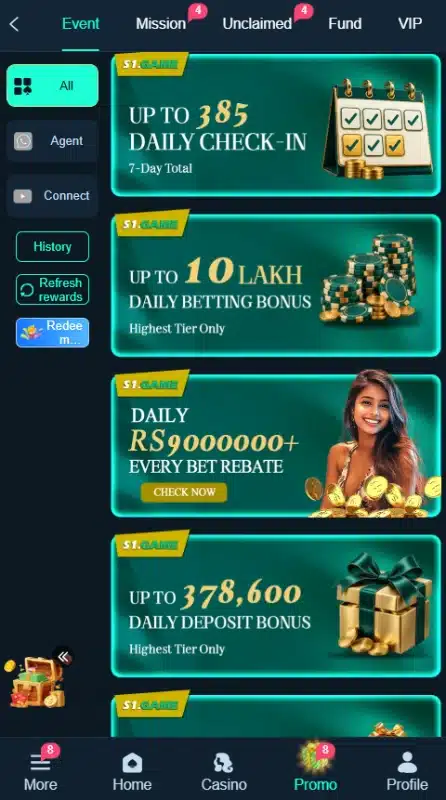
The bottom navigation contains More, Home, Casino, Promo and Profile. This gives users consistent destinations as they move between the lobby and account areas. Within Promo, horizontal tabs separate Event, Mission, Unclaimed, Fund, VIP, Rebate and History.
The layout also has a practical drawback: banners, floating promotions and pop-up offers compete for space on a narrow display. Closing an offer can make the lobby easier to inspect. The menu structure is clear enough to describe, but the review does not establish loading speed, device performance or accessibility across different phones.
S1 Game Bonuses
S1 Game bonuses cover several separate campaigns. Read each offer’s Event Rules, Rules or Details before treating its headline amount as available credit. A claim button does not remove eligibility requirements.
Daily Check-In Rewards
The check-in event lays out seven days of rewards and includes a Claim button. It also lists required deposit and betting progress, so this is not an unconditional reward for opening the platform. Review the day’s requirements and continuity rules before participating.
First-Deposit Extra Reward
The First Deposit Extra Reward panel links reward tiers to qualifying first deposits after registration. This event has its own thresholds. Do not combine it with a separate recharge banner unless the current rules explicitly allow both.
First-Recharge Promotion
A separate banner advertises an extra 20% on the first recharge and labels the offer as one-time only. That percentage describes the promotion, not a guaranteed withdrawable return. Check eligible payment routes, qualifying amounts and any turnover conditions in its rules.
Referral Chest
The S1 Game referral banner advertises a chest worth Rs 598 tied to one valid referral. The word valid matters: an invitation alone does not establish eligibility. Read the referral conditions before assuming that a new account qualifies or that the reward can be withdrawn.
Daily and Weekly Missions
The Mission area separates Newplayer, Daily Mission and Weekly Mission tabs. Tasks include cumulative recharge and wagering progress, and the daily area contains a reset countdown. Complete the relevant requirements within the active period; progress and rewards depend on the particular task.
VIP Rewards
The VIP section contains level progress, a reward list and a Rules tab. Its entries connect benefits to level and activity requirements, including deposits and betting. Labels such as monthly salary describe platform promotions; they do not represent employment income or a guaranteed payment.
Rebates and Loss Cashback
The Rebate page separates today’s estimated rebate, valid bets and claimed totals. A different event advertises up to 25% daily loss cashback. These are separate offers: the maximum percentage does not apply automatically to every loss, and cashback does not remove the risk of losing money.
Bonus-Code Events
The event list includes bonus-code and prize-code promotions. No currently redeemable code or complete redemption terms have been verified. Check the active event’s eligibility, expiry and claim instructions rather than using an assumed working code.
How to Download S1 Game APK on Android?
The S1 Game download control appears in a Download App banner. However, this review does not verify the downloadable file, its latest version, size or minimum Android requirement. Follow these steps only if the source currently offers an identifiable Android APK.
- Open the supplied platform website in your mobile browser.
- Find its Download App control and check the destination before continuing.
- Review any available publisher, version and compatibility information. Do not substitute figures from unrelated APK pages.
- If an Android installation file is available, review the browser’s warning before deciding whether to download it.
- Locate the completed file in Downloads. Stop if the route supplies an unexpected file or asks for unrelated software.
A download banner alone does not establish APK authenticity or compatibility. This review does not confirm a Google Play Store listing for the platform.
How to Install S1 Game App on Android?
These are general Android APK installation steps, not a report of a tested installation.
- Open the downloaded APK only after checking its origin and available release details.
- Read Android’s prompts. If installation requires source permission, open the indicated Settings page.
- Review Allow from this source for the specific browser or file manager. This grants that app permission to start installations; it does not certify the APK.
- Continue only if you understand the permission and accept the source. Keep Play Protect enabled and do not bypass a harmful-app warning.
- Follow the installation prompts, then review any permissions the application requests when opened.
- Turn off Allow from this source afterward if you no longer need it.
Android explains these controls in its guide to installing apps from other sources. Installation permission applies to a particular source on newer Android versions; granting it does not verify the downloaded APK. Menu names vary by phone and Android version. No verified compatibility specification is available for this particular APK.
Registration and Login Process
S1 Game Registration
The registration form offers Password registration and Code register. For the password route:
- Select Register.
- Check the displayed Pakistan country code, +92.
- Enter the requested phone number/profile.
- Create a password and review the strength indicator.
- Read the User Agreement. Confirm the over-18 checkbox only if it applies to you and you accept the agreement.
- Review the details before selecting Register.
The form also includes Google and Telegram binding icons. Their exact authorization steps remain unverified. Do not assume that email, a referral code or an OTP is mandatory for the password route.
S1 Game Login and Password Recovery
Select Login, enter the registered phone number/profile and provide the password for Password Login. The page also offers Code login, Remember account password and Forgot Password.
Use the recovery control if you forget your credentials, then follow the requirements it presents. This review does not confirm the later recovery screens or code-delivery method. Avoid remembering a password on a shared device, and never give another person your login code or payment-wallet PIN.
Deposit and Withdrawal Methods
S1 Game deposit and receiving-account pages list different controls. A payment option in one area does not establish support for every transaction type or confirm a successful payout.
Easypaisa
Easypaisa appears under Online deposit and in the receiving-account list. For a deposit, select the available route and review its instructions and recipient details. For a withdrawal destination, use Add beside Easypaisa and complete only the fields the platform requests.
JazzCash
JazzCash also appears in both areas. Check the selected method before submitting an amount, and verify the recipient information independently of any promotional banner. Adding a JazzCash receiving account does not itself submit or approve a withdrawal.
Bank Transfer
Bank Transfer appears as a receiving-account option. The reviewed deposit page does not establish a separate bank-deposit route. Use the receiving-account form’s current requirements rather than assuming which bank details it will request.
QR-Code Payment
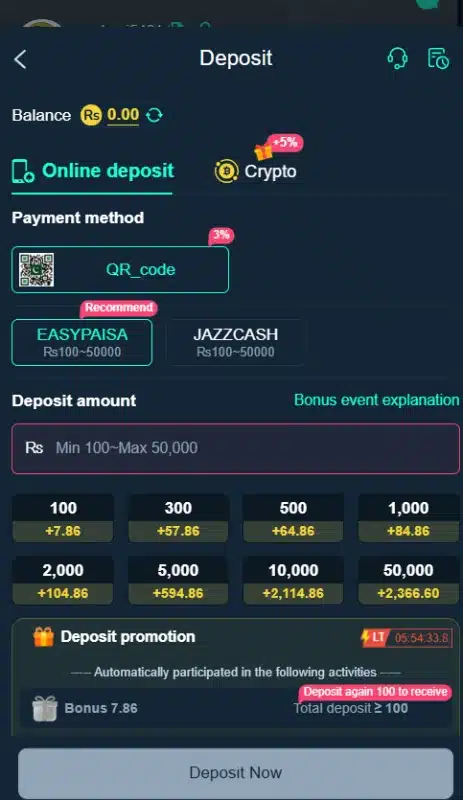
The Online deposit area contains a QR-code control. Follow the instructions for the selected route and check the recipient and amount before authorizing a payment.
Crypto Tab
The deposit page also lists a separate Crypto tab. The available material does not identify supported cryptocurrencies, blockchain networks or a crypto withdrawal procedure. Confirm those details before considering a transfer.
For a separate example of how payment channels differ, read our 1ee guide to QR payments and bonus rules. Check each platform’s own payment instructions rather than assuming the same options apply.
Deposit Process and Displayed Limits
Open Deposit, choose an available method, enter the amount and review the current instructions before submitting. Keep the payment receipt and transaction reference.
The reviewed Online deposit panel displays a minimum of Rs 100 and a maximum of Rs 50000. Treat these as the displayed limits for that panel, not permanent limits for every account or method. The deposit promotion includes a countdown, so its displayed offer is time-limited.
Withdrawal Password and Receiving Account
The withdrawal area first requests a withdrawal password and confirmation. This is a separate control from the login password. Set it privately, then add a supported receiving account where required.
The review does not establish the complete withdrawal submission flow, general withdrawal limits, fees or processing times. Check those conditions before requesting funds. If a deposit does not appear or a withdrawal remains pending, keep the reference details and use the platform’s Customer Service control; support response times remain unverified.
Our 718SP guide to payment menus and receiving accounts provides another example of the distinction between deposit controls and withdrawal destinations.
FAQs-Frequently Asked Questions
What is S1 Game?
It is a mobile-focused gaming platform with game listings, account tools, promotions and payment settings. Its menus include slots and several other gaming categories.
Can I use it without downloading an APK?
The supplied website advertises mobile-browser access. This review does not establish whether browser access includes every application feature.
Is the latest APK version verified?
No. The latest version number, file size and minimum Android requirement remain unverified. A download banner alone does not establish those specifications.
Which payment methods are listed?
The deposit area lists Easypaisa, JazzCash and QR-code controls. The receiving-account area lists Easypaisa, JazzCash and bank transfer. Crypto appears as a separate deposit tab.
Are bonuses guaranteed or immediately withdrawable?
No guaranteed payout or immediate withdrawal entitlement has been verified. Individual offers include eligibility and activity conditions; read their rules before accepting them.
What deposit limit does the reviewed panel display?
It displays Rs 100 to Rs 50000 under Online deposit. Confirm the current limits for the selected method before making a payment.
Conclusion
S1 Game groups game search, account access, promotions and payment settings in one interface. English and Urdu options and local receiving-account choices support its Pakistan focus. APK specifications and payout performance remain unverified. Read the platform’s own terms before participating.
Review ApnaAPK’s Terms and Conditions, Disclaimer and Privacy Policy for this website’s publishing and information practices. Wagering can result in financial loss.
Personal Experience and Final Thoughts
My S1 Game assessment comes from reviewing the official source, supplied material and available platform interface. The practical strengths lie in the organization: title search, provider tabs, language choices and separate account controls give users identifiable places to start. The withdrawal-password prompt also distinguishes payout access from ordinary login. The useful approach is to understand the menus and conditions first, rather than treat a download button, advertised reward or listed payment method as proof of a successful outcome.
Download links
How to install S1 Game APK Guide: From Lobby Search to Wallet Setup APK?
1. Tap the downloaded S1 Game APK Guide: From Lobby Search to Wallet Setup APK file.
2. Touch install.
3. Follow the steps on the screen.