PKNICE Game APK: Lobby, VIP Rules and Payment Checks
Description
PKNICE Game APK: Lobby, VIP Rules and Payment Checks
Introduction
PKNICE Game brings a game lobby, promotions, and payment controls into one mobile interface. Its main categories include Popular, Slots, Live, and Sports. JazzCash and Easypaisa appear among the deposit options, while separate menus lead to account tools and withdrawals.
Before downloading or adding money, understand what each part does. A promotion label does not explain every reward condition, and a download banner does not confirm an APK version or compatibility. This guide explains the available features and identifies the details that still need confirmation.
What Is PKNICE Game?
PKNICE Game is a gaming platform with slot titles, live and sports categories, wallet options, and activity-based promotions. Its betting conditions refer to deposits, withdrawals, and bets. It includes gambling-related features, so readers should not treat it as a source of income.
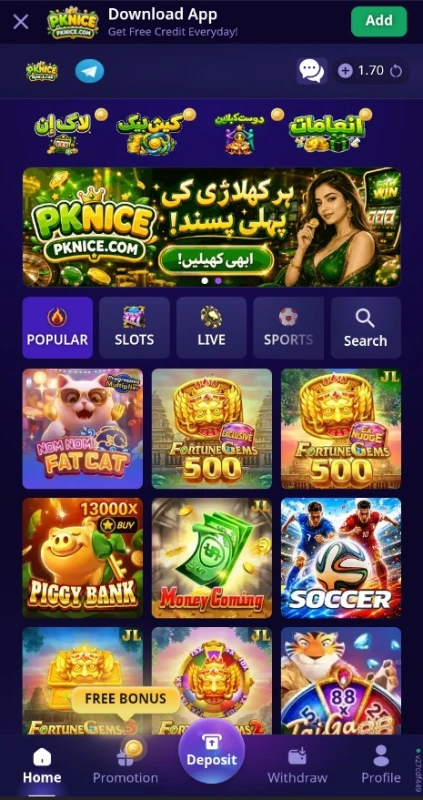
The home page places game tiles beneath category tabs. Account buttons sit near the top, and the bottom menu connects the lobby with Promotion, Deposit, Withdraw, and Profile. This layout separates browsing, account access, and money-related actions.
The platform also includes English and Urdu language options. Its app banner invites visitors to download or add the app, but a working Android package and its technical details remain unverified.
| Information | Verified detail or verification status |
|---|---|
| Platform name | PKNICE |
| Lobby categories | Popular, Slots, Live, Sports |
| Account access | Login and Register buttons |
| Deposit options | JazzCash and Easypaisa |
| Languages | English and Urdu |
| Promotions | Cashback, Refer & Earn, Free Balls, Redeem Free Code, Free Spin, VIP, Daily Free |
| Android compatibility | Android 5 and above |
| APK version | Latest |
| APK size | 8MB |
Key Features of PKNICE Game
PKNICE Game Lobby and Categories
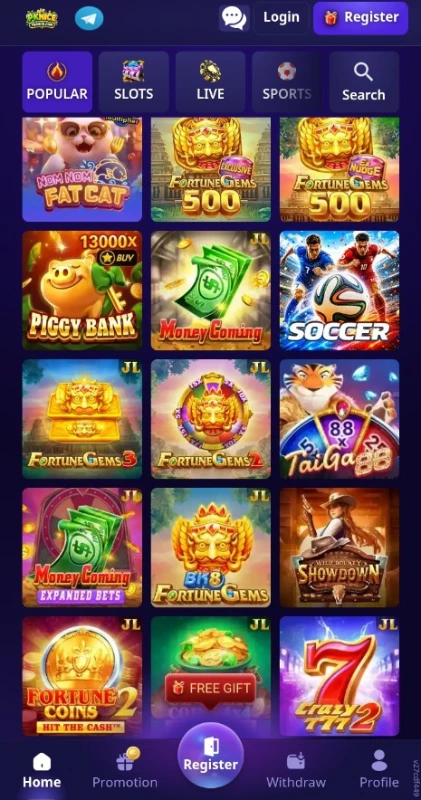
The lobby groups titles under Popular, Slots, Live, and Sports. A separate Search control gives users another place to look for a title instead of browsing the whole grid.
Recognizable Game Tiles
Titles include Piggy Bank, Money Coming, Fortune Gems 2, and Fortune Gems 3. Each tile has its own artwork and name, helping users distinguish individual games before opening them.
Separate Wallet Controls
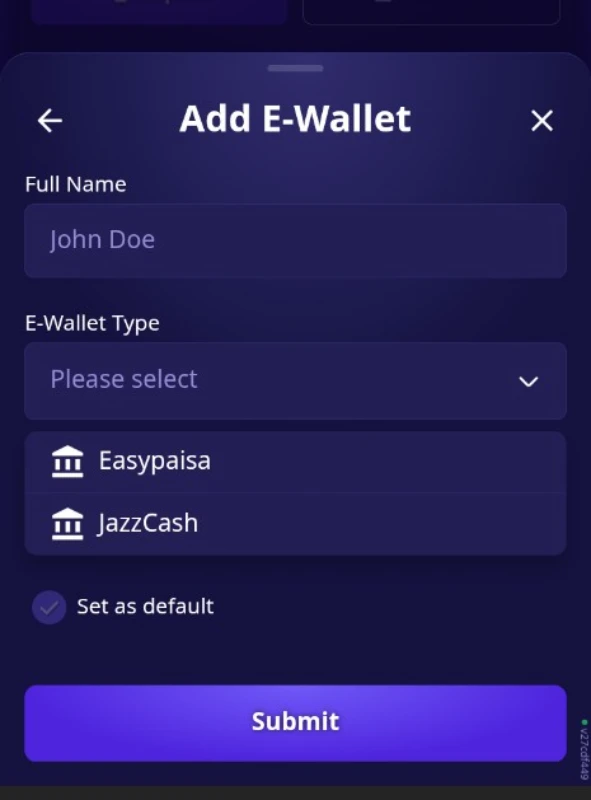
Deposit and Withdraw have separate positions in the bottom menu. The Add E-Wallet form includes a full-name field, wallet-type selector, and default-wallet option.
English and Urdu Options in PKNICE Game
The language menu lists English and Urdu. This gives readers looking for PKNICE Game in Pakistan a relevant interface option, although the extent of translation across every game remains unverified.
PKNICE Game VIP Progress
The VIP Centre displays levels, cashback percentages, and progress bars. These controls help users see that advertised VIP benefits depend on meeting activity requirements.
How to Play PKNICE Game
To explore PKNICE Game, start with the lobby and learn the menu before choosing a title.
- Open the platform and locate the category tabs.
- Choose a category or use the Search control.
- Select a game tile that interests you.
- Read that title rules, controls, and stake information before starting.
- Use Login or Register if the platform requests account access.
- Keep wallet actions separate from browsing, and check all payment conditions before proceeding.
Individual games have different rules. A slot title, live game, and sports section do not share one playing method. Paid play can result in losing money; no strategy or sequence of actions guarantees a financial return.
Bringing the Virtual World to Life
The PKNICE Game interface uses a dark purple background with brighter purple buttons. Colorful game covers fill a three-column lobby grid, while category icons sit above the titles.
Home, Promotion, Deposit, Withdraw, and Profile remain grouped along the bottom. The raised Deposit button stands out from the other navigation items. Promotional banners and floating gift labels also compete for attention around the game grid.
This arrangement makes the main sections easy to identify, but the number of offers can make the page feel busy. Read the label before tapping, especially when moving between a game, a reward, and a payment control.
To compare how another platform arranges its browsing tools, read our XQ777 lobby and account guide.
PKNICE Game Bonuses
The Promotion menu lists several separate offers. Each has its own entry point, and some display progress or timing requirements. An available button does not mean an account qualifies for a reward.
Cashback in PKNICE Game
Cashback has an Open button and a progress indicator. Check the offer eligible activity and claim rules; the promotional label alone does not establish how much an individual account will receive.
Refer & Earn option in PKNICE Game
Refer & Earn has a separate promotion entry. Review its eligibility rules before sharing an invitation.
Free Balls
Free Balls appears as another offer with an Open button. Its name does not establish the number of attempts, prizes, or participation requirements. Read its own instructions before taking part.
Redeem Free Code
The Redeem Free Code entry includes a message connecting free credit with a deposit. Do not assume that entering any code creates an unconditional reward.
Free Spin
The Free Spin entry displays a play-progress requirement. Check the required activity before expecting access.
VIP Rewards
Level 1 advertises 1.00% more cashback and displays a progress target. Higher levels list different percentages. These are conditional platform offers, not fixed returns on deposits or promises of profit.
Daily Free Bonus offer in PKNICE Game
Daily Free bonus displays a claim time and countdown. The supplied conditions describe daily credit linked to continued logins without requiring a deposit first. Check the current claim rules.
How to Download PKNICE Game APK on Android?
A Download App banner appears with an Add button. However, that wording does not establish whether it downloads an APK or adds a browser shortcut.
- Open the supplied source address, https://www.pknicem3.com/.
- Find the Download App banner.
- Select its control and read the resulting prompt.
- Check whether it offers an Android package or a home-screen shortcut.
- If it offers an APK, inspect the publisher information and compatibility details before downloading.
The PKNICE APK download, file size, and latest version have not been independently verified. Avoid choosing a file simply because another page labels it latest
How to Install PKNICE App on Android?
These are general Android installation steps, not confirmation that a particular PKNICE package works.
- After obtaining and checking an APK, locate it in Downloads.
- Tap the file to start Android installation process.
- If Android requests permission, review which browser or file manager wants to install it.
- Allow installation from that source only if you have verified the file and intend to proceed.
- Read any warnings before selecting Install.
- Turn off that source installation permission afterward.
Keep Play Protect enabled, and do not bypass a harmful-app warning. If you notice signs of unwanted software after installing an app, follow Google guide to removing unsafe software on Android.
Registration and Login Process
PKNICE Game Registration
The home page provides a Register button for account creation. Open it and read the current form before entering personal information.
The registration fields remain unverified. This guide therefore does not claim that PKNICE sign up requires a phone number, email address, OTP, or referral code. Check any agreement and eligibility conditions before submitting the form.
PKNICE Login
Returning users can choose Login from the home page. Follow the fields presented there and use the account details established during registration.
The login form and recovery process remain unverified. If access fails, check the platform available help options rather than assuming it supports a particular password-reset method.
Deposit and Withdrawal Methods
PKNICE Game lists JazzCash and Easypaisa on its deposit selector. Wallet setup also lists both names.
JazzCash Deposits
The JazzCash option displays a minimum deposit of Rs 100. Its amount screen shows a range of Rs 100 to Rs 100000, with preset amount buttons beneath the entry field.
The channel selector includes Auto (Fast). That is a platform label, not a verified processing-time claim. Confirm the amount and recipient details before authorizing any payment.
Easypaisa Deposits
Easypaisa appears as a separate deposit option with a displayed minimum of Rs 100.
The supplied material does not establish its maximum amount, fees, or completion time. Do not apply the JazzCash screen upper limit to Easypaisa without checking its own payment form.
Adding an E-Wallet
The Add E-Wallet form asks for a full name and provides an E-Wallet Type selector. Its choices include Easypaisa and JazzCash, followed by a default-wallet option and Submit button.
These controls establish available setup options. They do not confirm every account detail the full process may request.
Withdrawal Conditions
The platform supplied betting conditions state a minimum withdrawal of Rs 100. A separate Withdraw button appears in the navigation.
The complete withdrawal form, maximum amount, fees, approval requirements, and processing time remain unverified.
Our TD1947 payment and receiving-account guide offers another example of how deposit choices and withdrawal settings can differ.
FAQs- Frequently Asked Questions
What is PKNICE?
It is a gaming platform with a multi-category lobby, account access, promotions, and deposit and withdrawal controls. Its terms include betting-related conditions.
How do I download its Android app?
Check the Download App banner on the supplied source website. Confirm whether it offers an APK or a browser shortcut before proceeding.
Is the latest APK version verified?
No. A numerical version, APK size, and minimum Android requirement have not been verified.
Which payment methods appear?
The deposit selector lists JazzCash and Easypaisa. Both names also appear in the e-wallet setup menu.
What is the displayed deposit limit?
Both deposit choices show a minimum of Rs 100. The JazzCash amount screen shows Rs 100 to Rs 100000; the Easypaisa maximum remains unverified.
Are the bonuses guaranteed?
No. Offers can depend on activity, claim times, eligibility, and other rules. Promotional credit does not automatically equal withdrawable money.
Conclusion
PKNICE Game combines a colorful lobby with separate promotion and wallet menus. English and Urdu options, named game tiles, and visible payment controls explain much of its layout. APK details and the complete account and withdrawal processes.
Read PKNICE own payment and promotion conditions before proceeding. For this website scope and policies, review ApnaAPK Terms and Conditions, Disclaimer, and Privacy Policy.
Personal Experience and Final Thoughts
PKNICE Game gives me enough interface detail to explain its organization, and enough evidence to judge payment performance. My assessment comes from carefully reviewing the website and visible platform interface.
The clear category labels, language choices, and separate wallet controls are practical strengths. The busy promotional layout and incomplete information about reward eligibility and withdrawals are limitations.
Download links
How to install PKNICE Game APK: Lobby, VIP Rules and Payment Checks APK?
1. Tap the downloaded PKNICE Game APK: Lobby, VIP Rules and Payment Checks APK file.
2. Touch install.
3. Follow the steps on the screen.