666H Game APK: What the Lobby and Wallet Really Show
Description
666H Game APK: What the Lobby and Wallet Really Show
Introduction
666H Game brings game categories, account tools, promotions, and payment menus into one mobile interface. The home screen leads to games, while a fixed menu takes users to promotions, deposits, withdrawals, and their profile.
If you are deciding whether to use 666H Game, first learn what each menu does. That matters more than a large reward figure on a banner. This guide walks through the interface and points out details you should check for yourself, including APK information and promotion terms that have not been verified.
What Is 666H Game?
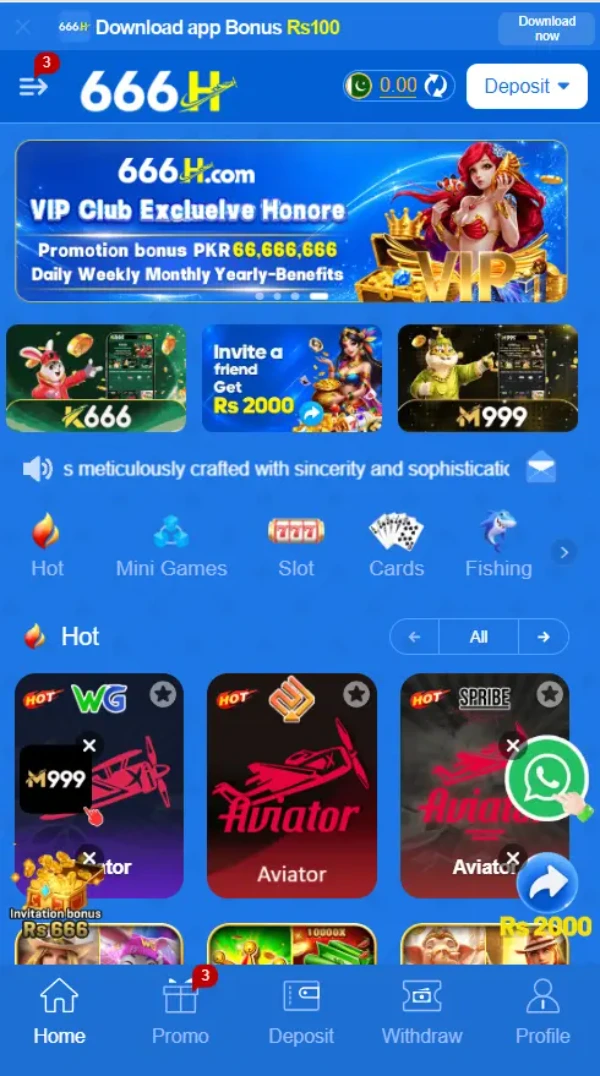
666H is a gaming platform with a blue mobile lobby and rows of game tiles. Its menu has five main destinations: Home, Promo, Deposit, Withdraw, and Profile. From Home, you can browse sections such as Hot, Mini Games, Slot, Cards, and Fishing.
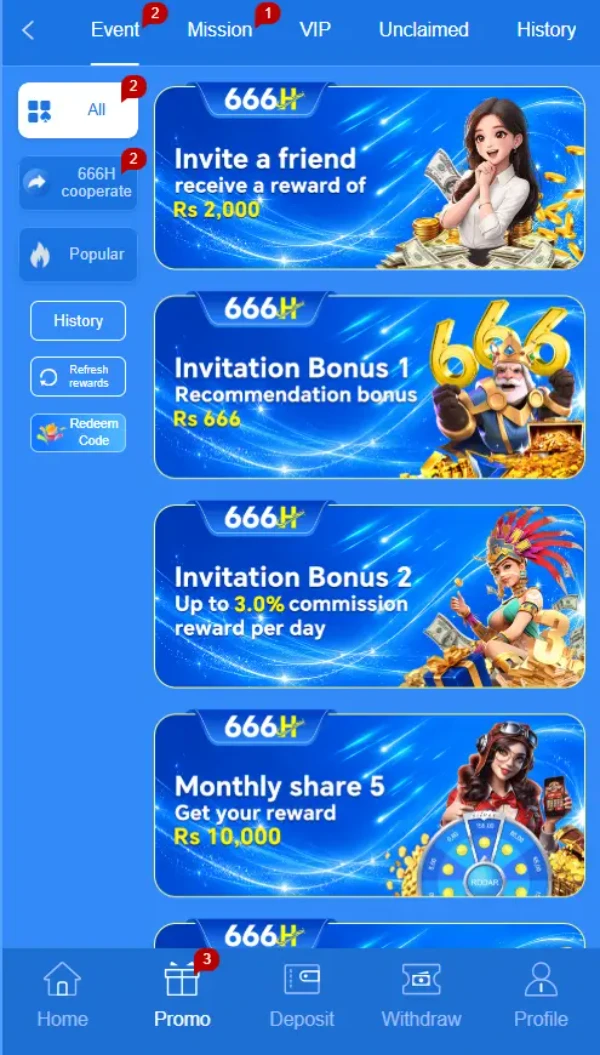
The platform also has registration and login forms, a Security Center, a Message Center, and wallet screens. Promotions sit in their own area, with tabs for Event, Mission, VIP, Unclaimed, and History. These menus help you find the part you need without treating every banner as a promise of a reward.
| Detail | Available information |
|---|---|
| Platform name | 666H |
| Game categories | Hot, Mini Games, Slot, Cards, and Fishing |
| Main navigation | Home, Promo, Deposit, Withdraw, and Profile |
| Account access | Registration and login forms with phone number or email options |
| Deposit methods displayed | JazzCash and Easypaisa |
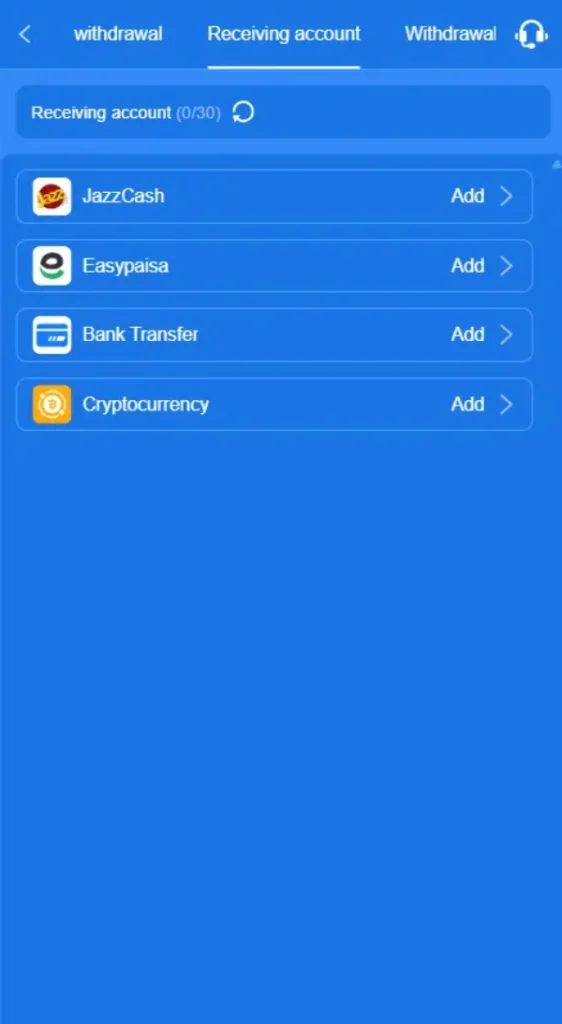
| Withdrawal receiving-account choices displayed | JazzCash, Easypaisa, Bank Transfer, and Cryptocurrency |
| Promotions | Referral, deposit, daily check-in, cashback, and VIP offers displayed |
| Operating system | Android download is promoted in the interface; APK compatibility not verified |
| APK version | Latest |
| APK file size | 9MB |
Key Features of 666H Game
666H Game categories and named titles
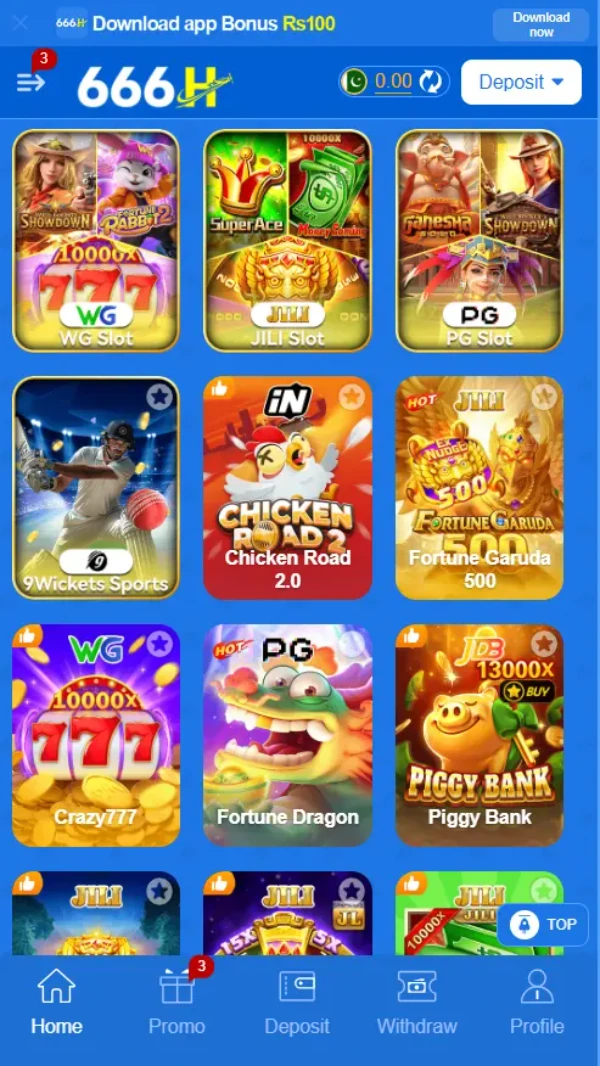
The lobby groups games by category instead of putting every title in one long list. Visible tiles include Aviator, Chicken Road 2.0, 9Wickets Sports, Fortune Gems 3, Money Coming, and Piggy Bank. A title on the home screen tells you what you can select; it does not tell you that you will win.
666H Game menu and wallet tools
The bottom menu stays easy to spot as you move around the interface. Deposit and Withdraw have separate destinations, so you can check the relevant options before entering payment details.
Profile and account controls
The Security Center lists a login password, withdrawal password, mobile phone, email, Google Authenticator, security question, and third-party accounts. It displays the status of each item. A listed control does not mean that you have already set it up.
Promotions, missions, and support
The Promo area separates events from missions and VIP information. The Message Center has support and help sections, including a forgotten-password topic. Check the available contact details in your own session before sharing account information.
English and Urdu menus in 666H Game
The language selector displays English and Urdu. You can choose the language that makes the menus and account instructions easier to read.
How to Play 666H Game
Open Home and choose a category that interests you. Start with a named tile or use the category controls to browse more titles. Before placing any stake, open the individual game and read its rules, controls, and amount settings. Two games can look similar in the lobby but work differently.
If a game asks you to sign in, use the registration or login option. Check your balance and the wallet menu before making a payment. Games that involve money can result in losses, so decide on a limit you can afford before you play.
Bringing the Virtual World to Life
The 666H Game lobby uses a strong blue background, bright game artwork, and large tiles. A balance display and Deposit button appear near the top, while the five-part menu sits along the bottom. Promotional banners take up space above the game list.
This layout makes the main actions visible, but it also puts several reward messages in front of new users. Move past the banners to find the game categories, account settings, and payment menus. Games, offers, and wallet actions each have their own place.
For another example of category and menu layout, see our D97 game lobby guide.
666H Game Bonuses
The promotions below appeared in the available interface. Check their current availability, full eligibility rules, and payout conditions within the platform before you rely on them.
New member and first-deposit offers
The 666H Game Event area advertises a new-member first-deposit bonus of up to Rs 50000. Up to describes an advertised maximum, not an amount every new member receives. The deposit screen displays separate first-deposit thresholds with different bonus amounts. Read the terms of the particular offer you select; do not add separate offers together.
Referral promotions in 666H Game
An Event card advertises Rs 2000 for inviting a friend. Other invitation cards display a recommendation bonus and a percentage-based commission offer. These are separate promotions. Check what makes a referral eligible, whether the invited person must complete an action, and whether the campaign is still active.
Daily check-in and cashback
The Promo area displays daily check-in and weekly cashback offers. Their banners do not establish what any individual account will receive. Open each offer to check the qualifying activity, dates, and claim steps.
VIP and time-limited events
There is a VIP tab and a VIP promotional banner mentioning daily, weekly, and monthly benefits. The available material does not establish the rules for reaching a VIP level or claiming those benefits. Other banners mention specific member days and monthly rewards. Check their dates and conditions before taking part.
How to Download 666H Game APK on Android?
A Download now button appears in the platform interface, but the actual APK file, version, and size have not been verified for this guide.
- Open the source address you intend to use and check that its domain is the one you expected.
- Find the app download option within that source.
- Before downloading, look for clear information about the file and where the button leads.
- If the destination changes to an unfamiliar site or the file details are unclear, stop and check the source first.
- Keep Android’s app checks enabled. Read Google’s Android app download guidance for information about apps from other sources.
Do not choose a download solely because a third-party page calls its file the latest version.
How to Install the 666H Game App on Android?
These steps apply only after you have obtained an APK from a source you have checked. They do not confirm the identity or compatibility of a particular file.
- Open the completed APK download on your Android device.
- Read the installation prompt and check the app name.
- If Android asks whether the browser or file manager may install apps from this source, review that request carefully. The setting applies to the app opening the file.
- Continue only if you trust the file and its source. Do not ignore a warning simply to finish installation.
- After installation, open the app and check its account screens before entering personal or payment information.
Android menus vary by device. You can turn off that source’s installation permission again after you finish.
Registration and Login Process
Registration
Open Register. The form offers phone number or email registration and displays +92 beside the contact field. It offers password registration and a code-registration option. Create the requested credentials, review the User Agreement, and use the age declaration only if it is true for you. The form states that users must be over 18.
Google, Facebook, and Telegram icons also appear beneath the form. Their presence does not confirm that every sign-in route will work for every user.
Login
Open Login and enter the account identifier and password requested by the form. It also displays a code-login option, a Remember account password checkbox, and Forgot Password. If you cannot access your account, use the recovery or customer-service route inside the platform. Never give a password or verification code to someone contacting you unexpectedly.
666H Game Deposit and Withdrawal Methods
The deposit screen and withdrawal receiving-account screen serve different purposes. A method listed for receiving a withdrawal is not proof that a payment has been sent or that the same method accepts deposits.
Deposit: JazzCash
JazzCash appears as a choice on the Deposit screen. Select it only after reading the current payment instructions and checking that the account details belong to the platform you intended to use. The amount field displays a range of Rs 100 to Rs 100000; check the current range and any offer terms before paying.
Deposit: Easypaisa
Easypaisa also appears on the Deposit screen. Select its option, enter an amount within the range currently displayed, and review the instructions before confirming. The screen does not establish a payment fee or completion time.
Withdrawal receiving account: JazzCash
The Receiving account menu lists JazzCash with an Add option. Check the account details requested there before saving a receiving account. The menu alone does not verify a completed withdrawal.
Withdrawal receiving account: Easypaisa
Easypaisa has its own Add option under Receiving account. Read the fields in your account before entering wallet details. Do not assume that the deposit instructions also apply to a withdrawal.
Withdrawal receiving account: Bank Transfer
Bank Transfer is listed as another receiving-account choice. The supplied material does not verify which banks are supported or what bank details the form requests.
Withdrawal receiving account: Cryptocurrency
Cryptocurrency is listed with an Add option. No supported coin, network, fee, or exchange rate has been verified. Do not transfer funds based only on the name of this menu item.
The 666H Game Security Center includes a withdrawal-password control. Check your receiving details and the platform’s current withdrawal rules before submitting any request. To compare another game’s wallet layout, read our R988 payment options guide.
Frequently Asked Questions
What is 666H Game?
It is a mobile gaming platform with game categories, an account area, promotions, and deposit and withdrawal menus.
Where can I download the APK?
A download button appears in the platform interface. Check the destination and file details before downloading; this review has not verified a specific APK file.
Is the APK version verified?
No. Neither a version number nor a file size was verified from the supplied material.
Which payment methods are displayed?
The deposit screen displays JazzCash and Easypaisa. The withdrawal receiving-account screen also lists Bank Transfer and Cryptocurrency.
Are the advertised bonuses guaranteed?
No. The banners describe offers, some with up to amounts. Eligibility, campaign dates, and other conditions need checking before you claim an offer.
What deposit range is visible?
The available deposit screen displays Rs 100 to Rs 100000. Confirm the current range in your own account before paying.
Conclusion
666H Game has a category-based lobby and routes to account, promotion, deposit, and withdrawal menus. The payment choices and registration fields help you understand the basic user flow before using it. APK details and the full terms of promotional offers still need verification.
Read the platform’s own account and promotion terms before making a decision involving personal information or money. For this site’s publishing policies, see ApnaAPK’s Terms and Conditions, Privacy Policy, and Disclaimer.
Personal Experience and Final Thoughts
My assessment of 666H Game comes from reviewing the supplied platform material and visible interface. The practical strength is the menu organization: games, promotions, wallet actions, and account settings have distinct places. Check the current rules rather than relying on a banner.
Download links
How to install 666H Game APK: What the Lobby and Wallet Really Show APK?
1. Tap the downloaded 666H Game APK: What the Lobby and Wallet Really Show APK file.
2. Touch install.
3. Follow the steps on the screen.