786fun Game APK: Explore the Lobby Before You Join
Description
786fun Game APK: Explore the Lobby Before You Join
Introduction
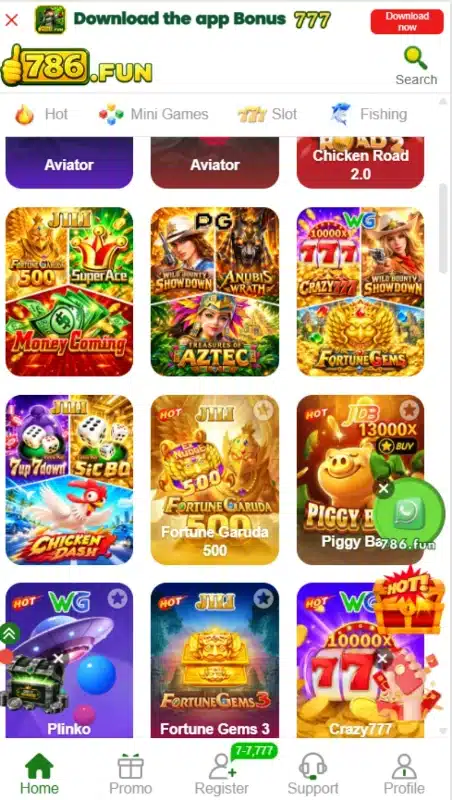
786fun Game brings a game lobby, account tools, payment controls and promotions into one platform. Its green-and-white interface includes titles such as Aviator, Chicken Road 2.0 and Plinko. You can browse categories, open the promotion area and find registration options from the main navigation.
Before downloading or creating an account, it helps to understand how these parts connect. A download banner does not confirm an APK’s version, and an advertised bonus does not mean you can withdraw it immediately. This guide explains the available controls, payment options and reward conditions without promising earnings.
What Is 786fun Game?
786fun Game, branded as 786.FUN, is a gaming platform with casino-style titles and money-related account features. Its lobby groups games into categories rather than presenting everything in one long list. Hot, Mini Games, Slot and Fishing appear among the browsing options.
The platform separates promotions from account and payment tools. The Promo area contains events, missions, VIP information and rebates. Deposit and withdrawal controls serve different purposes, while a receiving-account section lets users add supported withdrawal destinations.
Phone and username signup options appear alongside Google and Telegram access buttons. These choices describe the available interface; they do not establish that every account route or transaction will complete successfully.
| Item | Verified information |
|---|---|
| Platform name | 786.FUN |
| Lobby categories | Hot, Mini Games, Slot and Fishing |
| Listed titles | Aviator, Chicken Road 2.0, Plinko and Fortune Gems 3 |
| Account options | Phone signup, username signup, Google and Telegram access buttons |
| Languages | English and Urdu |
| Deposit options | JazzCash under Online deposit; a separate Crypto tab |
| Withdrawal account options | Easypaisa, JazzCash and Crypto; USDT-TRC20 listed |
| Promotion sections | Event, Mission, VIP, Rebate and Unclaimed |
| APK version, size and minimum Android requirement | Latest, 7MB, Android 5+ |
Key Features of 786fun Game
786fun Game Lobby Categories
Category tabs help users narrow the game list. You can move between mini games, slots and fishing titles instead of opening unrelated tiles to find a particular type.
Phone and Username Account Options
The account area offers phone signup and username signup. It also includes Google and Telegram buttons, giving users several displayed entry points without placing everything inside one registration form.
Separate Payment Controls
Deposit, Withdraw and Receiving account handle different tasks. This separation helps users distinguish adding funds, requesting a withdrawal and choosing where a withdrawal should go.
Missions and Reward Records
The Mission section includes Newplayer, Daily Mission and Weekly Mission tabs. History and Unclaimed areas provide places to check promotion activity and outstanding claims.
English and Urdu Interface Choices
The language selector offers English and Urdu. Users can choose the language they understand more comfortably before reading account instructions or navigating the menus.
How to Play 786fun Game
Start by understanding the lobby and the selected title’s rules. Games within the same platform can use different controls and betting systems.
- Open the home lobby and browse a category.
- Select a title, such as Plinko or Chicken Road 2.0.
- Read its rules, control labels and any displayed stake information.
- Complete account access if the platform requests it.
- Check any wallet requirement before proceeding.
- Stop if the rules or payment conditions remain unclear.
A lobby listing does not explain the complete rules of a game. Do not assume that earlier results predict later outcomes or that a promotion removes the possibility of losing money.
Bringing the Virtual World to Life
The 786fun Game interface uses a white background, green buttons and a yellow-green logo. Colourful game tiles fill the lobby, while category labels help break up the page. Promotional banners occupy prominent positions above and within the content.
The bottom navigation includes Home, Promo, Register, Support and Profile in the reviewed account state. Some account states replace Register with Invite. This layout keeps the main destinations close at hand.
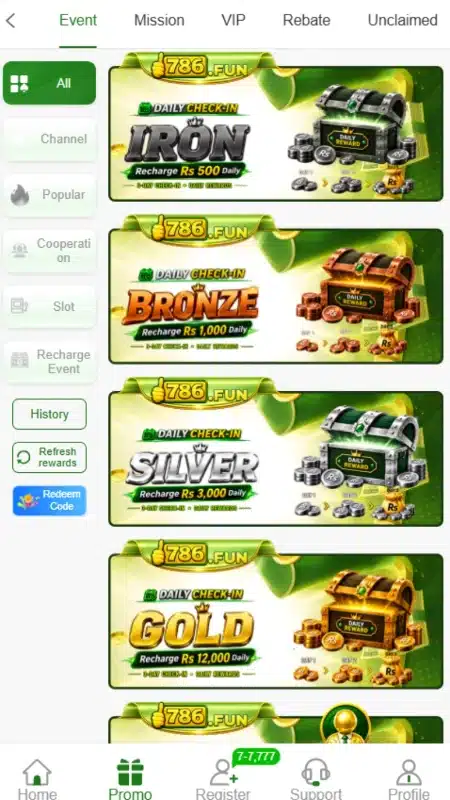
The promotion area has its own menu for Event, Mission, VIP, Rebate and Unclaimed. That arrangement separates different reward types, although the number of banners can demand careful reading. Opening an offer’s conditions matters more than relying on its headline.
For another example of category browsing and account navigation, see our 8W Game lobby and account guide.
786fun Game Bonuses
786fun Game promotions cover app downloads, referrals, deposits, missions, codes and VIP activity. Each campaign has separate conditions. An advertised amount represents an offer, not proof of payment or an automatically withdrawable balance.
App-Download Offer
The 786fun Game download banner advertises Rs 777. Full eligibility and withdrawal conditions for that offer remain unverified. Do not assume that downloading the app alone produces cash you can immediately withdraw.
Referral Offer
An invitation message advertises Rs 600 for referring friends. The reviewed material does not establish every qualifying action. Check the campaign’s rules for eligible referrals before treating the amount as a claimable reward.
First-Deposit Promotion
One banner advertises a 20% first-deposit bonus. A separate deposit panel lists a welcome-bonus campaign with its own amounts and conditions. These are separate offers; the material does not confirm that users can combine them.
Read the selected campaign’s eligibility, claim requirements and withdrawal restrictions before making a payment.
786fun Game Daily Check-In Offers
The event area lists Iron, Bronze, Silver and Gold check-in offers. Their banners state daily recharge amounts of Rs 500, Rs 1000, Rs 3000 and Rs 12000 respectively. These are recharge conditions, not the amounts of the rewards.
Read the chosen offer’s full check-in schedule, claim rules and withdrawal conditions. The banners alone do not establish the complete reward terms, and a higher recharge amount does not promise a financial return.
New-Player Missions
New-player mission terms require tasks including SMS verification and birthday settings. They also require users to claim rewards manually within the stated period.
These terms specify 5x turnover before withdrawal. In simple words, the bonus carries a wagering condition; claiming it does not make it immediately withdrawable. This rule belongs to the documented mission offer and should not automatically apply to other promotions.
Daily and Mystery Redemption Codes
The Event area includes daily and mystery redemption-code promotions. Codes can expire, and dated campaigns should not serve as a source of current working codes. Check the active event’s deadline and claim rules.
VIP Rewards and Rebates
The VIP area lists level-based benefits, including birthday gifts, next-level bonuses and salary-labelled rewards. Eligibility depends on the stated level and activity requirements. The word salary describes a promotional label here, not employment income.
The rebate section organises activity by game category and displays valid bets and claimable amounts. A listed rebate feature does not establish one fixed percentage for every user or game.
How to Download 786fun Game APK on Android?
The platform includes an app-download banner, but this review did not verify a working APK file or its latest version.
- Open the supplied source address, www.786fun.cc, in your browser.
- If the site loads, locate its app-download control.
- Check the destination and any file details before continuing.
- Start the download only if you understand the source and permissions involved.
- Find the completed file in your browser’s Downloads list.
Avoid choosing a file solely because another website labels it latest or official. Neither label verifies its contents.
How to Install 786fun App on Android?
These are general Android APK installation steps. The app’s compatibility with a particular phone remains unverified.
- Open the downloaded APK through your browser or file manager.
- If Android requests installation permission, open the relevant Settings prompt.
- Review the Allow from this source setting for that specific browser or file manager.
- If you choose to proceed, return to the file and tap Install.
- After installation, turn off that source’s installation permission again.
- Review any permissions the app requests before granting access.
Menu names vary between phones. Keep Play Protect enabled, and do not ignore a harmful-app warning just to complete installation.
After installation, review any access the app requests. Google’s guide to changing Android app permissions explains how to allow or deny access through your phone’s settings.
Registration and Login Process
786fun Game Registration
The registration area offers phone and username signup. The phone form includes the +92 country code, while the account field refers to a phone number or profile.
- Select the appropriate signup option.
- Enter the requested phone number or username.
- Create a password and repeat it in the confirmation field.
- Read the User Agreement.
- Confirm the over-18 checkbox only if it applies to you.
- Select Register and follow any further instructions.
A code-registration option also appears. Its complete process is not verified, so an OTP should not be described as compulsory for every signup route.
786fun Game Login
Returning users can choose Login from the account window and follow its prompts using their existing account details. The supplied material does not establish every field in the complete login form.
Google and Telegram access buttons also appear. Use the route linked to your account and avoid creating extra accounts to claim offers; the mission terms prohibit multiple accounts.
Deposit and Withdrawal Methods
786fun Game separates deposits from withdrawal-account setup. The methods listed for one process should not automatically be assumed available for the other.
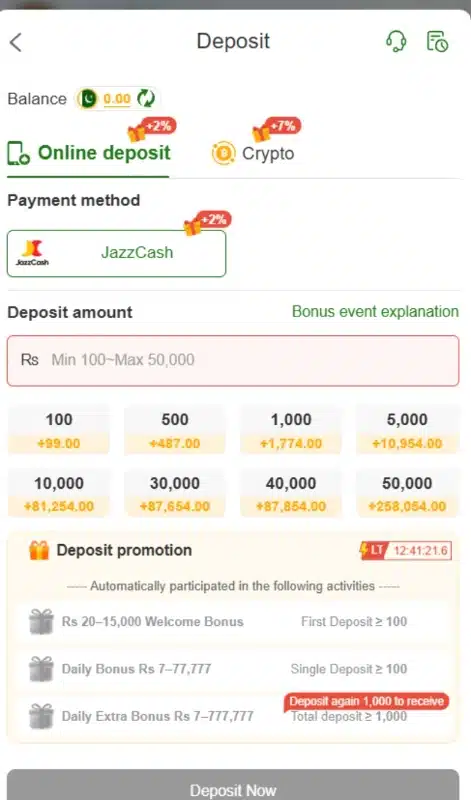
JazzCash Deposit
JazzCash appears under Online deposit. The displayed amount field states Rs 100 to Rs 50000 for that payment screen.
Select the method, enter an amount within the currently displayed range and review the payment instructions before confirming. The captured range does not establish a permanent limit across every channel or account.
JazzCash Withdrawal Account
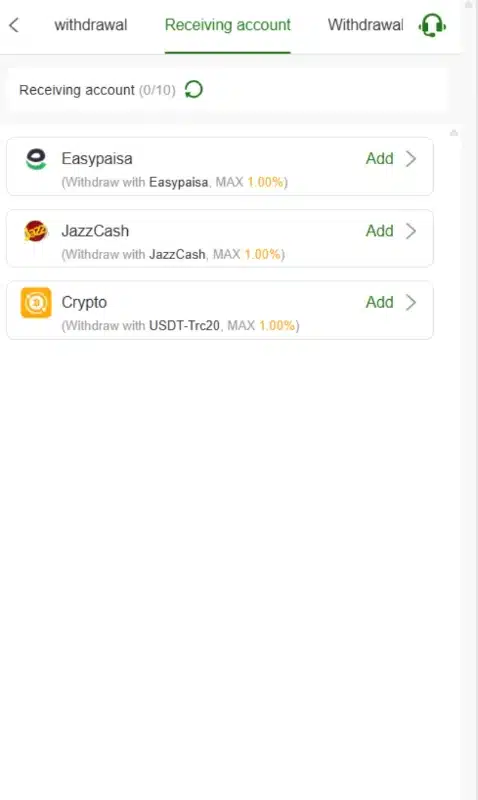
The Receiving account area lists JazzCash with an Add control. Follow that form to enter the requested receiving details. The available material does not verify withdrawal fees, limits or processing times.
Easypaisa Withdrawal Account
Easypaisa also appears as a receiving-account option. You can open Add to start setting up an Easypaisa receiving account. The reviewed deposit screen does not establish Easypaisa deposits.
Crypto Options
The deposit page has a Crypto tab. The withdrawal-account list separately identifies USDT-TRC20.
Do not assume the deposit tab uses the same asset and network without checking its instructions. The reviewed material does not establish the full crypto deposit process.
Withdrawal Password
Withdrawal setup asks users to create and confirm a separate withdrawal password. Keep this private and distinguish it from the password used to access the account.
The presence of this control does not verify payment success. Check the current withdrawal rules and any applicable bonus conditions before submitting a request.
If you are comparing payment options across platforms, our Fly33 payment and withdrawal guide covers a different deposit setup. Check each platform’s own rules separately.
FAQs – Frequently Asked Questions
What does the platform include?
786fun Game is a gaming platform with a category-based lobby, account tools, promotions and deposit and withdrawal controls.
How do I download the app?
The supplied source includes an app-download banner. A working APK download and its file contents were not independently tested for this review.
Is the latest APK version verified?
No. The APK version, file size and minimum Android requirement remain unverified.
Which payment methods appear?
JazzCash appears for online deposits. Easypaisa, JazzCash and Crypto appear in withdrawal-account setup. A separate Crypto deposit tab also exists.
Are bonuses guaranteed?
No. Offers carry eligibility and claim conditions. The documented new-player mission also requires turnover before withdrawal.
What is the displayed deposit limit?
The reviewed JazzCash deposit field states Rs 100 to Rs 50000. Check the current payment screen because this does not establish a universal or permanent limit.
Conclusion
786fun Game combines a varied lobby with account, promotion and payment tools. Its interface offers phone and username signup, plus English and Urdu language choices. Bonus headlines need careful reading because each campaign has separate conditions.
Read the platform’s own rules before using its payment or promotion features. For the scope of this website and its content, review ApnaAPK’s Terms and Conditions, Disclaimer and Privacy Policy.
Personal Experience and Final Thoughts
786fun Game offers several distinct areas to explore, based on my careful review of the supplied material and visible platform interface. The clearest strength is the separation between the lobby, promotions and account tools. Users have distinct places to browse titles, check missions and manage receiving accounts.
Download links
How to install 786fun Game APK: Explore the Lobby Before You Join APK?
1. Tap the downloaded 786fun Game APK: Explore the Lobby Before You Join APK file.
2. Touch install.
3. Follow the steps on the screen.