Fly33 Game APK: Check Login, Payments & Bonus Terms
Description
Fly33 Game APK: Check Login, Payments & Bonus Terms
Introduction
Fly33 Game brings casino-style titles, account tools, and promotions into one platform. Its lobby includes slots, cards, fishing, live games, and sports sections. You can browse game tiles, switch between English and Urdu, and reach account controls through the main navigation.
Before downloading or adding money, understand how the platform separates its payment options. The reviewed deposit screen lists USDT, while the withdrawal receiving-account menu includes JazzCash, Easypaisa, bank transfer, and crypto. Promotions also carry conditions, so a large reward headline does not tell you everything you need to know.
What Is Fly33 Game?
Fly33 is a real-money gaming platform with a shared lobby for different game categories. Titles such as Aviator, Chicken Road 2.0, Piggy Bank, FlyX, and Fortune Gems 3 appear among its game tiles. Each title has its own rules; the platform does not use one common gameplay system.
The Fly33 app interface also includes a promotion centre, account access, and wallet controls. Home, Promo, Invite, Deposit, and Profile form the main navigation. These sections separate browsing, offers, referrals, and account management.
The following information covers the reviewed platform. Download specifications remain unverified.
| Item | Verified information |
|---|---|
| Platform name | Fly33 |
| Source website | fly33.com |
| Game categories | Mini Games, Slot, Cards, Fishing, Live, and Sports |
| Account access | Phone number/email/profile field, password, and Google option |
| Languages | English and Urdu |
| Reviewed deposit option | USDT; the accompanying guide specifies TRC20 |
| Withdrawal receiving-account options | JazzCash, Easypaisa, Bank Transfer, and Crypto |
| Promotion sections | Events, missions, VIP, rebates, coupons, and spins |
| Minimum Android version | Latest |
| APK version and size | 6MB |
Key Features of Fly33 Game
Fly33 Game Lobby and Search
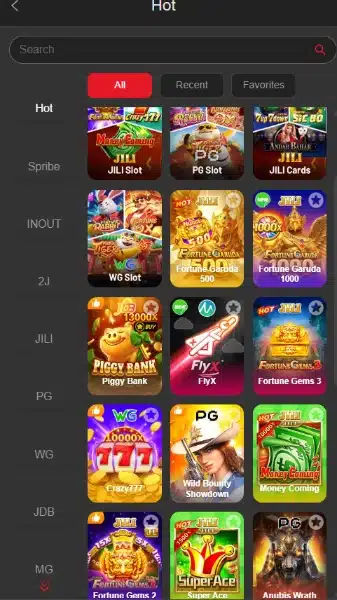
The lobby combines category browsing with a search field. All, Recent, and Favorites tabs give users different ways to find titles without scrolling through the entire collection.
English and Urdu Options
The language menu offers English and Urdu. Users can choose a preferred interface language, although this review does not establish the language options inside each individual game.
Separate Account Controls
Login includes a password-visibility control, a remember-password option, and Forgot Password. Withdrawal setup uses a separate password, so users should distinguish it from their normal login credentials.
Promotion and History Menus
The offer centre groups missions, VIP, rebates, coupons, and other promotions. History and Unclaimed sections provide places to review records and offers without searching through promotional banners.
Customer Service Access
Customer Service appears in the account-access area and side menu. The menu also lists FAQ and contact channels, but their presence does not establish support hours or response times.
How to Play Fly33 Game
- Open the lobby. Start with Home and review the available categories.
- Choose a category or search for a title. Use the game name when you already know what you want to find.
- Read that game’s rules. Check its controls, stake options, and explanation of results before starting.
- Check the account balance where relevant. Understand which balance or funds the game uses.
- Use the platform’s account tools when needed. Return to the main navigation for wallet controls, profile settings, or support.
Aviator and a slot title do not work in the same way. Avoid applying one game’s instructions to another. Real-money play can result in losses, and bonuses do not remove that possibility.
Bringing the Virtual World to Life
The Fly33 Game interface uses a dark background with bright red buttons and colourful game artwork. A red aircraft forms part of the branding, while promotional panels use gold coins, large figures, and contrasting colours.
The lobby arranges titles in a compact grid. Category controls sit beside the game collection, and provider labels offer another browsing route. This layout puts many choices within a small screen area.
The side menu contains language selection, search, game categories, records, and the offer centre. Further down, users can find APP Download, Customer Service, FAQ, and contact links. Several pop-ups promote different campaigns, so read each offer separately instead of treating them as one reward package.
For a comparison of category browsing and account shortcuts, see our guide to 8W Game lobby and account controls.
Fly33 Game Bonuses
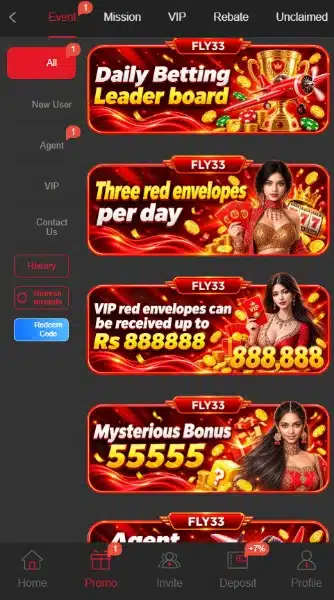
The promotion centre contains several reward types. Some screens show conditions, while others provide only advertising headlines. A displayed maximum is a possible campaign ceiling, not an amount every account receives.
Fly33 Game First-Deposit Offers
The first-deposit panel lists different deposit tiers and reward ranges. A separate banner advertises a 377% first-deposit campaign. This is an advertised percentage, not a verified return or an unconditional account credit.
Do not assume these offers combine; the reviewed material does not establish that they do. Open the relevant event details and check the eligible amount, claim process, and withdrawal conditions before deciding whether to participate.
Daily Sign-In Rewards
The Fly33 Game sign-in panel includes daily claim slots, consecutive check-in tracking, and a required-deposit indicator. It advertises rewards of up to Rs 18888.
That figure describes a maximum advertised reward. It does not mean a user receives Rs 18888 simply by logging in.
Daily Missions: Claim Time, Expiry and Turnover
Daily missions include inviting users who complete a qualifying first deposit. The displayed rules require first recharge, manual claiming within the time limit, and use before expiry.
Those mission rules also specify 2x turnover before withdrawal. This requirement applies to the reviewed mission and should not be treated as a universal rule for every Fly33 bonus.
VIP Levels and Rewards
The Fly33 Game VIP area displays the current level, progress towards another level, and benefit categories such as daily salary, monthly salary, and next-level bonuses.
Access depends on the relevant level and activity requirements. A benefit listed under a higher level is not automatically available to a new account. The platform’s use of the word salary does not make these rewards employment income.
Deposit Coupons
Coupons show qualifying deposit amounts, discounts, expiry timers, and payment restrictions. Some restriction text is shortened in the list, making the Details link important.
Check the full conditions before using a coupon. Do not assume that every deposit method qualifies.
Rebates and Cashback
Separate banners advertise rebates and weekly cashback. Their headline percentages alone do not explain eligibility, calculation, or claim rules.
Review the individual campaign terms. Do not add separate percentages together to estimate a personal return.
Spins and Time-Limited Events
The Spins section shows a prize wheel and a points balance. Other campaigns include leaderboards and weekly challenges.
Check entry requirements, available points, and closing times before participating. Prize labels show possible outcomes rather than a promised reward.
Our 3S Game download, bonus and payment guide provides another platform-specific reference; its offers and payment rules should not be applied to Fly33.
Red Envelopes and Mystery Promotions
Fly33 Game also advertises three red envelopes per day, a separate VIP red-envelope offer of up to Rs 888888, and a mystery promotion. The banners do not establish complete claim conditions. Check eligibility, event timing, and any turnover rules in each offer before treating an advertised figure as available money.
How to Download Fly33 Game APK on Android?
- Open the supplied source website, fly33.com, in your mobile browser.
- Find Download now or open the side menu and choose APP Download.
- Check where the download control takes you.
- If it offers an Android APK, review the filename and any available developer information.
- Read browser warnings before accepting a download.
Fly33 Game provides download controls, but this review has not verified the resulting APK’s version, size, or compatibility. Treat claims about a Fly33 latest version cautiously unless the current download supplies those details.
How to Install Fly33 App on Android?
These are general Android installation steps, not confirmation that a particular Fly33 APK will install on your device.
- Find the downloaded APK in your browser downloads or file manager.
- Tap the file and review the installation prompt.
- If Android requests permission, check which browser or file manager needs it.
- On supported Android versions, Install unknown apps controls permission for that particular source.
- Continue only if you understand the source and permissions. Stop if the phone reports a harmful file.
- After installation, turn off that source’s installation permission if you no longer need it.
Menu names vary by phone. Allowing installation does not certify an APK as safe. Keep Play Protect enabled when reviewing an APK. Google Play Protect guidance explains its checks and warnings for potentially harmful apps, including apps from outside Google Play.
Registration and Login Process
Fly33 Game Registration
Open Register to reach the account form. It provides a combined phone number/email/profile field and a password field.
Enter the relevant account identifier and choose a password. Read the User Agreement before accepting the checkbox, which also states that the user is over 18. Submit the form only if that statement applies to you.
A Google registration option also appears. The reviewed form does not establish a mandatory SMS-code step, so follow any additional instructions the live form presents.
Fly33 Login and Account Recovery
Choose Login, enter the account identifier used during registration, and type the password. The form also offers Google login.
Use the remember-password option only on a device you control. For a Fly33 login problem involving forgotten credentials, start with Forgot Password. Customer Service is available from the same access area if further help is necessary.
Deposit and Withdrawal Methods
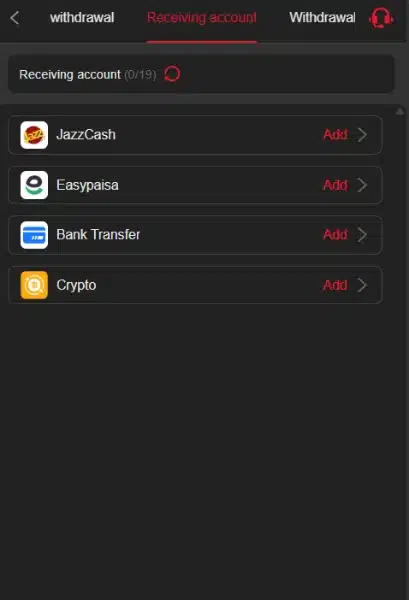
Fly33 Game separates deposits from withdrawal receiving accounts. An option in one menu does not prove that the same option appears in the other.
USDT Deposits and Receiving Accounts Are Separate
The reviewed Fly33 Game deposit page lists USDT. Its accompanying guide specifies TRC20, so the network matters as much as the currency.
- Open Deposit and review the available payment option.
- Select USDT and enter the intended amount.
- Check the current order details and required network.
- Use only the address and instructions supplied for that order.
- Match the requested amount exactly, including decimals.
- Keep the transaction reference and check the deposit record.
The deposit notice warns users not to round, change, or split the requested payment. A mismatch may require manual verification.
The field displays a range of 1 to 10000000 USDT. This is the range shown in the reviewed field, not a rupee range or confirmation that every account can transact throughout it. Recheck the live order rather than relying on a static limit or exchange rate.
JazzCash Withdrawals
JazzCash appears under Receiving account with an Add control. Select it to review the current account-linking form.
Its presence confirms a listed receiving-account option. It does not verify successful payouts, fees, or processing speed.
Easypaisa Withdrawals
Easypaisa has a separate Add option in the receiving-account menu. Check the details carefully before saving them.
Do not assume that an Easypaisa withdrawal option also means direct Easypaisa deposits are available in the current deposit screen.
Bank Transfer Withdrawals
Bank Transfer appears as another receiving-account choice. Open its form to check the required banking details.
The reviewed material does not establish supported banks or bank-specific withdrawal limits.
Crypto Withdrawals
Crypto also appears in the receiving-account list. Check the current currency, network, and address requirements before adding an account.
The USDT deposit guide does not establish which networks the crypto withdrawal form accepts.
Withdrawal Password and Requests
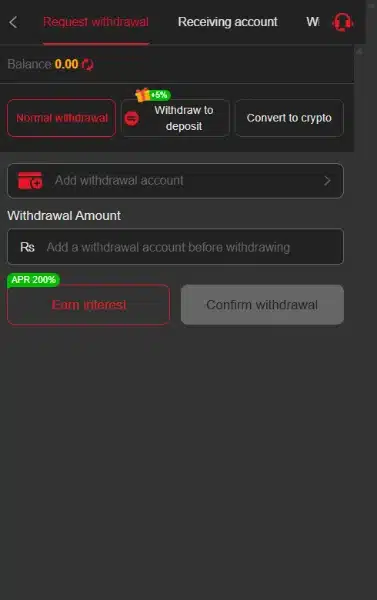
Fly33 Game first asks users to set and confirm a withdrawal password. It then provides receiving-account setup and a withdrawal amount field.
Add the intended account, review the amount and any displayed conditions, and check the request before confirming. If a Fly33 withdrawal remains pending or a deposit does not appear, retain the reference and contact Customer Service. This review has not tested transaction completion or timing.
FAQs-Frequently Asked Questions
What is Fly33 Game?
It is a real-money gaming platform with several game categories, account tools, payment menus, and promotions.
Where is the Fly33 APK download option?
Look for Download now or APP Download in the side menu. Check the destination and file details before downloading.
Is the APK version verified?
No. The reviewed material does not verify a numerical version, file size, or minimum Android requirement.
Which payment methods are listed?
The reviewed deposit screen lists USDT. Withdrawal receiving-account options include JazzCash, Easypaisa, Bank Transfer, and Crypto.
Are Fly33 bonuses guaranteed?
No. Offers have eligibility and claim conditions. Up to describes a maximum, while missions may also require deposits and turnover.
Can users choose Urdu?
Yes. The language selector includes English and Urdu.
Conclusion
Fly33 Game combines a varied lobby with account tools and a busy promotion centre. Its reviewed deposit and withdrawal menus contain different payment options. Read each campaign’s conditions before treating a headline as an available reward. APK specifications and payment performance verified.
Read Fly33’s own platform rules before using its services. For this website’s information policies, review ApnaAPK’s Terms and Conditions, Disclaimer, and Privacy Policy.
Personal Experience and Final Thoughts
My Fly33 Game assessment comes from carefully reviewing the official source, supplied material, and visible platform interface. The clear category labels, English and Urdu options, and separate account menus help explain how the platform is organised.
The most useful approach is to examine the exact feature you need. Read its form, conditions, and available controls rather than relying on a promotional headline elsewhere on the platform.
Download links
How to install Fly33 Game APK: Check Login, Payments & Bonus Terms APK?
1. Tap the downloaded Fly33 Game APK: Check Login, Payments & Bonus Terms APK file.
2. Touch install.
3. Follow the steps on the screen.