AC777 Game APK: See the Lobby Before You Download the APK
Description
AC777 Game APK: See the Lobby Before You Download the APK
Introduction
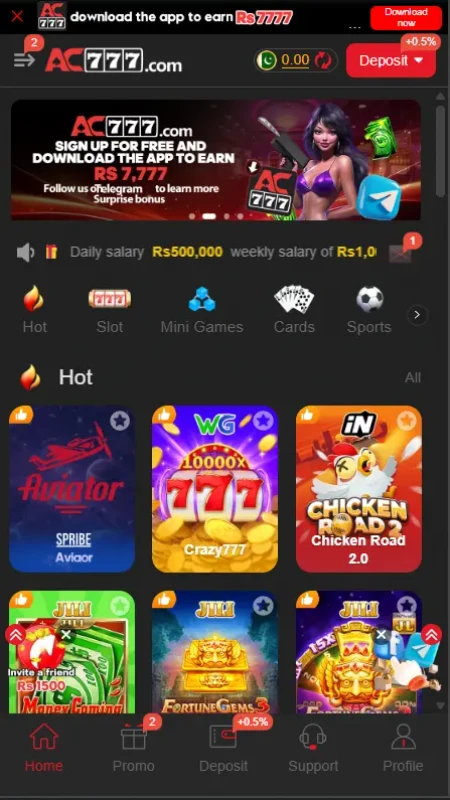
AC777 Game puts a lively game lobby next to practical account tools. The home screen leads to titles such as Aviator, Chicken Road 2.0 and Fortune Gems, while the bottom bar keeps promotions, deposits, support and your profile close by.
For AC777 Game, there is more to check than a download button. Registration, deposit choices and withdrawal accounts have their own screens. This guide walks through those screens in the order you are likely to need them, and separates advertised rewards from confirmed account benefits.
What Is AC777 Game?
It is a mobile-oriented gaming platform with different titles collected in one lobby. Category shortcuts include Hot, Slot, Mini Games, Cards and Sports. The cards beneath them let you browse particular games instead of guessing from a long list of names.
In AC777 Game, the bottom menu reads Home, Promo, Deposit, Support and Profile. The Promo page then separates Event, Mission, VIP, Unclaimed and Interest. The account side includes a registration form, payment choices, withdrawal receiving accounts and a separate withdrawal password.
The table gathers the details that matter most when getting started. Displayed amounts and offers can change, so check the live screen before making a decision.
| Item | Reviewed details |
|---|---|
| Platform | AC777 |
| Categories shown | Hot, Slot, Mini Games, Cards and Sports |
| Game examples | Aviator, Chicken Road 2.0, Fortune Gems, Money Coming and Piggy Bank |
| Main navigation | Home, Promo, Deposit, Support and Profile |
| Registration | Phone number/profile field, password registration or code-registration tab, agreement checkbox and Google option |
| Deposit options shown | JazzCash, Easypaisa, JazzCash QR and Easypaisa QR |
| Withdrawal receiving accounts | Easypaisa, JazzCash and Bank Transfer |
| Displayed deposit range | Rs 100 to Rs 100000 on the reviewed screen; check the current range |
| Android APK version | Latest |
| APK file size | 9MB |
Key Features of AC777 Game
AC777 Game Lobby by Category
The Home page starts with categories and large game cards. It helps you find a title by type, then see its artwork and name before opening it. If you want to compare another lobby layout, our Jeeto999 game guide covers a separate platform.
Game Cards with Recognizable Titles
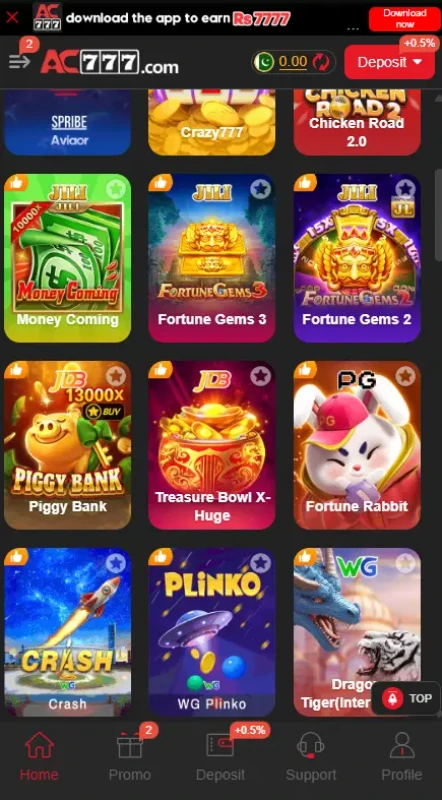
Alongside Aviator and Chicken Road 2.0, the grid includes Money Coming, Fortune Gems 2 and 3, Piggy Bank and WG Plinko. A familiar title still has its own rules: open the game and read those rules before using any balance.
Quick Routes to Account Tasks
The bottom navigation places Promo, Deposit, Support and Profile within reach from the lobby. You do not have to search the game grid to find a payment or help screen. Our 88KA account and lobby guide offers another example if you are comparing layouts.
Languages, Support and Withdrawal Setup
The language picker lists English, Urdu and Punjabi. Support has a message center and help questions. The withdrawal flow uses receiving accounts and a separate six-digit password, which you should keep private.
How to Play AC777 Game
Start at Home and choose a category, then tap a game card. Read that title’s rules and controls before playing. A slot, a crash-style game and a sports title do not have one shared playing method.
Profile is for account details; Deposit is where payment options appear. If you choose to spend money, check the current amount and rules first. Set a limit you can afford, because game results are uncertain.
Bringing the Virtual World to Life
The interface uses a charcoal background, red buttons and bright game tiles. Banners take up part of the opening screen, followed by category icons and rows of colorful cards. The contrast makes the games easy to spot, although the number of offers can make the top of the page busy.
In AC777 Game, a fixed menu brings some order to that busy view. Promo has tabs for different kinds of offers. Deposit groups payment choices and amounts on one page. Withdrawal uses a separate receiving-account page, so its available methods should be checked there.
AC777 Game Bonuses
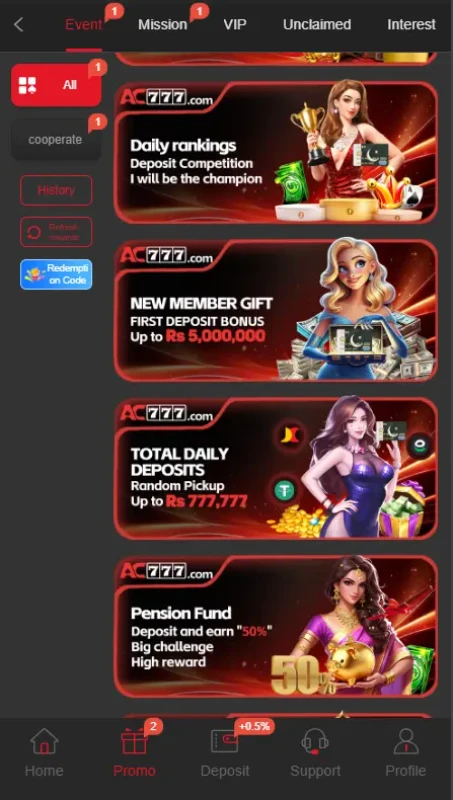
These figures describe separate advertisements in the reviewed material. They do not establish what any account will receive. Read each campaign’s current eligibility, dates and claim rules before acting on an offer.
App Download Offer in AC777 Game: Rs 777
The top banner advertises Rs 777 for downloading the app. It does not explain every claim or withdrawal condition. Check the offer page before expecting the amount.
Invitation Wheel Offer: Rs 777
An invitation-wheel card advertises Rs 777. The result depends on the current invitation and wheel rules; inviting someone alone does not establish a claim.
Mission Offer in AC777 Game: Rs 777
A separate card advertises Rs 777 for completing missions. Check which tasks count and how to claim a completed mission.
First-Deposit Offer: Up to Rs 5000000
A new-member card advertises a first-deposit bonus up to Rs 5000000. This is a stated maximum, not an amount every new user receives. Check the qualifying deposit and other current conditions.
VIP Benefits in AC777 Game
The VIP tab advertises level-related benefits. Check the level and activity rules before assuming a benefit applies to your account.
How to Download AC777 Game APK on Android?
- Open the AC777 App and check the URL carefully.
- Find the app download control. Review any file, publisher and version details the live page provides.
- If you decide to download the APK, save it to your Android phone.
- Find the file in your browser’s download list or Downloads folder. Do not rely on version or size figures from other websites; neither detail was verified for this article.
How to Install AC777 Game App on Android?
- Tap the downloaded APK file.
- If Android asks for permission, review the setting for the particular browser or file manager you used. Device menus can differ.
- Read Android and Play Protect warnings. Stop if you do not understand a warning or the file’s source.
- If you choose to proceed, tap Install. You can remove the temporary installation permission afterward.
Google’s Android app download guidance explains the risks of installing apps from other sources and the related device settings.
Registration and Login Process
Registration
Choose Register. The visible form asks for a phone number or profile number, a password and a repeated password. Password registration and code registration appear as separate tabs. The form also includes an over-18 and user-agreement checkbox, with a Google option below. Read the terms and follow any further instructions on the live form.
Login
If you already have an account, switch to Login and enter the details requested there. The reviewed material confirms the Login tab but does not show every field or recovery step. Keep your login password and any code private.
Deposit and Withdrawal Methods
Deposits and withdrawals use different screens. The reviewed deposit screen displays a range of Rs 100 to Rs 100000; confirm the current range and any offer conditions before paying.
JazzCash Deposit option in AC777 Game
Select JazzCash on the Deposit page, review the amount and follow the payment instructions displayed there. Confirm the recipient details in your payment app before authorizing a transfer.
Easypaisa Deposit option in AC777 Game
Easypaisa appears alongside JazzCash as a deposit choice. Check the amount and payment instructions for that specific method before sending funds.
JazzCash QR and Easypaisa QR
The deposit screen lists separate QR choices for both services. Choose the one that matches the payment app you intend to use, and verify the details shown by that app.
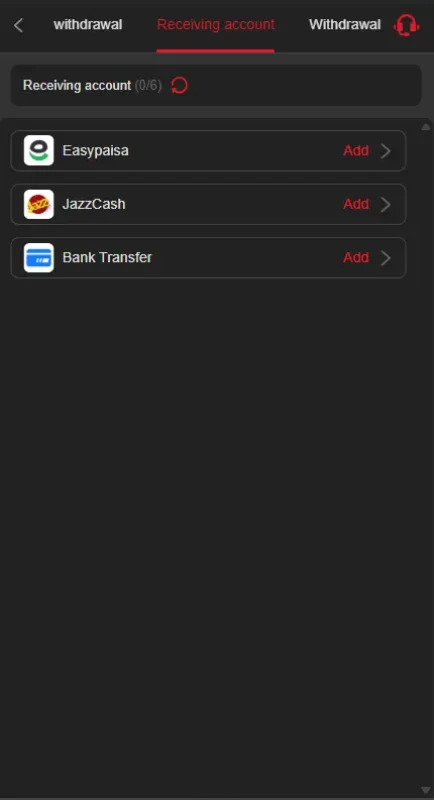
Easypaisa Withdrawal Account
The receiving-account page offers an Easypaisa account to add. Check the account details requested there before saving them.
JazzCash Withdrawal Account
JazzCash also appears as a receiving-account choice. Review the saved details before requesting a withdrawal.
Bank Transfer Withdrawal Account
Bank Transfer appears in the withdrawal receiving-account list. It was not listed among the reviewed deposit choices.
Withdrawal Password
The flow asks for a separate six-digit withdrawal password. Keep it private and check the live withdrawal rules. No fee or processing time was verified.
FAQs
What is AC777 Game?
It is a mobile gaming platform with a game lobby, account tools, promotions, deposits and withdrawal setup.
Where can I download the Android APK?
Start at the supplied source address, verify the URL and check the offered file details before downloading.
Is the latest version number verified?
No. The exact APK version and file size were not established from the supplied material.
Which payment methods are shown?
Deposits show JazzCash, Easypaisa and QR choices for both. Withdrawal receiving accounts show Easypaisa, JazzCash and Bank Transfer.
Are the advertised bonuses guaranteed?
No. Invitations, missions, first deposits and VIP offers each have their own conditions.
What deposit range was displayed?
The reviewed deposit screen showed Rs 100 to Rs 100000. Check the live page because limits can change.
Conclusion
AC777 Game has a clearly divided lobby and account menu, but its offers need a closer reading than their banners allow. Review the live deposit and withdrawal screens separately, and check game rules before using a balance. For information about this site, read our Terms and Conditions, Disclaimer and Privacy Policy.
Personal Experience and Final Thoughts
My assessment of AC777 Game comes from reviewing the official source and interface material and source address. I have personally played, deposited and withdrawn money. The category-first lobby and separate account screens make the platform’s layout easier to explain.
Download links
How to install AC777 Game APK: See the Lobby Before You Download the APK APK?
1. Tap the downloaded AC777 Game APK: See the Lobby Before You Download the APK APK file.
2. Touch install.
3. Follow the steps on the screen.