QK777 Game APK: Inside Its Lobby, Bonuses and Wallet
Description
QK777 Game APK: Inside Its Lobby, Bonuses and Wallet
Introduction
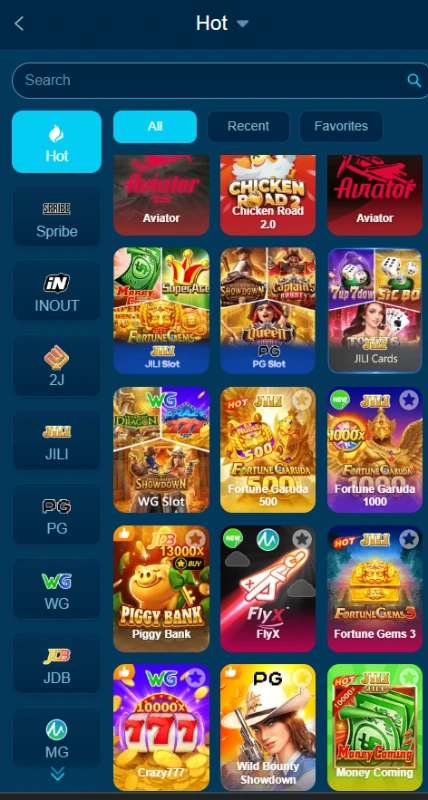
QK777 Game brings casino-style games, account tools and payment menus into one platform. Its lobby includes titles such as Aviator, Chicken Road 2.0, Fortune Gems and Piggy Bank. Search, provider filters and Favorites help users find a title without browsing every game tile.
Before downloading anything, understand how the platform separates games, promotions and wallet controls.This guide explains the available interface and its limits. Real-money gambling can lead to losses, so treat it as a financial risk rather than an income source.
What Is QK777 Game?
QK777 is a platform that brings several games together under one account. Users can browse a shared lobby, open individual titles and access account tools through the Profile menu. Provider tabs include JILI, PG, WG and JDB.
The platform also separates promotional activity from the main lobby. Promo contains events, missions, VIP information and rebates, while the account area provides records, withdrawal management and language settings. English and Urdu options appear in the language menu.
The table below summarises the verified interface details.
| Item | Information |
|---|---|
| Platform name | QK777; the interface also uses QK777.bet branding |
| Visible game groupings | Hot, JILI Slot, PG Slot and JILI Cards |
| Example titles | Aviator, Chicken Road 2.0, Fortune Gems, Piggy Bank and Super Ace |
| Account access | Phone number/email/profile field and password; Google quick-login option |
| Deposit options | JazzCash, Easypaisa, QR Payment and a Crypto tab |
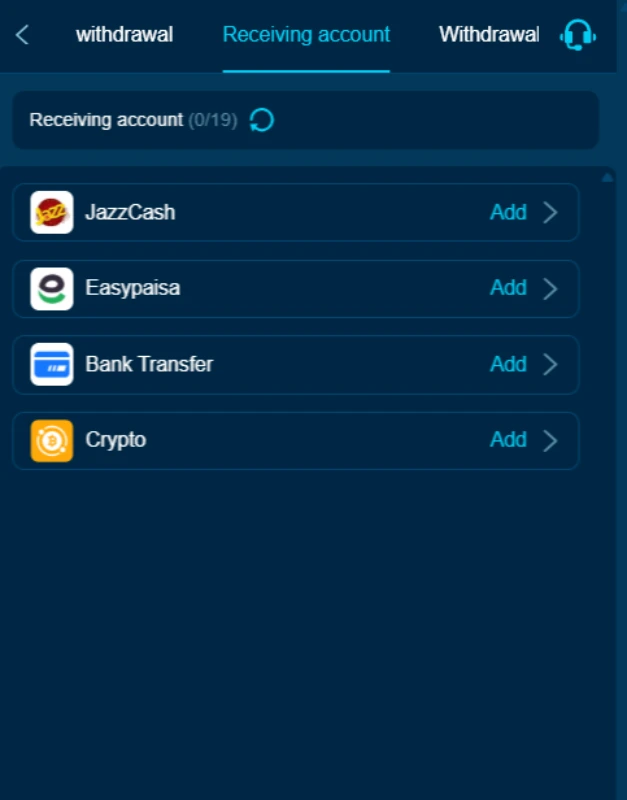
| Withdrawal receiving accounts | JazzCash, Easypaisa, Bank Transfer and Crypto |
| Languages | English and Urdu |
| Promotional tools | Events, missions, VIP, rebates and redeem-code access |
| Download choices | Desktop shortcut and Speed App (Super sign) |
| APK version, and minimum Android requirement | Latest/Android 5+ |
Key Features of QK777 Game
QK777 Game Search and Favorites
The lobby includes a search bar alongside All, Recent and Favorites. These controls help users narrow the game list and return to titles without searching through the whole collection.
QK777 Game Provider Filters
Provider tabs in QK777 Game offer another way to browse. A user looking through JILI or PG titles can use those filters instead of relying only on the Hot section.
For another example of provider-based browsing, see our HI309 lobby and account guide.
QK777 Game Account Tools
The QK777 Game profile includes My Records, Manage withdrawal, Security Center and Login device. These menu entries group account activity and settings in one area. Their presence alone does not establish the platform’s security standards.
QK777 Game Language Options
The QK777 Game language menu offers English and Urdu. To change QK777 language to Urdu, open Profile, find Language and select Urdu. The available material does not establish how completely every game or promotion translates.
Separate Promotion Sections
Event, Mission, VIP, Rebate and Unclaimed appear as separate tabs. This organisation helps users distinguish an advertised event from a task, a membership benefit or a reward awaiting attention.
How to Play QK777 Game
Each title has its own rules. The lobby does not provide one shared method for playing every game.
- Open the lobby. Start from Home and browse the available titles.
- Choose a provider or search. Use a provider tab or enter a title in the search bar.
- Open the selected game. Read its rules, controls and any stake information before proceeding.
- Check the account balance. Understand any real-money requirement before confirming a paid action.
- Use account records where needed. Return to Profile to find My Records and relevant wallet tools.
Do not assume that Aviator, a slot title and a card game use the same controls. No browsing method or betting pattern guarantees a return.
Bringing the Virtual World to Life
QK777 Game uses a dark blue background with bright cyan buttons and colourful game tiles. Game names appear beneath or within the artwork, while provider controls sit along the side of the lobby.
The main navigation contains Home, Promo, Invite, Deposit and Profile after account access. Search and browsing filters sit closer to the game collection. This arrangement separates finding a game from managing an account.
Promotional panels occupy a large part of the interface. Some include countdowns, reward figures and deposit buttons. Close these panels when you want to inspect the lobby, and read the relevant event details before treating a large headline amount as an available reward.
QK777 Bonuses
QK777 Game displays several reward programmes. Each has its own entry point, and their advertised figures should not be added together.
Monthly Bonus offer by QK777 Game
A monthly bonus kickoff up to Rs77777 is offers to users.

Registration Bonus Advertisement
The registration panel advertises a Rs 200 sign-up bonus. However, the available material does not establish its complete eligibility, claim or withdrawal conditions. Creating an account should not be described as a guaranteed Rs 200 cash payment.
QK777 First Deposit Extra Reward
The First Deposit Extra Reward panel in QK777 Game lists deposit thresholds and corresponding bonuses. For example, it pairs a first deposit of at least Rs 200 with Rs 40, and at least Rs 1000 with Rs 100.
The panel identifies the first deposit after registration as the qualifying deposit. Check the event details for any additional conditions. Do not merge this offer with the separate new-member banner advertising a maximum of Rs 30000.
Daily Sign-In Reward in QK777 Game
The daily sign-in panel displays Rs 7 on several day entries and a required-deposit counter of 0/100. That requirement matters: this is not evidence of an unconditional daily payment.
Read the current check-in rules before claiming. The larger headline maximum does not mean every user receives that amount.
QK777 Daily Missions
The QK777 Game daily mission board includes invitation tasks. One task requires an invited user to complete a first deposit and displays a reward range of Rs 6 to Rs 66.
Other tasks require more qualifying users. Sending an invitation alone does not satisfy a task that also requires a first deposit. The board includes a reset timer, so check the applicable task period.
Invitation Events in QK777 Game
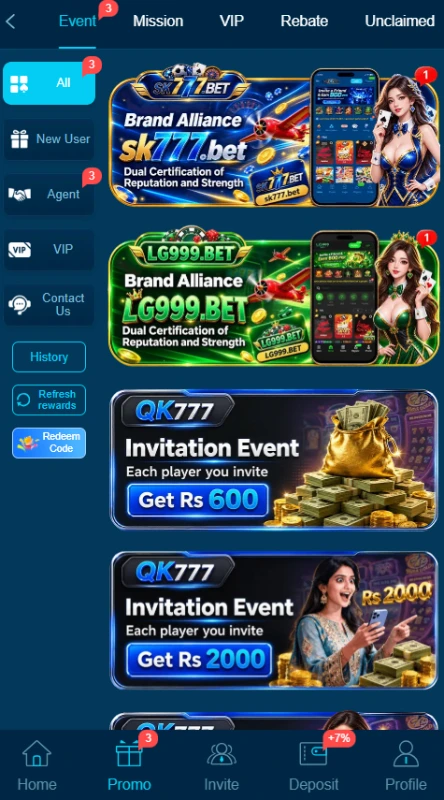
Several QK777 invitation rewards appear as separate campaigns, including a banner advertising Rs 600 for inviting a friend. Other banners display different amounts and conditions.
Do not assume every referral qualifies for every offer. Open the specific event and check what makes a referral eligible before expecting a reward.
QK777 VIP Rewards
The QK777 Game VIP area includes level tabs, progress information and benefit categories such as daily salary, monthly salary and next-level bonus.
These are the platform’s reward labels, not employment income. Access depends on the relevant level and activity requirements. A benefit shown under a higher VIP level does not apply automatically to a new account.
Rebates and Redeem Codes
The promotions area advertises game rebates of up to 3% and provides QK777 redeem-code access. Up to sets a maximum, not a rate that applies to every user or game.
Check qualifying activity and claim rules separately. No working redeem code has been verified for this guide.
Time-Limited Events and Coupons
A golden-egg campaign advertises up to Rs 77777 and states a seven-day duration. Deposit coupons also display thresholds and expiry timers.
These are time-limited offers. Their appearance in the reviewed material does not establish that they remain active when you visit.
How to Download QK777 Game APK on Android?
The QK777 download panel offers Desktop shortcut and Speed App (Super sign). These are different labels; a shortcut should not be treated as proof that an APK has downloaded.
- Open the supplied QK777 source address, qk777vip1.bet, in your Android browser.
- Find the download panel and read both option labels.
- Inspect the app option and any destination or file information it provides.
- Confirm that the download actually offers an Android APK before saving it.
- If the file identity or destination is unclear, stop rather than guessing.
The current QK777 APK version, package size and compatibility requirements remain unverified. This guide does not provide a tested direct APK link.
How to Install QK777 Game App on Android?
Use these general installation steps only after checking the APK’s source. They do not confirm that a particular QK777 app package will install on your phone.
- Open your Downloads folder and select the checked APK.
- Read the Android installation prompt.
- If Android requests permission, review the Install unknown apps setting for the browser or file manager opening the file.
- Allow that source only if you understand and accept the risk.
- Review any warnings before choosing Install.
- Turn off that source’s installation permission when you finish.
Menu names vary by device. Do not disable Play Protect or bypass a harmful-app warning just to complete installation. If Android blocks the file, review the warning first.
After installation, review the app’s permissions in your phone settings. Google’s guide to managing Android app permissions explains how to allow or deny access to features such as the camera, contacts and location.
Registration and Login Process
QK777 Game Registration
The QK777 registration form contains an account field labelled for a phone number, email or profile, followed by a password field.
- Open Register.
- Enter the account identifier the form accepts.
- Create a password that you do not use elsewhere.
- Read the User Agreement and the over-18 declaration.
- Accept only if you meet the stated age requirement and agree to the terms.
- Select Register and follow any further instructions.
The reviewed form does not establish a mandatory referral code, country-code selector or verification-code step.
QK777 Login and Password Recovery
Open Login, enter your account identifier and password, then select Login. The form also offers a remember-password checkbox.
A Google quick-login icon appears below the main form, although its full account-linking process has not been tested. For a forgotten password, use Forgot Password and follow the recovery prompts. Avoid saving login details on a shared device.
Deposit and Withdrawal Methods
QK777 Game separates the deposit screen from withdrawal receiving accounts. A payment option in one area does not automatically establish the same process in the other.
JazzCash
The QK777 deposit menu lists JazzCash options. JazzCash also appears under Receiving account for withdrawals.
For a deposit, select the relevant option and read its payment instructions. For a withdrawal, add the receiving account through the withdrawal area. Check the entered details before confirming either action.
Easypaisa
QK777 Easypaisa appears in both the deposit menu and receiving-account list. Read the instructions for the selected transaction rather than assuming they match JazzCash.
The reviewed material does not verify transaction fees or completion times.
Bank Transfer
Bank Transfer appears as a withdrawal receiving-account option. The supplied deposit screen does not establish a matching bank-transfer deposit method.
Do not assume that every bank or account type qualifies. Check the details requested when adding an account.
QR Payment
QR Payment appears among the online deposit options. The material does not establish which wallet or banking apps support the resulting code.
Read the payment destination and amount carefully before approving a scan-based payment.
Crypto
A Crypto tab appears in the deposit area, and Crypto also appears in the withdrawal receiving-account list. The reviewed material does not verify supported coins, networks or fees.
Do not choose a network or transfer address by assumption.
Deposit Amounts and Withdrawal Setup
The selected deposit form displays a range of Rs 100 to Rs 500000 in its amount field. Treat this as the range for that displayed form, not a confirmed universal limit across all methods.
The QK777 withdrawal process requires a separate withdrawal password. The request screen also asks users to add a withdrawal account before entering an amount.
Withdraw to deposit and Convert to crypto appear alongside Normal withdrawal. Read each option carefully; these labels describe different actions. No successful payout, withdrawal limit or processing time has been verified.
Our EU777 withdrawal setup guide offers another account-layout comparison; each platform has its own requirements.
Frequently Asked Questions
What is QK777 Game?
It is a platform with multiple casino-style titles, a shared lobby, account tools, payment menus and promotional sections.
How do I download its Android APK?
Inspect the platform’s app download option and verify the offered file before saving it. The Desktop shortcut option is not evidence of an APK download.
Is the latest version verified?
No. This review does not confirm a current version number, actual APK size or minimum Android version.
Which payment methods appear?
The deposit area lists JazzCash, Easypaisa, QR Payment and Crypto. Withdrawal receiving accounts include JazzCash, Easypaisa, Bank Transfer and Crypto.
Are QK777 bonuses guaranteed?
No. Different offers have different deposit, referral, activity, level or time conditions. An advertised maximum does not establish what a particular user will receive.
What is the visible deposit limit?
The reviewed deposit form displays Rs 100 to Rs 500000. Check the selected payment method for its current limits before proceeding.
Conclusion
QK777 Game combines a searchable game lobby with account, payment and promotional tools. Its menus include English and Urdu settings, receiving accounts and a separate withdrawal password. Bonus amounts require careful reading because each campaign has its own conditions.
Check QK777’s current platform and campaign terms before participating. For information about this website and its content, read ApnaAPK’s Terms and Conditions, Disclaimer and Privacy Policy.
Download links
How to install QK777 Game APK: Inside Its Lobby, Bonuses and Wallet APK?
1. Tap the downloaded QK777 Game APK: Inside Its Lobby, Bonuses and Wallet APK file.
2. Touch install.
3. Follow the steps on the screen.