ZH88 Game APK: Explore Bonuses and Features Before Download
Description
ZH88 Game APK: Explore Bonuses and Features Before Download
Introduction
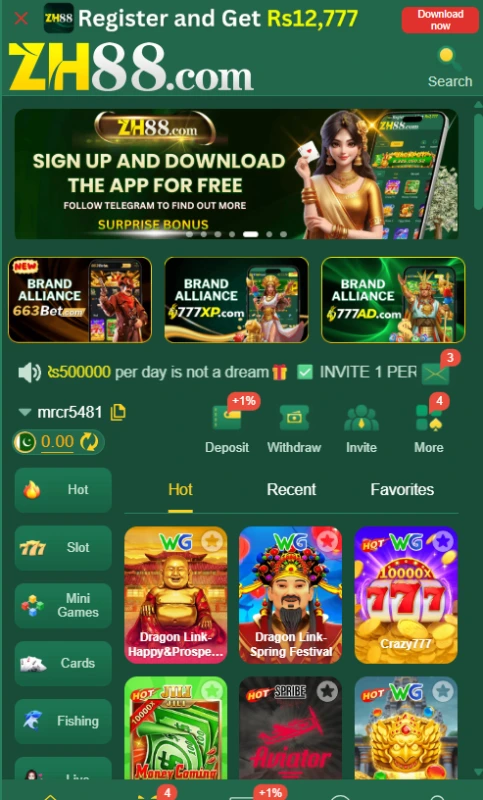
ZH88 Game brings several types of games into one green-themed lobby. You can browse slots, mini games, cards, fishing, live games, and sports from the category menu. The same interface gives you access to your account, deposits, withdrawals, invitations, and promotions.
If you are new to the platform, it helps to understand those areas before downloading an app or adding money. This guide walks through the visible controls, explains what the bonus offers actually say, and points out details that have not been verified.
What Is ZH88 Game?
ZH88 is a gaming platform with a main lobby and separate account tools. Its lobby has a category menu on the left, game tiles in the centre, and shortcuts for Deposit, Withdraw, Invite, and More. You can browse the displayed titles before deciding which one you want to open.
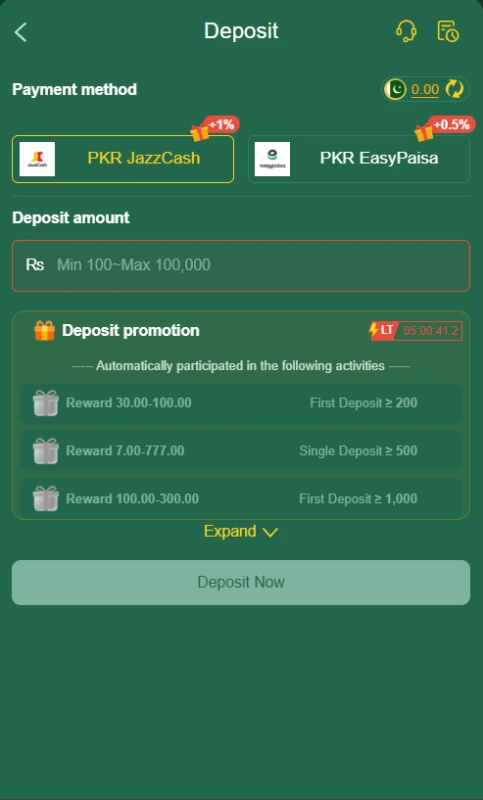
The account area handles a different set of tasks. Registration offers a phone-number field and password setup. The deposit page displays PKR JazzCash and PKR Easypaisa, while the receiving-account menu lists JazzCash, Easypaisa, and Bank Transfer. There is also a separate withdrawal-password setup screen.
Promotions appear in their own areas, including Event, Mission, VIP, and Rebate. These menus tell you where to look for current offers; they do not mean every account qualifies for every reward.
| Detail | Verified information |
|---|---|
| Platform name | ZH88 |
| Game categories | Slot, Mini Games, Cards, Fishing, Live, and Sports |
| Registration | Phone-number field and password setup are visible |
| Deposit methods shown | PKR JazzCash and PKR Easypaisa |
| Receiving-account choices shown | JazzCash, Easypaisa, and Bank Transfer |
| Promotion areas | Event, Mission, VIP, and Rebate |
| App download option | A Download App button is visible |
| APK version | Latest |
| APK file size | 9MB |
| Minimum Android version | Android 5+ |
Key Features of ZH88 Game
ZH88 Game categories you can browse
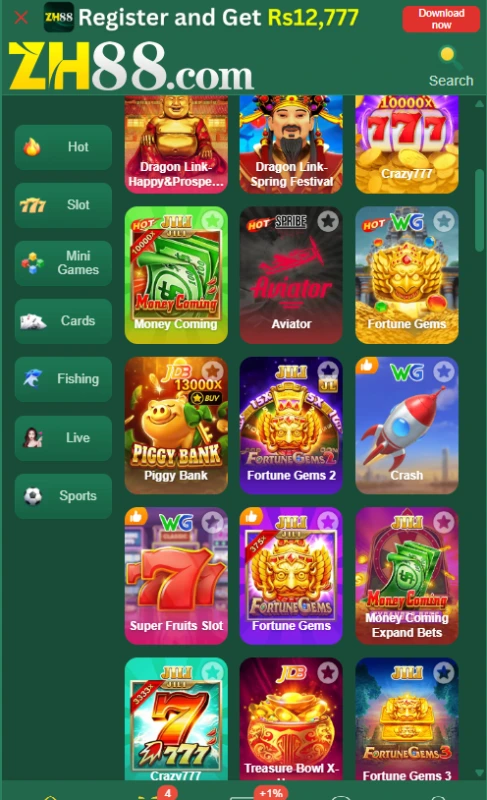
The side menu groups titles by type. Open Slot, Mini Games, Cards, Fishing, Live, or Sports to narrow the lobby. This is easier than searching through every tile on the home screen.
Quick access to ZH88 Game account tools
Deposit, Withdraw, Invite, and More sit near the main game area. You can move from browsing games to checking an account task without hunting through the category list.
ZH88 Game missions and VIP levels
Mission and VIP have separate tabs. The VIP area shows levels and their stated rewards or privileges, while Mission displays tasks and event rules. Check the details inside each tab before assuming a reward applies to your account.
Receiving accounts and withdrawal password
The ZH88 Game receiving-account menu lets you choose from the displayed wallet and bank options. A separate screen asks you to set and confirm a withdrawal password. Keep that password private and check the account details before submitting a request.
ZH88 Game help and messages
The Message Center includes Support, News, Notice, and Reward Feedback tabs. It also provides a customer-service entry point and a Help Center with common questions.
How to Play ZH88
Start in the lobby and choose a category that interests you. Open a game tile, then read that title rules, controls, and betting information before taking any action. The lobby groups different kinds of games together, so one game rules should not be assumed to apply to another.
Use the account shortcuts when you need to check a balance, deposit, or look at withdrawal settings. If an offer is attached to a game or event, read its eligibility and use conditions first. Playing a game or joining a promotion does not guarantee a return.
Bringing the Virtual World to Life
The interface uses a dark green background with bright game tiles and yellow action buttons. A vertical category menu keeps the game types in view while you scroll through the lobby. Larger banners sit above the game list and draw attention to current promotions.
The layout separates browsing from account management. Game categories stay together on the left; Deposit, Withdraw, and Invite have their own shortcuts; and the Event, Mission, VIP, and Rebate tabs collect reward information in one place. If you want to inspect a promotion, you can go directly to its tab and read the rules there. For another example of a category-based layout, see the QZR888 game interface guide.
ZH88 Game Bonuses
Registration and app-download offer
A banner advertises a reward connected with registering and downloading the app. Treat the displayed amount as an offer subject to its current rules, not money credited simply for tapping Download App. Check the eligibility steps and whether the campaign is still active.
First-deposit promotions in ZH88 Game
The platform displays first-deposit and first-recharge promotions. The first-recharge panel lists different deposit and reward bands. These are separate advertised offers, so read the applicable panel before depositing. A first-deposit reward depends on meeting that campaign first-deposit conditions.
Invitation rewards in ZH88 Game
The Invite area describes rewards for bringing in a friend. It lists actions and reward tiers, but an invitation alone may not complete the requirements. Read the current referral rules and confirm what the invited person must do.
VIP rewards, missions, and rebate
VIP levels display different bonuses and privileges. The Mission tab gives event-specific tasks and rules, while Rebate shows rates that vary by displayed activity band. Your account must meet the relevant level, task, or rebate conditions. These figures can change, so check the live terms rather than treating a banner largest amount as a personal entitlement.

How to Download ZH88 Game APK on Android?
- Open the supplied ZH88 website in your phone browser.
- Find its Download App button and check the destination before downloading.
- If it offers an APK, review the file name and any version information shown at the time. A version number and file size could not be verified for this guide.
- Save the file only if you are comfortable with its source and your phone warnings.
Do not assume that another site using ZH88 in its name supplies the same app. Google Android app-download guidance explains the risks of installing apps from outside Google Play.
How to Install ZH88 Game App on Android?
- Open the downloaded APK from your browser downloads list or your phone Files app.
- If Android asks whether that browser or Files app may install apps, read the prompt before granting permission. The wording varies by phone.
- Review any warning or app-permission request. If you cannot confirm the file origin, stop the installation.
- Tap Install only when you have checked the file and want to proceed. You can remove the install permission afterward in your phone settings.
Keep Google Play Protect active. Google Play Protect guidance explains that Android checks apps from other sources and may warn about harmful behaviour.
Registration and Login Process
Registration
Open Register and enter your phone number in the field provided. The form offers password registration and code registration. If you choose password registration, enter and confirm your password. It also asks you to confirm that you are over 18 and have read the user agreement before tapping Register.
A Google sign-in symbol is visible below the form. Check the choices presented on your device rather than assuming every sign-in method will be available at all times.
Login
Open the Login tab next to Register and follow the fields displayed there. Use the same account details you registered with. If you cannot access the account, use the platform customer-service entry point for help; do not share your password or verification code with someone claiming to assist you.
Deposit and Withdrawal Methods
JazzCash deposit
Choose PKR JazzCash on the deposit page if you want to use that wallet. Enter your amount and follow the payment instructions displayed for that method. Confirm the recipient and amount before sending money.
Easypaisa deposit
PKR Easypaisa is the other visible deposit choice. Select it to see its own payment instructions instead of using details from the JazzCash option. The amount field displays Rs 100 to Rs 100000; check the live range and any applicable offer terms before paying.
For another example of how a gaming platform presents payment controls, see the X44 Bet payment guide. Follow only the instructions shown in your own ZH88 account when making a deposit.
JazzCash receiving account
JazzCash appears in the receiving-account menu. If you select it, enter the wallet details requested on that screen and check the number carefully before saving it.
Easypaisa receiving account
Easypaisa is a separate receiving-account option. Use the corresponding Easypaisa account details rather than reusing details for a different wallet.
Bank Transfer receiving account
Bank Transfer is also listed as a receiving-account choice. Follow the fields presented for a bank account and check the account information before submitting it. Its appearance here does not establish bank transfer as a deposit method.
In ZH88 Game, a separate screen also asks you to create a withdrawal password. The available material does not establish withdrawal fees, processing times, or whether every request will be approved. Read the current rules and any message shown during your own request.
Frequently Asked Questions
What is ZH88 Game?
It is a platform with several game categories, account controls, payment menus, and promotional sections in one interface.
Where can I find the app download?
The ZH88 Game website displays a Download App option. Check the destination and file details before installing anything.
Is the latest APK version verified?
No. The available material does not confirm a numerical APK version, file size, or minimum Android version.
Which payment methods are displayed?
The deposit page shows PKR JazzCash and PKR Easypaisa. The receiving-account menu lists JazzCash, Easypaisa, and Bank Transfer.
Are the advertised bonuses guaranteed?
No. Promotions have eligibility, activity, or timing conditions. Open the relevant offer and read its current rules before relying on an advertised amount.
What deposit range is visible?
The deposit amount field displays Rs 100 to Rs 100000. Confirm the range on the live deposit page before making a transaction.
Conclusion
ZH88 Game puts game categories, account shortcuts, payment menus, and promotions within one lobby. Its visible controls make the main tasks easy to locate, but the APK version, file size, and withdrawal processing times remain unverified. Read each offer current rules before using it. You can also review ApnaAPK Terms and Conditions, Disclaimer, and Privacy Policy for information about this guide and the website.
Personal Experience and Final Thoughts
My assessment of ZH88 Game comes from reviewing the supplied platform material and the source website. I have not played the games, installed the APK, made a deposit, or tested a withdrawal. The clearest strengths are the organised category menu, visible account shortcuts, and separate areas for missions, VIP levels, and rebates.
Download links
How to install ZH88 Game APK: Explore Bonuses and Features Before Download APK?
1. Tap the downloaded ZH88 Game APK: Explore Bonuses and Features Before Download APK file.
2. Touch install.
3. Follow the steps on the screen.