777DX Game APK: Check Wallet Options and Other Features Before You Start
Description
777DX Game APK: Check Wallet Options and Other Features Before You Start
Introduction
777DX Game brings slots, mini games, fishing, live games, cards and sports into one gaming lobby. It also places promotions, VIP levels and payment tools within the same interface. Before downloading the app or creating an account, it helps to understand how these sections connect and which details still need checking.
This guide explains the menus, advertised rewards and payment options in plain language. The platform includes money related gaming features, so a reward banner should never be read as a promise of income. APK specifications, complete bonus rules and payment outcomes remain unverified.
What Is 777DX Game?
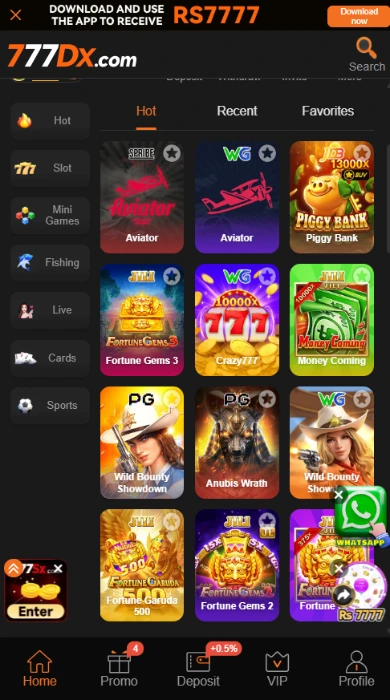
777DX Game acts as a shared lobby for several game categories. Instead of opening a separate application for each title, users browse category buttons and game tiles from the home area. Aviator, Piggy Bank, Fortune Gems 3, Crazy777 and Money Coming appear among the available tiles.
Account tools sit alongside this game selection. The home area includes balance information and shortcuts for Deposit, Withdraw and Invite. A bottom menu connects Home, Promo, Deposit, VIP and Profile, while a language selector offers English and Urdu.
| Detail | Information |
|---|---|
| Platform name | 777DX |
| Game categories | Slot, Mini Games, Fishing, Live, Cards and Sports; Hot provides another browsing view |
| Main navigation | Home, Promo, Deposit, VIP and Profile |
| Languages | English and Urdu |
| Deposit options | JazzyCash label under Online deposit; separate Crypto tab |
| Withdrawal receiving accounts | JazzCash and Easypaisa |
| Promotions | Invitation offers, missions, VIP rewards, rebates and deposit offers |
| APK version, file size and minimum Android requirement | Latest version/9MB/Android 5+ |
Key Features of 777DX Game
777DX Game Categories and Browsing Tabs
The category menu separates slots, cards, fishing and other game types. Hot, Recent and Favorites offer additional browsing views, helping users distinguish category browsing from their recent or saved selections.
Account and Balance Shortcuts
Deposit, Withdraw and Invite appear near the balance area. This arrangement gives account tasks their own entry points instead of placing everything inside the game tiles.
English and Urdu Options in 777DX Game
The language menu lists English and Urdu. To change the interface language, open that selector and choose the preferred option; the review does not establish whether every individual game also supports Urdu.
Separate Promotion Sections
Promo includes Event, Mission, VIP, Rebate and Unclaimed tabs. These labels separate different reward activities, although users still need each offer’s rules to understand eligibility and withdrawal conditions.
Withdrawal Password Setup 777DX Game
The withdrawal area asks users to create and confirm a withdrawal password. This is a separate money-related control; it should not be confused with a login password or a JazzCash or Easypaisa wallet PIN.
How to Play 777DX Game
Start with the 777DX Game lobby and learn where the main controls sit before opening a title.
- Open Home and choose a category such as Mini Games, Slot or Cards.
- Select a title from its game tile.
- Read that title’s rules, controls and stake information before starting a round.
- Check the account balance and any money requirement before confirming a paid action.
- Return to Home to choose another category or open account tools.
Individual games can use different rules. An Aviator tile does not establish its exact controls, payout settings or round behaviour. This review covers the lobby and account interface rather than tested gameplay. Money placed at risk can be lost; do not treat play as a dependable source of income.
Bringing the Virtual World to Life
The 777DX Game interface uses a dark background with orange buttons, white labels and bright game artwork. Category icons run down the left side, while the main area displays game tiles in rows. The balance and account shortcuts sit above this grid.
The bottom navigation keeps the main sections together. Promotional banners, floating contact buttons and advertisements for other platforms also occupy space around the lobby. They add visual clutter, so read a button’s label before tapping: an advertisement for another platform can lead somewhere different from the selected game.
The overall organization makes the distinction between games, promotions and account tasks clear. However, a review of the layout cannot establish loading speed, touch responsiveness or performance on a particular phone.
777DX Game Bonuses
777DX Game promotions cover several separate activities. The amounts below describe advertised offers, not confirmed payments. Full eligibility rules are unavailable for several campaigns, so check each offer before taking part and do not assume separate rewards can be combined.

777DX Game Invitation Rewards
One invitation offer advertises Rs 500 to Rs 2500 for inviting one friend. Two separate special-invitation offers display Rs 1000 and Rs 5000. Each requires an eligible referral under its own rules; a shared link alone does not establish entitlement.
Another invitation campaign advertises commission of up to 5.0% per day. That percentage is a maximum advertised rate, not a guaranteed daily return. The applicable activity and calculation basis need confirmation.
Sharing and Random Mission Rewards
Separate invitation banners list random mission rewards of Rs 500, daily sharing rewards of Rs 777 and weekly sharing rewards of Rs 7777. Keep these campaigns separate and check their task requirements, claim windows and eligibility rules.
New-Player, Daily and Weekly Missions
The Mission area includes Newplayer, Daily Mission and Weekly Mission tabs. New-player tasks include signing up, logging in to the app, saving a desktop shortcut and saving the URL.
Tasks display Claim or Go buttons. Completing an action does not by itself establish that its reward is available for withdrawal; read the event conditions before claiming.
777DX Game VIP Level Rewards
The VIP area displays a current level, a reward list and a Rules tab. The VIP 1 panel lists a Rs 25 monthly reward and a Rs 50 next-level bonus, alongside a 10000 betting requirement for promotion.
These are activity-based level benefits. They are not wages, and the listed amounts do not mean a new account can claim them immediately. Higher levels have separate requirements and reward entries.
Deposit Bonus in 777DX Game
A deposit banner advertises a 0.5% bonus on every deposit. Check whether the selected payment route qualifies and whether the credited bonus carries further requirements. The banner describes an ongoing deposit offer; it does not label this as a first-deposit reward.
Rebate Offer
A rebate banner advertises up to 3%. This is an advertised maximum, not a fixed payment on every activity. The qualifying activity, calculation base and claim rules remain unverified.
Slot Loss-Relief Offer
A separate slot promotion advertises 10% daily loss relief. Its eligible games and calculation rules need checking. This offer does not establish that a player will recover their losses.
Mystery Treasure Box in 777DX Game
Mystery Treasure advertises a randomly distributed box associated with daily login. Random distribution does not mean every account receives the same reward. Full eligibility and claim conditions remain unverified; check the current event rules before participating.
For another example of how to read offer conditions, see our BOO999 bonuses and reward-rules guide. Assess each platform campaigns separately.
How to Download 777DX Game APK on Android?
The interface includes Download buttons, but this review has not verified a working APK file or its latest version. If you choose to proceed with a 777DX Game APK download:
- Confirm the platform address and operator before using its download control.
- Find the Download button in the platform header.
- Check the destination before accepting the 777DX app download.
- Review any available file details and browser warnings.
- Locate the completed file in Downloads before attempting installation.
A Google Play listing for this application has not been verified.
How to Install 777DX App on Android?
These are general Android installation steps, not confirmation that this particular package installs successfully.
- Open the downloaded APK using your browser or file manager.
- If Android requests installation permission, review which app is requesting it.
- Only if you have verified the source and choose to continue, allow installation for that specific browser or file manager.
- Read the installation prompt, then select Install.
- Keep Play Protect enabled and stop if Android flags the file as harmful.
- After installation, turn off that source’s installation permission again.
Read Google explanation of Play Protect checks and warnings to understand how Android checks apps for potentially harmful behaviour. These checks do not certify this particular APK.
Menu names vary by phone and Android version. Do not bypass an additional security block simply to complete installation. The minimum supported Android version remains unverified.
Registration and Login Process
Create a 777DX Account
The 777DX Game missions area includes a sign-up task, but the actual registration form was unavailable for review. Therefore, this guide cannot confirm phone, email, country-code, referral-code or verification fields.
To create a 777DX account, open the platform’s registration option and follow its current form. Read any age requirement and user agreement before submitting information. Use only the fields the platform actually requests.
777DX Login and Account Access
The platform also lists a login-to-the-app mission. For 777DX account login, use the sign-in method associated with your registration. The exact login fields and recovery options remain unverified.
If you encounter a 777DX login problem, first check your entered details and the address you opened. Use an account-recovery control only if the platform provides one. Never share a wallet PIN or withdrawal password with someone offering login help.
Deposit and Withdrawal Methods
The 777DX Game payment screens separate adding money from choosing a receiving account. A method listed for withdrawal should not automatically be described as a deposit option.
Online Deposit: JazzyCash Label
The Online deposit screen labels its payment option JazzyCash. Its amount field displays Rs 100 to Rs 100000. Treat this as the range shown for that screen, not a verified limit for every account or route.
To review a deposit, open Deposit, inspect the payment option and enter an amount within the displayed range. Check the next prompt before authorizing payment. The review does not establish fees, processing times or successful crediting.
Crypto Deposit Tab
Crypto appears as a separate deposit tab. Supported coins, networks, wallet addresses and minimum amounts remain unverified. The tab alone is not enough information to make a transfer.

JazzCash Withdrawal Account
JazzCash appears under Receiving account with an Add option. The withdrawal setup also requires a withdrawal password. Add only an account you control and check all requested details before submitting a withdrawal request.
The available material does not establish the JazzCash withdrawal minimum, fee or completion time.
Easypaisa Withdrawal Account
Easypaisa also appears as a receiving-account option. Its presence supports describing an Easypaisa withdrawal setup, but it does not verify Easypaisa deposits.
Check the current withdrawal form for any amount and account requirements. No completed Easypaisa payout was tested for this review.
For a separate account-menu comparison, our XQ777 receiving-account and withdrawal-password guide explains those controls on another platform. Its listed methods do not establish what this service supports.
FAQs-Frequently Asked Questions
What does the platform include?
It is a gaming platform with several game categories, account tools, promotions and payment sections within one lobby.
How do I download the Android app?
The platform includes Download buttons. Verify the address and file source first; this review does not confirm a working APK package.
Is the latest APK version verified?
No. The version number, file size and minimum Android requirement remain unverified.
Which payment methods are listed?
Online deposit uses the label JazzyCash, and a Crypto tab is available. Withdrawal receiving accounts list JazzCash and Easypaisa.
Are the bonuses guaranteed?
No. Advertised rewards depend on campaign eligibility and conditions. A banner amount does not establish a payable or withdrawable reward.
What deposit range appears in the interface?
The reviewed Online deposit amount field displays Rs 100 to Rs 100000. Other routes or later updates may use different limits.
Conclusion
777DX Game combines a category-based lobby with promotions, VIP levels and payment tools. Its English and Urdu options give users a language choice. APK specifications, complete reward conditions and payment outcomes still need verification. Read the platform’s Terms and Conditions before using account or money-related features. ApnaAPK Terms and Conditions, Disclaimer and Privacy Policy explain the use of this website, the limits of its information and its data practices.
Download links
How to install 777DX Game APK: Check Wallet Options and Other Features Before You Start APK?
1. Tap the downloaded 777DX Game APK: Check Wallet Options and Other Features Before You Start APK file.
2. Touch install.
3. Follow the steps on the screen.