BOO999 Game APK: Games, Payments and Bonus Rules
Description
BOO999 Game APK: Games, Payments and Bonus Rules
Introduction
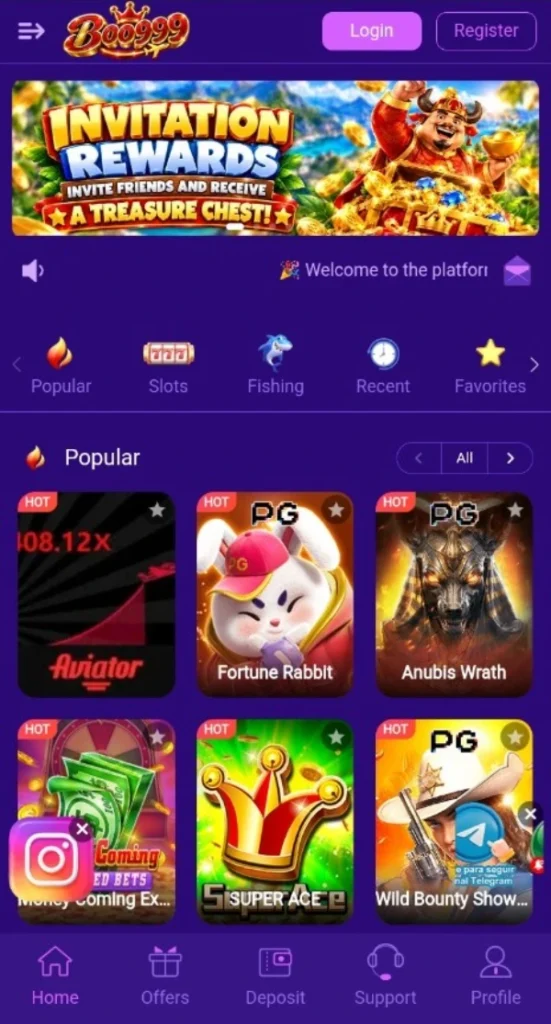
BOO999 Game brings a game lobby, account tools, payment options, and reward sections into one mobile interface. Its lobby includes titles such as Aviator, Fortune Rabbit, and Anubis Wrath. Visitors can browse the available tiles, while separate account areas handle registration, deposits, and withdrawal-account management.
Before creating an account, it helps to understand how these sections connect. Deposit methods differ from the full list of withdrawal-account options, and promotional rewards carry conditions. This guide explains the interface, the information available about Android downloads, and the account rules worth reading before using paid features.
What Is BOO999 Game?
BOO999 is a gaming platform with slot and fishing categories, individual game tiles, and account-based payment features. Popular, Recent, and Favorites provide additional ways to browse. These browsing tabs serve different purposes from the game categories themselves.
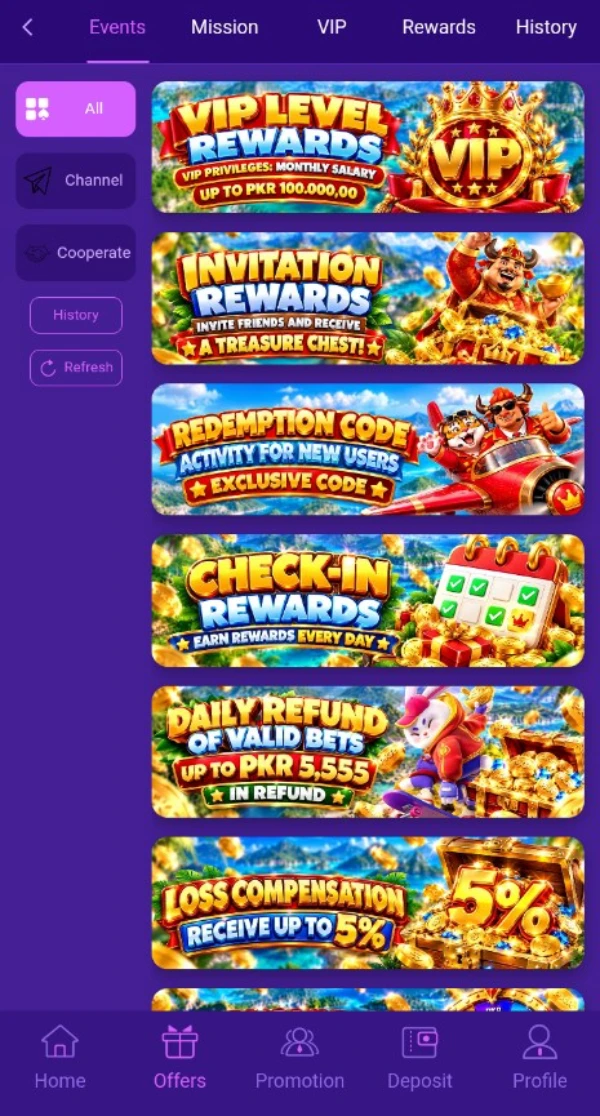
The platform also has an Offers area with Events, Mission, VIP, Rewards, and History tabs. This separates promotional activities from the main lobby. Users can review a campaign without confusing its conditions with the rules of an individual game.
The following information covers the reviewed interface. A displayed payment option confirms its presence in the menu; it does not establish successful payment processing.
| Detail | Verified information |
|---|---|
| Platform name | BOO999 |
| Source domain | boo999.com |
| Game categories | Slots and Fishing |
| Browsing tabs | Popular, Recent, and Favorites |
| Example game tiles | Aviator, Fortune Rabbit, Anubis Wrath, Super Ace, Fortune Tiger, Fortune Ox, and Fortune Mouse |
| Account registration | Phone/account entry, Password Registration, and Code Registration options |
| Deposit methods | JazzCash and Easypaisa |
| Displayed deposit range | Rs 200 to Rs 50000 |
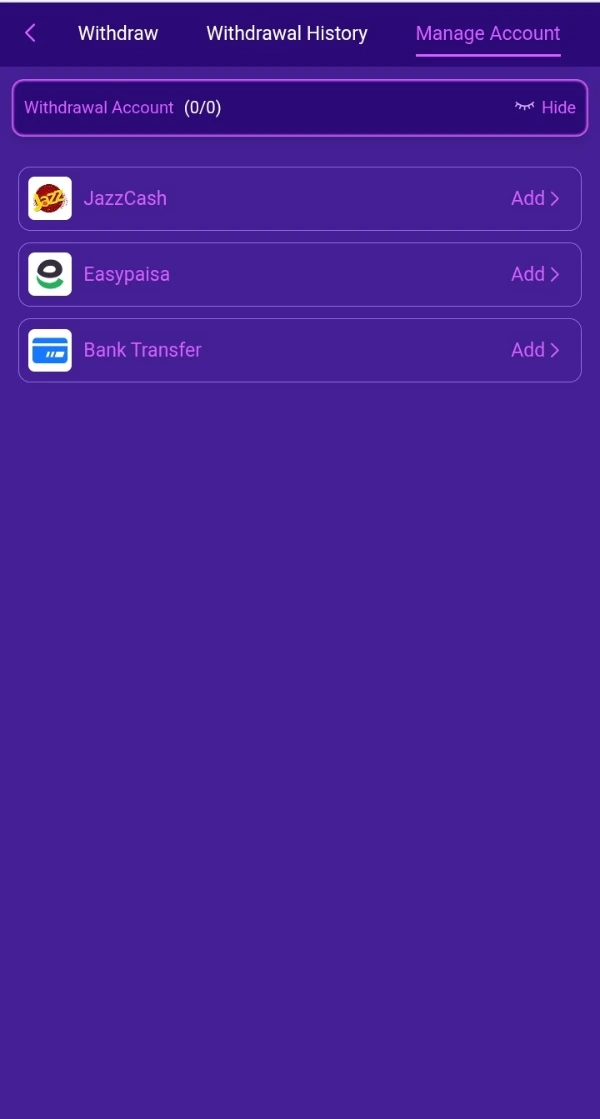
| Withdrawal-account options | JazzCash, Easypaisa, and Bank Transfer |
| Reward areas | Events, Mission, VIP, Rewards, and History |
| APK version and file size | 9MB |
| Minimum Android requirement | 5+ |
Key Features of BOO999 Game
BOO999 Game Lobby and Browsing Tools
The lobby groups game tiles beneath browsing and category tabs. Readers can distinguish Slots and Fishing from tools such as Recent and Favorites, which organize access to titles rather than describe game types.

Account Registration Choices
BOO999 Game offers Password Registration and Code Registration. The password form includes a phone/account field and password confirmation, giving readers a clear starting point for understanding account creation.
Separate Payment and Account Controls
The deposit panel lists payment methods and an amount field. Withdrawal management has its own account list and history tab, so users should check the correct section for the task they want to complete.
Missions and VIP Information
The Mission area includes New User, Daily, and Weekly tabs. VIP has separate Rewards and Rules views, allowing users to look beyond a promotional banner and read the conditions attached to membership benefits.
Support Access
A Support shortcut appears in the lobby navigation, and Customer Service appears beneath registration. These provide visible help entry points, although response times and service hours remain unverified.
How to Play BOO999 Game
Start by understanding the lobby rather than choosing a title only because its artwork looks appealing.
- Open the lobby and review its browsing tabs.
- Choose a category, such as Slots or Fishing, or inspect the Popular selection.
- Select a title and read its own instructions before starting.
- Check the controls, stake information, and any balance requirement.
- Use account or wallet tools only after understanding the relevant conditions.
Aviator, Super Ace, and the Fortune titles are separate games. Their tiles do not explain every control or rule. Do not assume that instructions for one apply to another, or that earlier results predict the next outcome.
Bringing the Virtual World to Life
BOO999 Game uses a purple background, bright buttons, and illustrated game cards. The lobby places Login and Register near the top, followed by a promotional banner and horizontal browsing tabs. Game tiles sit in a three-column layout.
Each card uses artwork and a title to identify a game. Some titles shorten to fit the available space, so users may need to open a tile to read its full name. Stars appear on game cards alongside the Favorites browsing option.
The main screens also use bottom navigation. The lobby includes Home, Offers, Deposit, Support, and Profile, while some promotional screens include Promotion. Readers should follow the labels on their current page rather than expect every screen to use an identical menu.
For another menu arrangement, our PK11 lobby and wallet navigation guide explains how that platform places payment shortcuts near its game catalogue.
BOO999 Game Bonuses
The platform advertises several campaigns. Each has its own purpose, and the visible material does not establish complete terms for every offer. Do not treat a reward banner as a promise of withdrawable money.
Daily Login and Check-In Rewards
The registration panel advertises a daily login reward of Rs 3.88, while the Events area has a separate check-in banner. The material does not establish that both belong to the same campaign. Check each offer’s eligibility, claim process, and expiry before expecting a reward.
Invitation Rewards
An invitation banner promotes rewards connected with inviting friends. Full referral conditions are not available in the reviewed material. Do not assume that sending a link alone qualifies, or that every invited account creates a payable reward.
Redemption-Code Activity
The Events area advertises a redemption-code activity for new users. We have not verified a working code. Any BOO999 redemption code needs its own eligibility and expiry check; the banner alone does not establish a claimable amount.
BOO999 Game Mission Rewards
The new-user mission terms mention SMS verification and payment-method binding. They also require manual redemption within the specified period and state that unused rewards can expire.
The displayed terms attach a 10× rollover requirement to this mission bonus before withdrawal. In simple words, the bonus has a qualifying betting requirement. The terms identify Slots and Fishing as eligible categories. These conditions belong to this mission and should not be applied to every promotion.
VIP Rewards
The VIP area separates the rewards list from its rules. It displays levels, bonus totals, and activity requirements for progress. A listed total does not mean every account can claim that amount; eligibility depends on the relevant level and conditions.
Daily Refund and Loss Compensation
Separate banners advertise a daily refund on valid bets and loss compensation. The reviewed material does not establish their complete eligibility and calculation rules. Keep these campaigns separate and read their individual terms rather than assuming they refund every loss.
How to Download BOO999 Game APK on Android?
We could not verify a working APK file or its release details during this review. Use these checks before attempting a BOO999 Android download:
- Check the platform’s source domain, boo999.com, and confirm that you have reached the intended service.
- Look for a download option and examine its destination before proceeding.
- Check the published file details and device requirements.
- Download only after establishing the file’s source. Stop if the destination is unrelated or unclear.
A page advertising the BOO999 latest version does not, by itself, verify a release number. A download button also does not establish who created the file or whether its contents match the stated app.
How to Install BOO999 Game App on Android?
These are general Android installation steps, not a tested installation of this particular app.
- Find the downloaded APK in your phone’s Downloads folder.
- Tap it and read Android’s prompts.
- If Android requests permission for your browser or file manager to install unknown apps, review that request carefully.
- Proceed only after checking the source and any security warnings.
- Follow the installation prompts, then remove the source app’s installation permission if you no longer need it.
Menu names vary between phones. Do not disable Play Protect or bypass a harmful-app warning to force installation. BOO999 APK installation compatibility remains unverified.
After installation, review the app’s access requests using Google’s guide to reviewing Android app permissions. This guidance explains permission management; it does not certify this particular APK.
Registration and Login Process
Create a BOO999 Account
The password-registration form provides a clear sequence:
- Select Register.
- Enter a phone number or account name in the combined field.
- Choose Password Registration.
- Enter a password and repeat it in Confirm Password.
- Read the User Agreement and the over-18 declaration.
- Continue only if you meet the age requirement and accept the terms.
Code Registration appears as another choice. A Google icon also appears under Quick Register, but its complete authorization flow was not reviewed. Do not assume that the alternative methods use the same fields.
Log In to an Existing Account
Existing BOO999 Game users can select the Login tab or lobby button. The exact login form was not available for this review, so this guide does not prescribe unverified fields or recovery steps.
For BOO999 login problems, check the domain and your entered details first. Use the available Customer Service or Support entry point for account-specific help. Never send another person your password or verification code.
Deposit and Withdrawal Methods
The BOO999 Game payment menus distinguish deposits from withdrawal-account management. Confirm the options and requirements in your account before making a transaction.
JazzCash
JazzCash appears on the deposit panel and in the withdrawal-account list. The withdrawal menu provides an Add control for account setup. This confirms the option’s presence, without establishing fees, processing times, or payout success.
Easypaisa
Easypaisa also appears in both areas. Select it within the relevant section and follow the current instructions. Check all account details before submitting information or authorizing a payment.
Bank Transfer
Bank Transfer appears under withdrawal-account management. The reviewed deposit panel does not list it. Its presence on the withdrawal screen should not be described as proof that bank deposits are available.
Deposit Amounts and Presets
The BOO999 Game deposit panel displays an amount field, preset amounts, and a Deposit Now button. Its stated range is Rs 200 to Rs 50000.
Select an available method and check the current amount requirements before proceeding. Some preset amounts display additional promotional figures. Their complete conditions are not established, so do not automatically count them as withdrawable balance.
Withdrawal Accounts and Request History
The BOO999 Game withdrawal area has Withdraw, Withdrawal History, and Manage Account tabs. Manage Account lists the available methods, while Withdrawal History provides the relevant place to look for recorded requests.
Minimum withdrawal amounts, fees, and processing times remain unverified. Read those requirements before depositing. Adding a payment account does not prove that a later withdrawal will succeed.
Our XF777 withdrawal-account guide offers another example of receiving-account controls; BOO999’s own rules still govern its transactions.
FAQs
What is BOO999 Game?
It is a gaming platform with a lobby, Slots and Fishing categories, account tools, payment menus, and promotional sections.
How do I download its Android APK?
First verify a download route through the platform’s source. This review did not establish a working APK file, its size, or compatibility.
Is the latest APK version verified?
No. We have not verified a release number and will not use competing download pages as proof.
Which payment methods appear?
Deposits list JazzCash and Easypaisa. Withdrawal-account management lists those two methods plus Bank Transfer.
Are the bonuses guaranteed?
No. Offers have eligibility and claim conditions. The reviewed new-user mission also includes expiry provisions and a 10× rollover requirement.
What deposit limits are displayed?
The reviewed deposit panel lists Rs 200 as the minimum and Rs 50000 as the maximum. Check the current panel for changes.
Conclusion
BOO999 Game combines game browsing, account access, payment controls, and promotional sections. Its interface distinguishes deposit methods from withdrawal-account options. Mission rewards have conditions that deserve attention before participation.
Read BOO999’s own account and promotion rules before using paid features. For the scope of this guide and your use of ApnaAPK, review our Disclaimer, Terms and Conditions, and Privacy Policy. Paid play can result in financial loss.
Download links
How to install BOO999 Game APK: Games, Payments and Bonus Rules APK?
1. Tap the downloaded BOO999 Game APK: Games, Payments and Bonus Rules APK file.
2. Touch install.
3. Follow the steps on the screen.