PK11 Game APK: From Lobby to Wallet and Rewards
Description
PK11 Game APK: From Lobby to Wallet and Rewards
Introduction
PK11 Game puts game tiles, a visible balance and wallet shortcuts close together. A visitor can browse titles from the home screen, then open a separate menu to read an offer or check account messages. This guide follows those paths in the order a new visitor would meet them.
The platform advertises several rewards, but a banner cannot tell you whether your account qualifies. The APK version and file size are verified. Here you can see which account and payment options were actually visible, and which details you should check yourself before using them.
What Is PK11 Game?
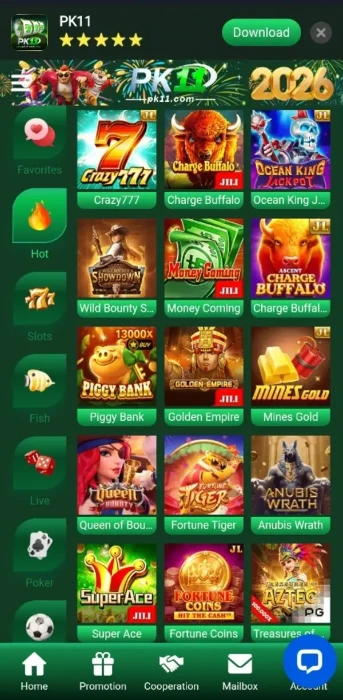
PK11 Game is a mobile-focused gaming platform that groups different titles in one lobby. The source website lists Slots, Fish, Live, Poker, Sports and Cockfight. The reviewed home screen also includes named tiles such as Super Ace, Fortune Coins, Zombie Party and Aviator. A tile identifies a title; it does not explain that title’s playing rules.
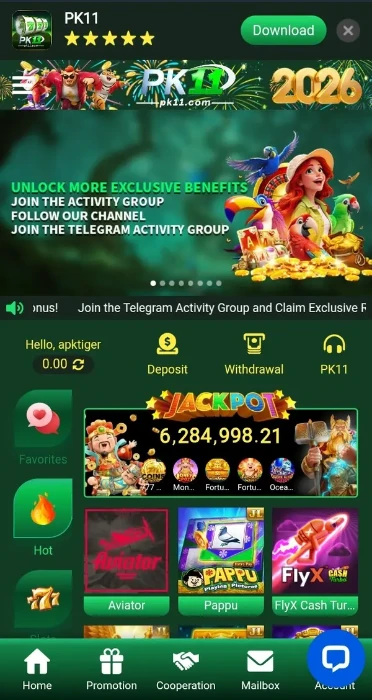
The home area places Deposit and Withdrawal near the displayed balance. Home, Promotion, Cooperation and Mailbox appear along the lower navigation. These routes separate browsing, offers and messages from wallet tasks.
These are the details available from the platform material and website. Any changing figure should be checked again in the live account.
| Item | Reviewed information |
|---|---|
| Platform | PK11 |
| Categories listed by the source | Slots, Fish, Live, Poker, Sports and Cockfight |
| Account access | Username and password login; registration form with username, password, password confirmation, mobile number and country code |
| Payment options visible | JazzCash and Easypaisa on deposit and e-wallet setup screens |
| Promotion types visible | First deposit, daily first deposit, referral, loss compensation, VIP, Lucky Wheel and Telegram activities |
| APK version | Latest |
| APK file size | 9MB |
Key Features of PK11 Game
PK11 Game Lobby and Category Shortcuts
The lobby shows illustrated game cards beneath its main banner. The category list gives visitors a starting point, while the card names help them identify a particular game. Open a title to read its own rules; one set of instructions will not cover every category.
Wallet Shortcuts Near the Balance
Deposit and Withdrawal sit close to the account balance. The withdrawal flow has a separate page for receiving-account details, followed by an amount and password field on the request screen. This helps distinguish adding an account from making a withdrawal request.
Promotion Details Beyond the Banners
The Promotion area contains individual campaign pages. A first-deposit offer, a daily deposit offer and a referral offer have different conditions. Read the page for the specific campaign instead of applying one banner’s rules to another.
Messages and Account Access in PK11 Game
Mailbox gives messages a place outside the game grid. The separate login and account-creation forms also make it clear when you are browsing and when you are entering personal information. To compare another menu arrangement, read our Jeeto999 lobby and menu guide.
How to Play PK11 Game
Open Home and choose a category or named tile. Read that title’s controls, rules and any displayed balance requirement before playing. A slot game and a sports option have different actions and outcomes, so there is no useful single formula for every title in the lobby.
If an activity uses money, check the amount before confirming anything. The wallet shortcuts help you inspect the available balance and payment screens; they do not change the uncertainty of a game’s result. You can leave a game and return to Home before making any account decision.
Bringing the Virtual World to Life
The PK11 Game lobby uses a dark green background, brighter green controls and colourful tiles. A large banner occupies the top of the mobile page. The balance and wallet controls sit above the game cards, while the lower navigation stays within reach when moving between the main areas.
The opening screen is busy, especially where banners and game cards compete for attention. Promotion offers a more useful place to inspect an advertised reward: each campaign has room for its own rules. For another example of how games and money tools can be arranged, see our 666H lobby and wallet guide.
PK11 Game Bonuses
PK11 Game lists separate campaigns with separate conditions. The amounts below are advertised possibilities, not payments verified in a user’s account. Check the live offer dates, eligibility, verification and wagering rules before taking part.
30% First-Deposit Offer in PK11 Game
The new-user promotion advertises a 30% bonus on the first deposit. Its displayed terms set a minimum deposit of Rs 100 and require selection of the offer during the deposit process. The same campaign mentions a Lucky Wheel ticket and a chance of up to Rs 111111. That number is a possible upper prize, not an amount every participant receives. Read the remaining terms before joining.
10% Daily First-Deposit Offer in PK11 Game
A different promotion advertises 10% on the first deposit of each day. It lists a Rs 100 minimum, selection of the promotion during deposit and phone-number verification before participation. Its Lucky Wheel mention does not mean the daily offer combines with the new-user offer. The visible page continues into a wagering requirement, so review that full rule on the current offer page.

Referral Reward
The referral page asks the invited person to enter a code when registering or use an invitation link. Its example pairs a Rs 111 reward with a Rs 200 total-deposit condition within 30 days. The page also limits the promotion to Slot Games. The invited person must complete verification and meet the stated conditions; sending a link alone does not earn the reward.
Loss Compensation
The displayed campaign describes compensation of up to 6% based on a qualifying loss amount. Its table has several loss bands, and the terms include a wagering requirement. This is an offer connected to losses, not protection from losing money. Review the current eligibility and conditions before treating any displayed percentage as applicable to your account.
VIP, Lucky Wheel and Telegram Activities
The Promotions area also lists VIP levels, a Lucky Wheel event and Telegram activities. VIP benefits depend on the relevant level and activity rules. Wheel prizes depend on the event outcome. Telegram rewards are attached to activities that may change or end. None of these should be counted as a confirmed account balance.
How to Download PK11 Game APK on Android?
The PK11 Game mobile interface has a Download button. Other websites use similar PK11 names, so check the address before opening a file.
- Open the supplied PK11 website on your Android phone.
- Find the Download option and check where it leads.
- Read any available file details and compare the displayed name with the app you intended to get.
- If your browser warns that the file might be harmful, pause and assess the source. A warning does not prove that a file was checked or approved.
- Continue only if you understand the source and your phone’s warnings.
How to Install PK11 Game App on Android?
PK11 Game installation steps below apply only if you decide to use an APK after checking its source. Android menus may differ between phones.
- Open the downloaded file from your phone’s Downloads area.
- Read the installation prompt. Android may ask whether your browser or file manager may install apps from this source.
- Allow that source only if you understand the file and still want to install it.
- Review further warnings and the permissions requested by the app. Stop if something is unexpected.
- After installation, return to settings and remove the source’s installation permission if you no longer need it.
Google explains how Play Protect checks apps from other sources and handles warnings. Its guidance supports reviewing a warning; it does not certify this particular APK.
Registration and Login Process
Create an Account
Open Create Account. The reviewed form asks for a username, password, password confirmation and mobile number, with a selector for country code. It also asks the user to agree to the platform’s Terms and Privacy Policy. Read those terms before ticking the agreement. A country-code option does not prove that every listed country has the same account or wallet availability.
Log In
The login form asks for a username and password and includes a Forgot? route. Enter your own registered details and keep the password private. The supplied material does not establish that a verification code is required at every login, so follow the current prompt rather than expecting one particular sequence.
Deposit and Withdrawal Methods
The reviewed screens separate choosing a deposit method, adding a receiving e-wallet and submitting a withdrawal request. Check each screen for the current instructions before entering an amount.
JazzCash Deposit
JazzCash appears in the PK11 Game deposit-method selection. The page also offers payment channels and preset amounts. Review the selected channel and amount before proceeding. No deposit processing time or fee was verified.
Easypaisa Deposit
Easypaisa appears alongside JazzCash on the deposit screen. Choose the option that matches the wallet you plan to use, then check the current instructions on that route. The displayed offer minimum of Rs 100 applies to the specified bonus campaigns; it is not proof of a universal deposit minimum.
JazzCash and Easypaisa Receiving Accounts
The e-wallet setup lists both providers. It asks for the receiving name to match the name registered with the financial provider and warns that the name cannot be changed after submission. Check that spelling carefully before adding an account.
Withdrawal Request and Bank Tab
The withdrawal page has E-wallet and Bank tabs, a displayed balance, an amount field and a password field. The Bank tab’s presence does not verify a particular bank-transfer route or its conditions. No withdrawal time, success rate or fee was confirmed. Read the current account screen for those details.
FAQs
What is PK11 Game?
It is a mobile-focused platform with game categories, a lobby, wallet shortcuts and separate promotions.
Where can I find the APK?
The supplied pk11.com mobile interface has a Download button. Check its destination and your phone’s warnings before opening a file.
Is the latest APK version verified?
No. A numeric version and file size could not be confirmed from the reviewed source material.
Which payment methods are visible?
JazzCash and Easypaisa appear on the reviewed deposit and e-wallet setup screens. Check the current choices in your account.
Are the advertised rewards guaranteed?
No. Each campaign has conditions, and an up-to amount describes a possible maximum rather than a promised payment.
What minimum deposit is shown?
The reviewed 30% new-user and 10% daily first-deposit promotions each state Rs 100 as their minimum. That does not establish a universal minimum.
Conclusion
PK11 Game gives visitors distinct routes to game tiles, offers and wallet tasks. JazzCash and Easypaisa are visible, while an exact APK version, size and transaction timing remain unverified. Read the platform’s own terms before participating in an offer. For how this guide should be used, consult ApnaAPK’s Disclaimer, Privacy Policy and Terms and Conditions.
Personal Experience and Final Thoughts
PK11 Game appears straightforward to navigate from its visible lobby and account screens. My assessment comes from the supplied material and the official source.
The named game tiles and nearby wallet shortcuts help explain where to go next. The limits are equally practical: full current offer terms and verified APK file details need checking before a reader can make an informed decision. Review those details directly before entering personal or payment information.
Download links
How to install PK11 Game APK: From Lobby to Wallet and Rewards APK?
1. Tap the downloaded PK11 Game APK: From Lobby to Wallet and Rewards APK file.
2. Touch install.
3. Follow the steps on the screen.