999HA Game APK: Inside the Lobby, Rewards & Wallet
Description
999HA Game APK: Inside the Lobby, Rewards & Wallet
Introduction
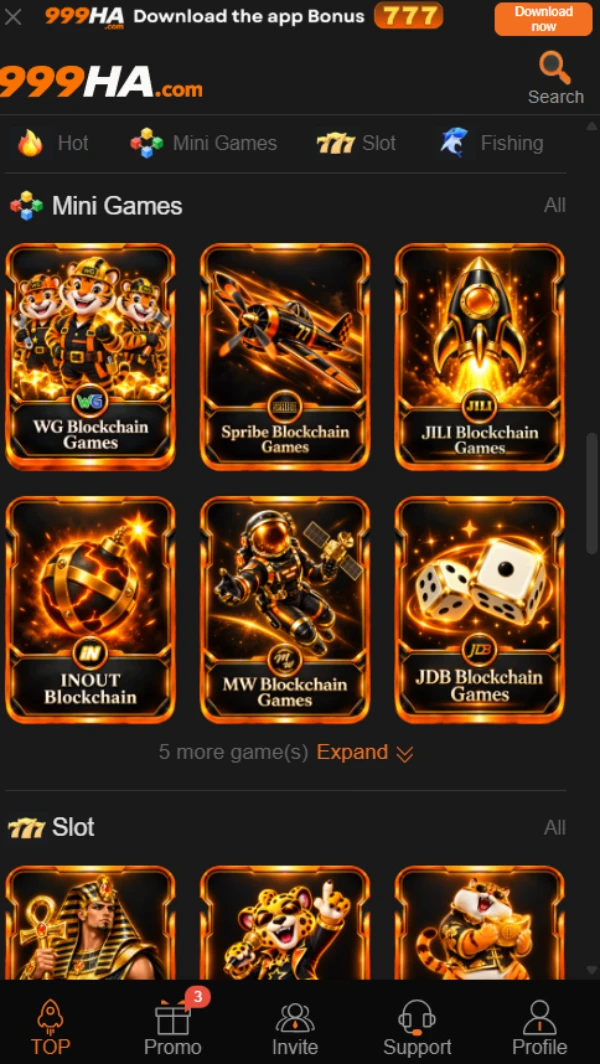
999HA Game greets you with large reward banners, but the useful starting point sits below them: a row of game categories and a small navigation bar. You can browse the titles without mistaking an advertised prize for something already in your wallet.
From that first screen, this guide follows the same route a new visitor would take: find a game, inspect the Promo tabs, look at the payment choices, and check what an APK download actually tells you. Several details are visible; the app file and successful payments have not been verified.
What Is 999HA Game?
The name refers to a collection of games, not a single title. Along the top of the 999HA lobby you can switch between Hot, Mini Games, Slot, and Fishing. The Mini Games row includes several distinct tiles, while Aviator also appears on the home page. You choose a title from the lobby and then read that title’s own controls.
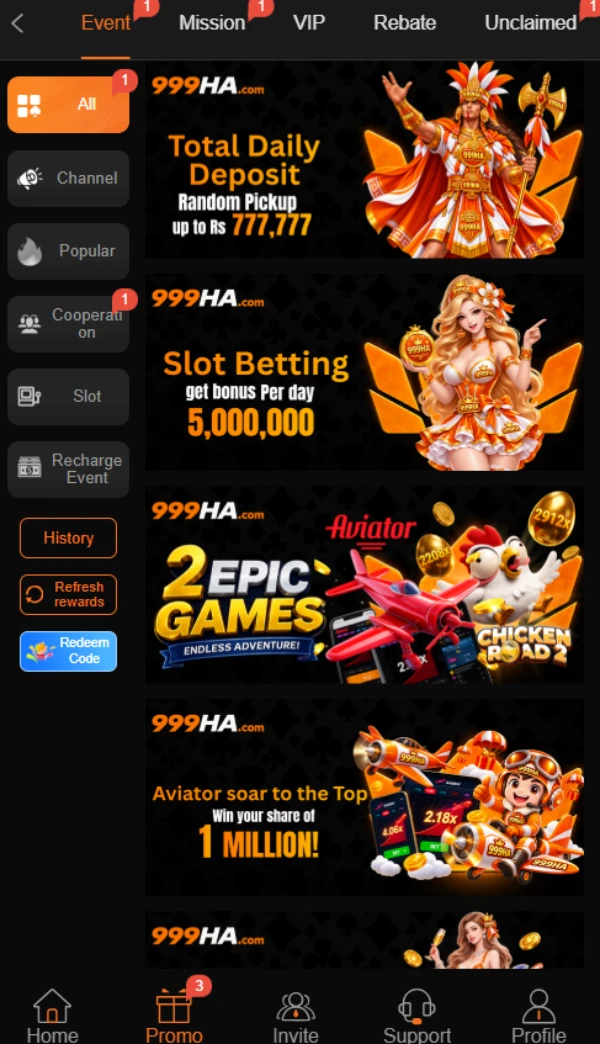
999HA Game keeps reward information in a separate Promo area. Event, Mission, VIP, Rebate, and Unclaimed sit across the top; side filters include All, Channel, Popular, Slot, and Recharge Event. A busy promotional list becomes easier to follow once you choose the type of offer you want to inspect. A banner alone cannot establish your eligibility.
| Detail | Available information |
|---|---|
| Platform name | 999HA |
| Visible game sections | Hot, Mini Games, Slot, and Fishing |
| Main navigation | Home, Promo, Invite, Support, and Profile |
| Languages shown | English and Urdu |
| Deposit choices shown | Easypaisa, JazzCash, and a separate Crypto tab |
| Withdrawal receiving-account choices | Easypaisa, JazzCash, Bank Transfer, and Crypto |
| Rewards area | Events, missions, VIP, rebate, redeem codes, and check-in offers |
| Android app | A Download APP option is displayed |
| APK version | Latest |
| APK file size | 9MB |
| Minimum Android version | Android 5+ |

Key Features of 999HA Game
Game categories and the 999HA lobby
The 999HA Game home page groups titles by type. You can move from Mini Games to Slot or Fishing without searching through every tile on the page. A tile tells you which game you can open; you still need to read that game’s rules before playing.
999HA Game navigation and account tools
The bottom menu keeps Home, Promo, Invite, Support, and Profile within reach. Deposit and Withdraw controls also appear near the account area. These are separate actions, so check the relevant screen before entering money or receiving-account details.
Promotions kept in separate tabs in 999HA Game
In 999HA Game, the Promo page divides offers into Event, Mission, VIP, Rebate, and Unclaimed. It also includes controls for checking reward history and redeeming codes. This separation helps you find an offer again and check whether it belongs to a daily task, a VIP level, or a limited event.
English and Urdu options in 999HA Game
The language selector offers English and Urdu. Choose the language in which you can understand payment instructions and offer conditions most clearly. Do not rely on a large number in a banner if the smaller conditions are unclear.
Support and withdrawal-password setup
A Support destination appears in the main menu, and a support icon appears on payment screens. The account flow also asks you to set a separate withdrawal password. Keep that password private and check the receiving-account details yourself before submitting a request.
How to Play 999HA Game
To play 999HA Game, start on Home and choose a category. Open a title that interests you, then read its controls, rules, and any amount settings inside that game. The lobby does not explain how every game works.
If the title requires an account, use the platform’s registration or login option. Check your balance and wallet controls before any paid activity. Set a spending limit you can afford to lose: games involving stakes can end in a loss, and an earlier result cannot promise the next one.
For another example of how a gaming lobby and wallet are arranged, read our 666H lobby and wallet guide.
Bringing the Virtual World to Life
999HA Game uses orange labels against a nearly black background. Promotional art fills much of the first screen, while the game categories and tiles begin lower down. If you came to compare games, scroll past the offers and use the category row rather than tapping the first large banner.
The five-part bottom bar takes you to Home, Promo, Invite, Support, and Profile. Within Promo, the top tabs select the kind of reward and the side buttons narrow the event list. That two-level menu explains why different offers appear on one page without belonging to the same campaign.
999HA Game Bonuses
The following offers appear in the platform interface. They are advertisements with conditions, not guaranteed payments. Check each offer’s current rules, dates, and claim steps in your own account. Do not add figures from separate campaigns together.
First-deposit offer
A registration message advertises a 20% first-deposit bonus. A deposit screen also lists a welcome-bonus activity with a first-deposit threshold. Those screens do not establish that the two offers can be combined. Read the terms attached to the particular offer before depositing.
Invite-a-friend offer
The registration message advertises Rs 600 for inviting friends. The message does not explain which actions make an invited friend eligible or when a reward becomes claimable. Check the Invite area for the current rules before expecting that amount.
Daily check-in and missions
A three-day check-in event advertises Rs 5, Rs 10, and Rs 40 for successive days. Its detail panel also shows a required daily deposit of Rs 500 and says daily recharge and valid betting conditions apply. The Mission tab lists different account tasks. Treat the check-in amounts as conditional campaign rewards, not a balance you receive just for opening the page.
Redeem codes in 999HA Game
The Promo area includes a Redeem Code control and code-related event cards. A code may have its own availability period and eligibility rules. Check the event details before assuming that an advertised code will work on your account.
VIP and rebate offers
The VIP tab shows levels and benefits tied to activity requirements. Rebate has its own tab. A displayed percentage or benefit is an offer subject to its rules; reaching a level or receiving a rebate is not automatic.
How to Download 999HA Game APK on Android?
A Download APP button appears in the interface, but the supplied material does not verify the file it delivers, its version, or its size.
- Open the provided 999HA source address and check the address in your browser.
- Look for the app download option within the platform.
- Check where the button leads and whether the destination gives clear file details.
- If the destination or file looks unfamiliar, pause and verify it before downloading.
- Keep Android’s app checks enabled. Google’s installation guidance is linked in the next section.
Do not treat a third-party page’s latest-version label as proof of the current APK.
How to Install the 999HA Game App on Android?
These steps apply only after you have checked the APK and its source. They do not confirm that a particular file is genuine or compatible with your phone.
- Open the downloaded APK on your Android device.
- Read the installation prompt and check the app name.
- If Android asks your browser or file manager for permission to install an app from that source, review the request before allowing it.
- Stop if your device warns you about the file and you cannot resolve the warning.
- After installation, open the app and review its account screens before entering personal or payment details.
Android menus vary by phone. You can remove the browser’s or file manager’s installation permission afterward. Google’s Play Protect guidance explains how Android checks apps from outside Google Play and may warn about harmful ones.
Registration and Login Process
Registration
The available material confirms that a registration flow exists and displays a Registration Successful message. It does not show the full sign-up form clearly enough to verify its required fields. Follow the fields presented in the live form, read any agreement and eligibility statements, and check the web address before submitting your details.
Login
Use the platform’s own login screen with the credentials you created. The supplied material does not confirm every login field or recovery option. If you cannot access your account, use the Support route shown in the interface. Never send your password or verification code to someone who approaches you through a message.
999HA Game Deposit and Withdrawal Methods
Deposit choices and withdrawal receiving accounts appear on different screens. Seeing a method listed does not prove that a transaction will succeed or establish how long it will take.
Deposit: Easypaisa
The online deposit screen lists Easypaisa and Easypaisa1 as separate choices. Select the option you intend to use, enter an amount, and review the instructions shown for that choice before confirming. The amount field displays Rs 100 as the minimum and Rs 100000 as the maximum on the reviewed screen; check the current range when you use it.
Deposit: JazzCash
JazzCash and JazzCash1 also appear as separate deposit choices. Check the instructions for the selected option rather than assuming that the two labels work in exactly the same way. The screen does not establish a fee or completion time.
Deposit: Crypto
A Crypto tab sits beside Online deposit. Its presence confirms an available menu, but the supplied material does not establish its deposit currency, network, limits, or instructions. Review those details inside the live payment flow before using it.
Withdrawal: Easypaisa and JazzCash
The Receiving account page lets you add an Easypaisa or JazzCash account. Add the intended receiving details before requesting a withdrawal and review them carefully. An account choice on this page is not proof that a withdrawal has been completed.
Withdrawal: Bank Transfer
Bank Transfer appears as another receiving-account option, described in the interface as a Pakistan bank card. The available material does not verify supported banks or the fields required when you tap Add.
Withdrawal: Crypto
The receiving-account list also shows Crypto with USDT-TRC20 in its description. Check the live network and address details before using that choice. A wrong network or address can affect a transfer.
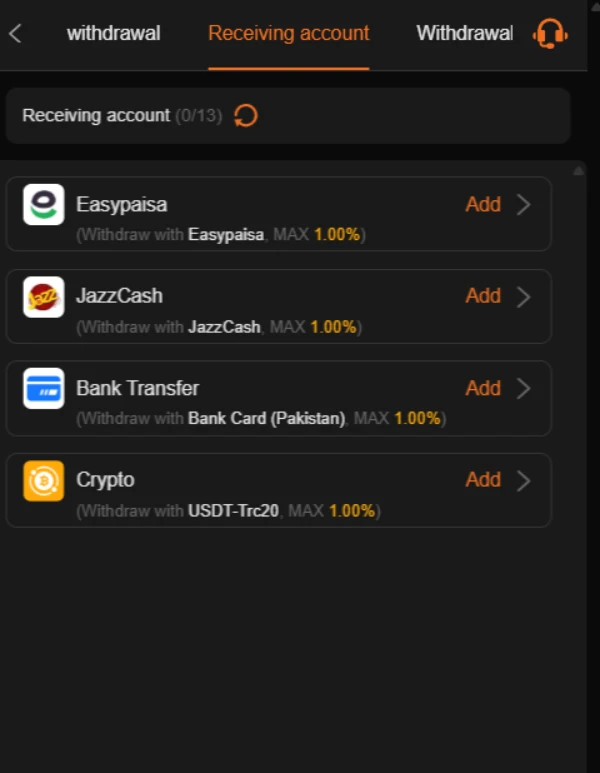
The 999HA Game withdrawal screen offers Normal withdrawal and Convert to crypto. Its amount field asks you to add a receiving account first; the separate password screen asks you to create and confirm a withdrawal password. These steps explain the visible order of actions, not the outcome of a request. No successful withdrawal, fee schedule, or processing time has been verified here. For a different account layout, see our 999XA lobby and rewards guide.
FAQs-Frequently Asked Questions
What is 999HA Game?
It is a mobile gaming platform with game categories, promotions, account controls, and deposit and withdrawal menus.
Where can I download the app?
A Download APP control appears in the platform. Check its destination and the APK details before downloading; this guide has not verified a specific file.
Is the latest APK version verified?
No. The supplied material does not establish a version number, file size, or minimum Android version.
Which payment methods appear?
The online deposit screen shows Easypaisa and JazzCash choices, plus a separate Crypto tab. The withdrawal receiving-account page lists Easypaisa, JazzCash, Bank Transfer, and Crypto.
Are the advertised bonuses guaranteed?
No. Offers have eligibility and claim conditions. For example, the three-day check-in event refers to daily recharge and valid betting requirements.
What deposit range is displayed?
The reviewed online deposit screen displays Rs 100 to Rs 100000. Check the live amount field before making any payment because platform settings can change.
Conclusion
999HA Game brings games, promotions, and account controls into one mobile layout. Its deposit screen shows local wallet choices, while its withdrawal page asks you to set up a receiving account. The APK’s version and size remain unverified, and advertised rewards depend on their conditions. Before using a paid feature, read the platform’s current rules. You can also review ApnaAPK’s Terms and Conditions, Disclaimer, and Privacy Policy for information about this website and its external links.
Personal Experience and Final Thoughts
My assessment of 999HA Game comes from reviewing the supplied platform material and the accessible source page. The clearest strengths of the visible layout are its grouped game categories, separate promotion tabs, and distinct receiving-account choices.
Download links
How to install 999HA Game APK: Inside the Lobby, Rewards & Wallet APK?
1. Tap the downloaded 999HA Game APK: Inside the Lobby, Rewards & Wallet APK file.
2. Touch install.
3. Follow the steps on the screen.