
PakTop Game APK Guide: Lobby, Login and Wallet
Description
PakTop Game APK Guide: Lobby, Login and Wallet
Introduction
PakTop game brings slots, card games, and mini-games into one lobby. You can browse titles such as Aviator and Chicken Road, search for a specific game, or switch the interface between English and Urdu.
The bottom menu gives you direct access to promotions, deposits, support, and your profile. This guide explains where those tools sit, what the account forms ask for, and what to check before downloading an app or acting on a bonus banner.
What Is PakTop Game?
PakTop is a real-money gaming platform with several titles in one lobby. Open Hot to see highlighted titles, or choose Slot, MiniGames, or Cards to narrow the list. Use the search field when you already know the name you want.
The platform keeps games, offers, and wallet tools in separate areas. Home takes you to the lobby, Promo opens offers and missions, and Deposit opens the payment screen. The account forms also have Demo and Customer Service shortcuts.
| Detail | Information |
|---|---|
| Platform name | PAKTOP |
| Lobby categories | Hot, Slot, MiniGames, and Cards |
| Example titles | Aviator, Chicken Road, and Fortune Gems 3 |
| Account access | Password and code options |
| Interface languages | English and Urdu |
| Deposit screen | Not Only Wallet, JazzCash scan code, Easypaisa scan code, and a separate Crypto tab |
| Withdrawal receiving accounts | Bank card, JazzCash, and Easypaisa under Not Only Wallet |
| APK version | Latest |
| APK file size | 6MB |
| Minimum Android version | 5+ |
Key Features of PakTop Game
PakTop Game Lobby and Search
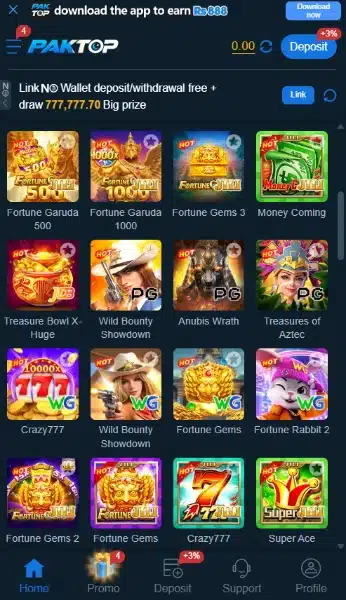
The search field sits above the game tiles. Search for a known title directly, or use the category buttons if you want to browse a smaller group of games.
English and Urdu Language Options
Open Language and choose English or Urdu. This gives readers in Pakistan a choice of interface language when looking through menus and account controls.
PakTop Game Account and Support Tools
The sign-in form groups Forgot Password, Customer Service, and Demo near the account fields. The lobby has its own Support tab, so you can find a contact option from either area.
How to Play PakTop Game
- Open Home to reach the lobby.
- Pick a category or search for a title such as Aviator, Chicken Road, or Fortune Gems 3.
- Open the title and check its rules. Look for what starts a round, what the controls do, and when the round ends.
- If the game asks you to sign in, use the account screen. If a round uses a cash balance, check the stake before you confirm it.
Check the rules again when you switch titles. Two games in the same category can use different controls or round formats.
Bringing the Virtual World to Life
PakTop uses a dark lobby with bright game artwork. A banner sits above the search field and category buttons. Below them, a grid shows the game names alongside their artwork. Some tiles have similar names, so read the full label before opening one.
The bottom bar keeps Home, Promo, Deposit, Support, and Profile in one row. You can move from the lobby to a common account tool without digging through the profile menu.
PakTop Game Bonuses
The Promo area separates Event, Mission, VIP, Unclaimed, and History. Open the relevant offer to check its rules before acting on the headline.
PakTop Game New Member Bonus
The new-member panel lists first-deposit tiers after registration. Check the requirement for your tier and the reward that goes with it. The deposit figure describes the qualifying top-up. The offer details explain the reward separately.
Rs 888 App Download Offer
The banner pairs a deposit with downloading the app and advertises Rs 888. The available details leave the full eligibility and payout rules unclear. Open the offer rules to check both requirements and how PakTop applies the reward.

Daily Missions
The mission list includes account signup, linking Not Only Wallet, and an app login task tied to a first deposit. Each task has its own requirement. Open Event Rules for the task you plan to complete.
Invitation Bonus and VIP Rewards
The invitation area lists referral offers. Check what makes a referral eligible before counting on a reward. The separate VIP area advertises perks. Open its terms to see whether a perk depends on your level or activity.
How to Download PakTop Game APK on Android?
- Open the PakTop source site in your Android browser and look for its app download control.
- If the site offers several options, check which one provides an Android APK file.
- Confirm where the file comes from before downloading it. If you cannot confirm its origin, stop there.
The direct PakTop APK download link, latest version, and file size still need direct verification.
How to Install PakTop App on Android?
- Once you confirm the APK’s origin, open the file from Downloads.
- If Android asks for permission, open Settings from the prompt and review Allow from this source. This setting applies to the browser or file manager opening the APK.
- If you choose to continue, return to the installer and tap Install. Stop if Play Protect flags the file.
- Turn off Allow from this source for that browser or file manager after installation. The menu path can vary by phone.
For more detail, see Google’s guide to allowing and turning off installation from a source.
Registration and Login Process
Create an Account
Open Register. The phone field displays Pakistan’s +92 country code. The form offers password registration and code registration. If you choose the password option, enter the password and type it again. Read the User Agreement before ticking the box that confirms you are over 18 and accept it.
Sign In to an Existing Account
Open Login and choose Password Login or Code Login. Follow the fields for the option you choose. Use Forgot Password if you need to recover your password.
For another example of how a gaming app organizes registration and sign-in, see the HE 786 account setup guide.
Deposit and Withdrawal Methods
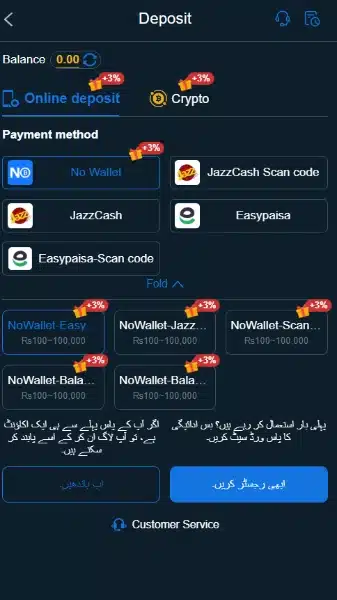
For a top-up, open Deposit and check the Online deposit list. For a withdrawal, PakTop prompts you to set and confirm a separate Withdrawal Password. The Receiving account screen lists methods with an Add control.
JazzCash
For deposits, select the JazzCash scan-code option and read the payment instructions on that screen. For withdrawals, the receiving-account menu lists JazzCash under Not Only Wallet.
Easypaisa
The deposit menu has a separate Easypaisa scan-code option. The withdrawal menu also lists Easypaisa under Not Only Wallet. Check the receiving-account details when you use Add.
Bank Card Transfer
The receiving-account menu lists Bank card transfer under Not Only Wallet. Open this entry to review the bank card details PakTop asks for when you set up a receiving account.
Not Only Wallet and Crypto
The deposit screen lists Not Only Wallet and has a separate Crypto tab. The Crypto tab label gives no details about supported coins or networks. Check the instructions for the selected method.
To compare how another platform presents wallet options and offer rules, see the EP555 payments and bonus guide.
FAQs: Frequently Asked Questions
Can I use PakTop in Urdu?
Yes. The Language menu lists both Urdu and English.
Where can I check the latest PakTop game APK version?
Check the version details where PakTop distributes the file. This review could not verify the current version or minimum Android requirement.
Does downloading the app qualify me for Rs 888?
The banner also names a deposit. Check the full offer rules for eligibility and how PakTop applies the reward.
What is the minimum deposit?
This review could not confirm one minimum for every payment method. Check the amount range next to the method you select.
Why does PakTop ask for a withdrawal password?
The platform uses a separate password for withdrawals. The setup form asks you to enter the new password and confirm it.
Conclusion
PakTop game groups slots, cards, and mini-games in a searchable lobby. The account screen offers password and code options, and the wallet separates deposits from withdrawal setup. Check PakTop’s promotion rules and read its User Agreement before opening an account or adding funds.
For ApnaAPK’s site policies, see our Disclaimer, Privacy Policy, and Terms and Conditions.
Download links
How to install PakTop Game APK Guide: Lobby, Login and Wallet APK?
1. Tap the downloaded PakTop Game APK Guide: Lobby, Login and Wallet APK file.
2. Touch install.
3. Follow the steps on the screen.