7A Game APK Guide: Check Features Before You Start
Description
7A Game APK Guide: Check Features Before You Start
Introduction
7A Game brings casino-style titles, account controls, and promotional offers into one platform. Its lobby includes cards, slots, and mini games, while separate menus handle registration, rewards, and withdrawals. English and Urdu language options give users a choice when reading the interface.
Before creating an account, it helps to understand how these sections connect. A reward banner, a receiving account, and an available balance serve different purposes. This guide explains the visible controls and conditions, while clearly identifying details that remain unverified.
What Is 7A Game?
This platform groups several games inside a shared lobby. Users can browse categories or look for a title through the search control. Labels include Aviator, Chicken Dash, Dragon Tiger, Fortune Gems 500, Crash, and Plinko.
The account area sits alongside the games. It includes registration, login, deposit and withdrawal controls, a profile section, and customer support. The promotions area has separate Event, Fund, VIP, Rebate, and Unclaimed tabs.
For people researching 7A Game in Pakistan, the registration form includes a +92 phone field and PKR currency selection. However, those local settings do not establish payment performance or confirm the platform operating credentials.
| Item | Information |
|---|---|
| Platform name | 7A Game |
| Lobby categories | Hot, Cards, Mini Games, Slot |
| Account access | Register and Login controls |
| Registration options | Password registration and code registration |
| Languages | English and Urdu |
| Currency selection | PKR Pakistani rupees |
| Receiving-account options | Easypaisa, JazzCash, Bank Transfer |
| Deposit methods | Easypaisa, JazzCash |
| Promotions | First-deposit offers, referral promotions, cashback, rebates, VIP benefits |
| Android compatibility requirement | 5+ |
| APK version and file size | 6MB |
Key Features of 7A Game
7A Game Categories and Search
Hot, Cards, Mini Games, and Slot organize the lobby. These tabs offer a starting point when browsing, while search provides another way to locate a particular title.

7A game Account and Payment Controls
Register, Login, Deposit, Withdraw, VIP, and More appear near the lobby upper section. Their labels separate account tasks from game selection, so readers can identify each function before opening it.
English and Urdu Options
The language menu lists English and Urdu. Choose Urdu from this menu to change the interface language. The available material does not establish whether every game also changes language.
Help Center and Account Questions
The 7A Game Message Center contains support and help topics. These include cashout questions, recharge-not-credited issues, referral-code questions, and agent information. The topic list helps users identify where to look for account assistance.
How to Play 7A Game
Start with the lobby and the rules of the individual title you choose. Different games use different controls, so one set of instructions cannot explain them all.
- Open the lobby and browse a category.
- Choose a title, such as Dragon Tiger, Crash, or Plinko.
- Find its rules, information panel, and controls before participating.
- Check any displayed stake, balance requirement, or round conditions.
- Use the account controls when a title requires login.
- Review any wallet action separately before confirming it.
The supplied material does not establish the detailed rules of each title. Casino-style play can involve losing money; neither a game label nor a promotional offer promises a return.
Bringing the Virtual World to Life
The interface uses a dark background with bright green buttons and gold details. Colourful game tiles occupy most of the lobby, with names beneath or within their artwork. Category tabs sit above the tiles.
The bottom navigation changes between the supplied account views. One arrangement includes Home, Promo, Register, Login, and Profile. Another includes Home, Promo, Invite, Support, and Profile. Users should therefore follow the labels available in their current view.
The promotions area has its own filters and tabs. This separates offer browsing from the main game list. Several banners compete for attention, so opening an offer terms matters more than relying on its headline.
For another example of game browsing and account menus, read our QK777 lobby and account guide.
7A Game Bonuses
The platform advertises several reward types. Each campaign has its own requirements, and a banner alone does not establish whether a particular account qualifies.
First-Deposit Extra Reward
The first-deposit panel lists reward tiers. For example, it pairs a first deposit of at least Rs 100 with a Rs 20 bonus, and at least Rs 300 with a Rs 60 bonus.
These are promotional thresholds, not confirmed minimum deposit limits. The panel includes a View Event control for further details. Check eligibility and any use or withdrawal conditions before treating the bonus as available money.

Separate Deposit Promotions
Other banners advertise a 20% first-deposit bonus and a 7% deposit bonus. They also include a next-day deposit promotion.
Treat these as separate offers. The reviewed material does not establish that users can combine them or apply them to the same payment.
Referral Rewards in 7A Game
An invitation promotion advertises Rs 588 for an eligible friend referral. Another notice connects an invitation reward with the referred person topping up.
Sending a link alone does not establish eligibility. Read the relevant referral terms to understand the required account and payment activity.
Weekly Cashback
A banner advertises 25% weekly cashback. The available material does not establish its complete calculation rules, exclusions, or claim conditions.
Cashback should not be described as a refund of every loss. Its meaning depends on the specific campaign terms.
7A Game VIP Benefits
The VIP area displays level progress, next-level bonuses, and other privileges. Higher-level panels also list weekly and monthly rewards.
Deposit and betting requirements appear within the level system. Check the selected level’s conditions rather than assuming that every account receives the same benefits.
Live Casino Rebate
A live-casino event describes a rebate linked to accumulated bets on designated games during the event period. Its rules mention claiming cashback the next day.
This is a conditional, time-limited event offer. The advertised maximum is up to five times the basic rebate, subject to event conditions; it does not mean users receive five times their stake or a guaranteed profit. Its appearance in the reviewed material does not confirm that the event remains active.
For related reading on another platform offers, see our BOO999 payments and bonus guide. Its conditions are separate from those discussed here.
How to Download 7A Game APK on Android?
The supplied source address is https://7agame.xyz/. This review could not verify a working APK download, current release, or file size. Use the following checks if you visit the source:
- Confirm the address before opening any download page.
- Look for an Android download option, if the site provides one.
- Review the destination address and any available file details.
- Stop if the link leads to an unrelated platform or unclear file.
- Download only after you can establish what the file is and where it comes from.
How to Install 7A Game App on Android?
These are general Android installation steps, not confirmation that a particular 7A APK works on your phone.
- Locate the verified APK in your Downloads folder.
- Tap the file and read the installation prompt.
- If Android requests permission, review the setting for the browser or file manager opening it.
- On Android 8.0 and later, installation permission applies to a particular source through Install unknown apps.
- Continue only if you understand the source and permissions.
- After installation, turn off that source’s installation permission if you no longer need it.
Menu names can vary by device. Keep Play Protect active, and do not bypass a harmful-app warning to complete installation.
Read Google explanation of Play Protect checks and warnings before deciding how to respond to an unfamiliar-app alert.
Registration and Login Process
7A Game Registration
The registration form offers Password registration and Code register options. The reviewed password form contains the following controls:
- A phone number/profile field.
- A password field and strength indicator.
- A password-confirmation field.
- A phone field with the +92 country code.
- A currency selector showing PKR.
- An over-18 declaration and User Agreement acknowledgement.
- A Register button.
Read the currency notice carefully. It states that the selection affects game currency and payment methods and cannot be modified. Do not assume that you can change it later.
The code-registration option exists, but its complete verification sequence remains unverified.
Accessing Your Account
For 7A Game login, choose Login from the available navigation or account tab. Follow the fields presented in that form and use your registered account details.
The complete login and password-recovery forms were not available for this review. Customer Service offers a visible route for account questions; do not share your password or verification code with another person.
Deposit and Withdrawal Methods
Deposits and Recharge Questions
The interface provides a Deposit control and several recharge-related promotions.
Check the actual deposit page for current methods, amounts, and conditions. Do not treat a first-deposit bonus threshold as a transaction limit.
For a recharge-not-credited issue, the Help Center lists a relevant question. Check transaction status before making another payment.
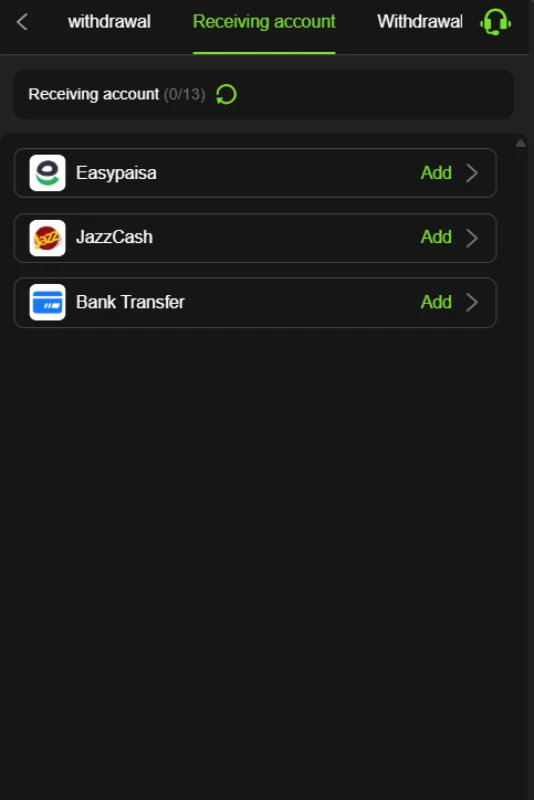
Easypaisa Receiving Account
Easypaisa appears under Receiving account with an Add control. This identifies it as a listed payout-account option.
The reviewed material does not include the next form, processing time, or successful payment evidence. Confirm the requested account details before saving them.
JazzCash Receiving Account
JazzCash also has an Add control in the receiving-account list. Adding a JazzCash account is a setup step, not a completed withdrawal.
No verified fee, transaction limit, or payout time is available for this method.
Bank Transfer Receiving Account
Bank Transfer appears as a third receiving-account option. The required bank-detail fields and supported institutions remain unverified.
Check the live form before entering information. Do not assume that the platform accepts every bank account.
Withdrawal Password and Requests
A separate screen asks users to create and confirm a withdrawal password. The interface instructs users to set it before continuing with withdrawal-related activity.
Adding a receiving account and setting this password are setup tasks. They do not prove that a withdrawal request will succeed. Review the actual request page for any additional conditions, fees, or limits.
FAQs-Frequently Asked Questions
What does the platform contain?
7A Game combines a game lobby with registration, account controls, promotions, VIP pages, and payment-related settings.
Is the current APK version verified?
No. The 7A Game APK version, file size, minimum Android requirement, and working download destination remain unverified.
Can users choose Urdu?
Yes. The language menu includes English and Urdu. Translation coverage inside individual games remains unverified.
Which withdrawal methods are listed?
The receiving-account menu lists Easypaisa, JazzCash, and Bank Transfer. Their presence does not confirm processing times or successful payouts.
Are promotional bonuses guaranteed?
No. First-deposit, referral, cashback, and VIP offers depend on their respective conditions. An advertised amount does not establish account eligibility.
What is the deposit limit?
The reviewed material does not establish a transaction limit. Reward-tier amounts should not be used as minimum or maximum deposit figures.
Conclusion
7A Game combines several game categories with account, promotion, and receiving-account controls.
English and Urdu options, labelled menus, and a Help Center provide useful points of reference.
APK details, deposit channels, transaction limits, and payout performance remain unverified.
Read the game operator’s own terms before registering or accepting an offer.
For this website information and data practices, review ApnaAPK Terms and Conditions, Disclaimer and Privacy Policy.
Download links
How to install 7A Game APK Guide: Check Features Before You Start APK?
1. Tap the downloaded 7A Game APK Guide: Check Features Before You Start APK file.
2. Touch install.
3. Follow the steps on the screen.