
999iG game APK Guide: Look Beyond the Bonus Banner
Description
999iG APK Guide: Look Beyond the Bonus Banner
Introduction
999iG brings several casino-style games, account tools and promotional activities into one mobile-oriented platform. Its lobby includes Aviator, Chicken Road 2.0, slots and other titles. Separate areas handle registration, missions, VIP benefits and payments, so understanding the menus matters before using any balance-related feature.
The important details sit beyond the home-page banners. Deposit options differ from receiving-account options, and reward terms include eligibility checks, manual claims and turnover requirements. This guide explains those differences in simple words. It also identifies information that remains verified, including the APK version, file size and withdrawal processing time.
What Is 999iG?
999iG groups games from several provider labels inside a shared lobby. Instead of opening one standalone game, users browse categories and select a title. The available categories include Hot, Mini Games, Slot, Fishing and Cards.
Account access includes phone and username signup, alongside Google and Telegram login buttons. The phone registration form uses Pakistan +92 country code. Users can also select English or Urdu through the language menu.
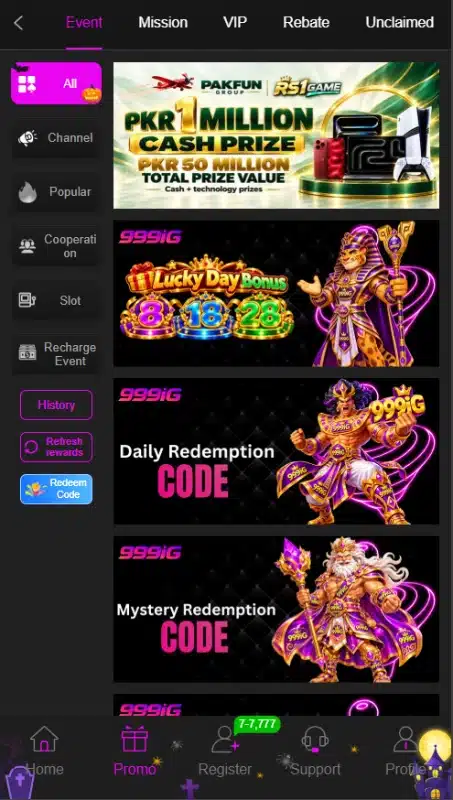
Promotions occupy their own area, with tabs for Event, Mission, VIP, Rebate and Unclaimed. These sections serve different purposes: an event banner advertises a campaign, while mission terms explain tasks and claiming conditions.
| Detail | Verified information |
|---|---|
| Platform name | 999iG |
| Visible categories | Hot, Mini Games, Slot, Fishing and Cards |
| Account access | Phone or username signup; Google and Telegram login options |
| Languages | English and Urdu |
| Selected deposit method | JazzCash1 under Online deposit; a separate Crypto tab |
| Receiving-account options | Easypaisa, JazzCash and USDT-TRC20 |
| Promotional sections | Event, Mission, VIP, Rebate and Unclaimed |
| Minimum Android version | 5+ |
| APK version and file size | 7MB |
Key Features of 999iG
999iG Game Categories and Provider Filters
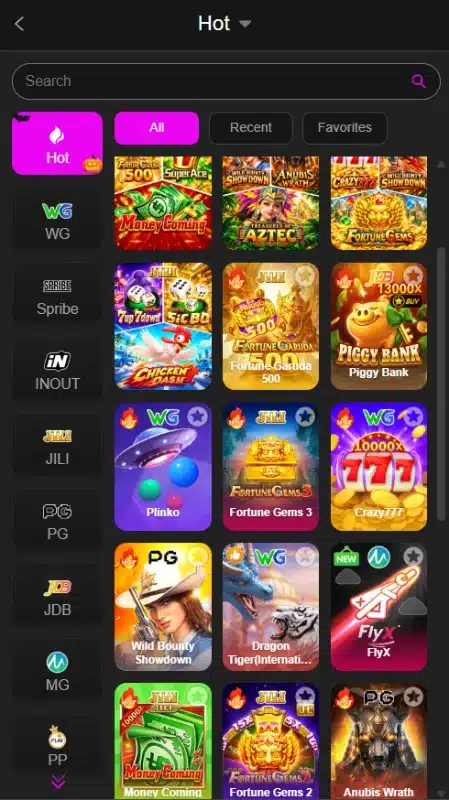
The Hot area includes a search field and All, Recent and Favorites controls. Provider filters include labels such as WG, Spribe, INOUT, JILI and PG. These controls help users find a title without browsing every tile.
Separate Promotion Tabs in 999iG
The Promo area separates events from missions and VIP information. This arrangement gives users a place to check a campaign and then look for its conditions, rather than relying on the headline alone.
Receiving Accounts and Withdrawal Controls
The 999iG payment area separates withdrawal requests from receiving accounts. A separate six-digit withdrawal password adds another account control. Its presence does not establish payment reliability or processing speed.
Language and Support Options
English and Urdu appear in the language selector. Support appears in the bottom navigation, while registration also includes a Customer Service link. Response times and the quality of assistance remain unverified.
How to Play 999iG
Start with the lobby and learn the controls before using any paid feature. Different titles have different rules, so instructions for Aviator should not be applied to slots or fishing games.
- Open the home area and select a category.
- Browse the tiles or use the title search.
- Select a game and read its own instructions, payment rules and controls.
- Check whether it requires an account or a funded balance.
- Review any displayed stake and confirmation controls before proceeding.
- Return to the account or payment area when you need balance-related tools.
The lobby includes Plinko, Money Coming, Fortune Gems 3 and Crazy777, alongside other titles. Their presence does not establish a winning method. Games involving money can produce losses, and promotional rewards do not remove that risk.
Bringing the Virtual World to Life
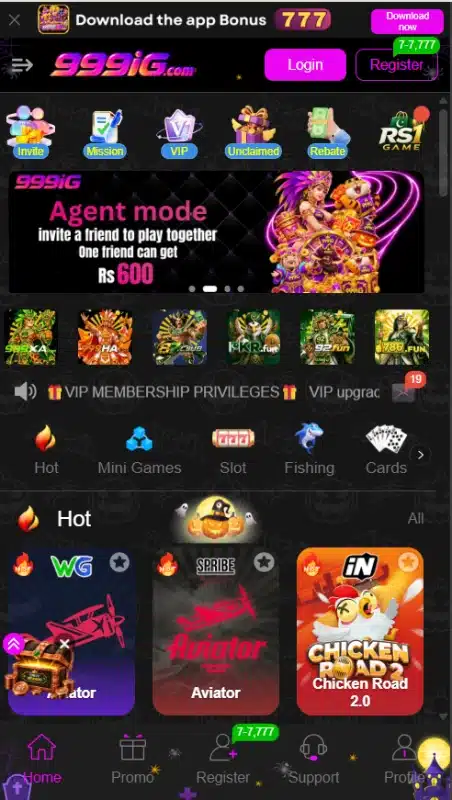
The interface uses a dark background with bright pink and purple controls. Game artwork fills much of the lobby, while category icons separate groups such as slots, cards and fishing. Promotional banners sit above the main game tiles.
The 999iG bottom navigation provides direct routes to Home, Promo, Support and Profile. Its account-related option varies between registration and invite controls in the reviewed states. Inside the promotion area, horizontal tabs sit above the campaign list.
For another example of game browsing and account navigation, read our 786fun lobby and account guide. Each platform rules need checking separately.
The design gives games and offers strong visual emphasis. However, several banners compete for attention. A useful way to navigate is to choose one task first finding a title, reviewing a mission or managing a receiving account and open the relevant section.
999iG Bonuses
Promotional amounts describe advertised offers. Read each campaign own rules before treating a headline as an available reward. Separate offers can have different conditions.
App-Download Promotion
The top banner advertises Rs 777 for downloading the app. This confirms the advertised amount, but it does not establish that downloading alone completes every requirement. The complete eligibility and payout terms for this offer remain unverified.
999iG New-Player Mission Rewards
The 999iG mission list includes saving the URL, signing up, mobile SMS verification and Login to the APP (First deposit). Each listed task displays a reward range of Rs 7 to Rs 7777. The upper figure represents the advertised maximum, not an amount every account receives.
The new-player terms apply to first-time users and require SMS verification and birthday settings. Users must claim rewards manually within the specified time. The terms also state that rewards expire and require 5× turnover before withdrawal, with restrictions on eligible games.
For example, a Rs 100 bonus with 5× turnover requires Rs 500 in qualifying bets. This explains the calculation only; it does not promise a withdrawable balance after those bets.
For a separate discussion of campaign eligibility, see our 87club bonus and reward guide. Its offers should not be applied to this platform.
First-Deposit and Deposit Offers
An event banner advertises a 20% first-deposit bonus. Another separately advertises a 20% deposit bonus. Do not combine these campaigns or assume both apply to one payment.
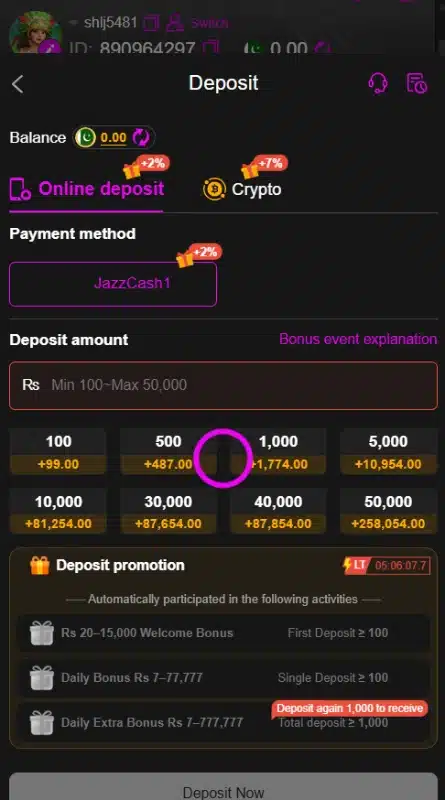
The selected payment screen also lists a Rs 20 to Rs 15000 welcome-bonus range with a first-deposit condition of at least Rs 100. Its relationship to the 20% event is not established. Open the relevant bonus explanation to check eligibility, turnover and claiming rules.
Referral Promotion
The Agent mode banner advertises Rs 600 for inviting a friend. Treat this as a conditional referral offer. The reviewed material does not establish that sharing a link or receiving a registration alone qualifies for payment.
Daily Check-In Campaigns
Separate check-in banners name Iron, Bronze, Silver and Gold tiers. They display daily recharge requirements of Rs 500, Rs 1000, Rs 3000 and Rs 12000 respectively. These are qualifying recharge amounts, not reward amounts. Check each tier complete terms before participating.
VIP Rewards in 999iG
The VIP area lists level-related benefits such as monthly rewards, next-level bonuses and birthday gifts. The VIP0 view states a betting requirement of Rs 9000 toward VIP1 and lists benefit amounts beside further conditions. Those figures do not establish an unconditional monthly payment.
Redemption Codes and Time-Limited Events
The Event area includes daily and mystery redemption-code banners, plus a Redeem Code control. No current working code has been verified. A countdown also appears beside a deposit promotion, so availability should be checked at the time of use.
How to Download 999iG APK on Android?
The interface offers a Download now button. However, the APK file itself has not been inspected, and its version, size and minimum Android requirement remain unverified.
- Check the platform address and source before downloading anything.
- Find the Download now control in the platform interface.
- Check the destination and any available file information before accepting a download.
- If the button supplies an APK, let the download finish.
- Locate the file in your browser Downloads area or file manager.
These steps describe the download route rather than a tested file delivery.
How to Install 999iG App on Android?
Only continue if you can establish the file source. An APK installation guide does not confirm that a particular file is appropriate for your phone.
- Open the downloaded APK from Downloads or your file manager.
- Read Android installation message and any warning.
- If your phone requests permission, review Install unknown apps for the browser or file manager opening the file.
- Allow that source only if you have checked it and choose to proceed.
- Follow the installation prompts and review any requested access.
- After installation, turn off that source installation permission if you no longer need it.
Keep Play Protect enabled. If Android blocks the file as harmful, stop and investigate the warning. Menu wording varies by phone and Android version; installation success and compatibility have not been tested here.
After installation, review any access the app requests. Google guide to changing Android app permissions explains how to allow or deny permissions through device settings.
Registration and Login Process
999iG Registration
999iG signup options include phone and username routes. The registration form provides password registration and a code-registration option.
- Open Register and choose the relevant signup route.
- For phone registration, check the +92 country code and enter your number.
- For password registration, create a password and repeat it in the confirmation field.
- Read the User Agreement and age declaration.
- Confirm the declaration only if you meet its over-18 requirement and accept the agreement.
- Submit the form and follow any additional instructions.
Do not assume every route uses the same verification process. The full code-registration sequence has not been tested.
Account Login
Open Login and use the details linked to your account. Google and Telegram login buttons also appear. Their availability does not prove that account linking will succeed on every device.
If access fails, check the selected login route and entered details before using Customer Service. Never give support your password, wallet PIN or verification code.
Deposit and Withdrawal Methods
JazzCash Deposit
Under Online deposit, the selected method carries the label JazzCash1. Its amount field displays Rs 100 to Rs 50000. This is the range on that selected payment screen, rather than a confirmed limit for every channel.
The screen also provides preset amounts and a Bonus event explanation link. Review the current amount and promotion terms before submitting a payment. Fees, processing time and successful crediting have not been verified.
Crypto Deposit
A separate Crypto tab appears beside Online deposit. The reviewed deposit material does not establish its network, wallet address, limits or full payment sequence. Do not infer a deposit network from a withdrawal label.
Easypaisa Receiving Account
The Receiving account area lists Easypaisa with an Add control. This identifies a withdrawal destination; it does not establish Easypaisa deposit support.
JazzCash Receiving Account
JazzCash has its own Add control for receiving-account setup. Deposit instructions do not replace this separate withdrawal-account step.
Check the required account details before saving a receiving account. The interface also displays a MAX 1.00% badge, but its meaning is not clear enough to call it a fee or a reward.
USDT-TRC20 Receiving Account
The Crypto receiving-account option explicitly names USDT-TRC20. The request area also includes Convert to crypto. These labels do not establish conversion charges, exchange rates or processing times.
Withdrawal Request
The 999iG request area provides Normal withdrawal and Convert to crypto options. It prompts users to add a withdrawal account before entering an amount. A separate setup screen requires a six-digit withdrawal password and confirmation.
Review the receiving account, current withdrawal rules and any applicable bonus restrictions before submitting a request. Minimum and maximum withdrawal amounts remain unverified, as does the time needed to receive funds.
FAQs-Frequently Asked Questions
What does the platform include?
It is a multi-game platform with casino-style titles, account tools, payment controls and separate promotional sections.
How do I download the APK?
The interface includes a Download now button. Check its destination and file details first; the actual APK delivery has not been tested.
Is the latest app version verified?
No. A numerical version, file size and minimum Android requirement have not been confirmed.
Which payment methods appear?
JazzCash1 appears on the selected deposit screen. Receiving-account options include Easypaisa, JazzCash and USDT-TRC20. A separate Crypto deposit tab also appears.
What is the visible deposit limit?
The selected JazzCash deposit screen displays Rs 100 to Rs 50000. Check the current channel before relying on that range.
Conclusion
999iG combines multiple game categories with account, promotion and payment tools. The selected JazzCash deposit screen gives a clear amount range, while several withdrawal details remain unverified. Reward headlines need to be read alongside eligibility, expiry and turnover conditions. Review the platform own User Agreement before using paid features. For this website content scope and data practices, read ApnaAPK Terms and Conditions, Disclaimer and Privacy Policy.
Personal Experience and Final Thoughts
999iG has a clearly divided interface, with useful search filters, separate promotion tabs and dedicated receiving-account controls. Those details make it possible to explain where users would go for a particular task without claiming that every feature works as advertised. This assessment comes from careful review of the supplied platform material and visible interface.
Download links
How to install 999iG game APK Guide: Look Beyond the Bonus Banner APK?
1. Tap the downloaded 999iG game APK Guide: Look Beyond the Bonus Banner APK file.
2. Touch install.
3. Follow the steps on the screen.